
百度登录弹出窗口谁会写呢?求思路或代码。
http://www.baidu.com
百度登录弹出窗口谁会写呢?求思路或代码。
如图,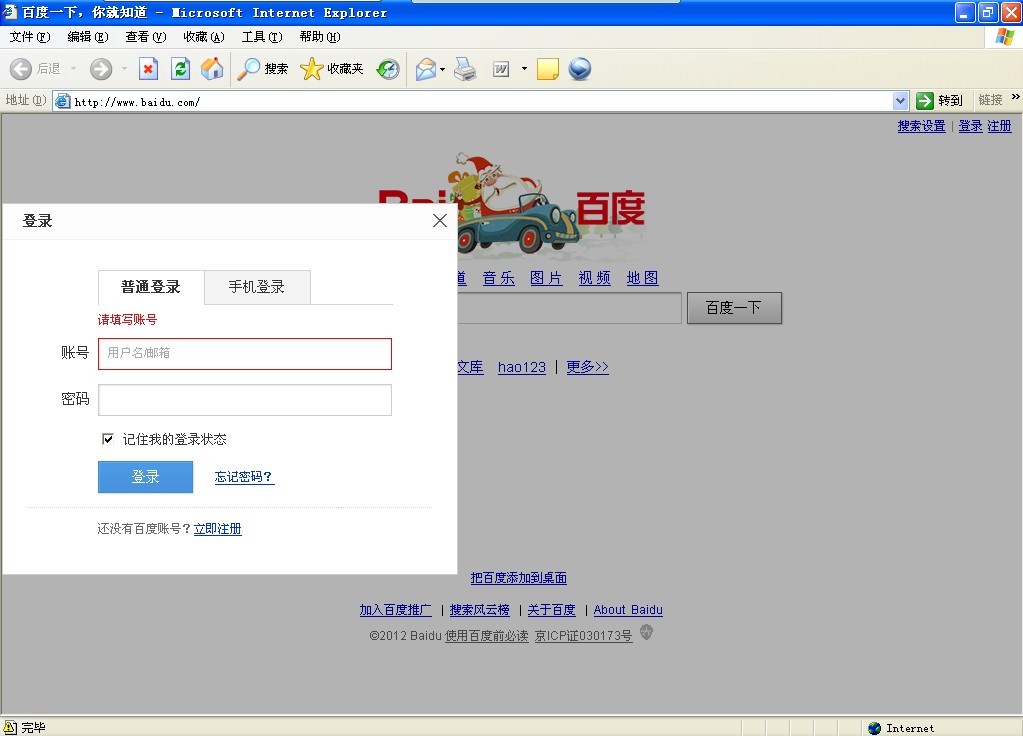
[解决办法]
这种弹窗很普通啦。
<style>
#a1{
display: none;
position: absolute;
top: 25%;
left: 25%;
width: 50%;
height: 50%;
z-index:1002;
}
#a2{
display:none;
position:absolute;
top: 0;
left: 0;
width:102%;
height:100%;
background-color:black;
z-index:1001;
opacity:.80;
filter: alpha(opacity=80);}
div.b3{
position:absolute;
width: 100%;
height:35px;
background-color:#CCCCCC;
line-height:35px;
overflow:hidden;
font-size:22px;
font-weight:900;
cursor:move;
}
div.b3 a{text-decoration:none;color:#FFFFFF;}
div.b3 a:hover{color:#000000;}
div.b4{
width: 100%;
height: 100%;
background-color:#FFFFFF;
}
a.b5{
position:absolute;
right:0;
margin-top:-5px;
}
</style>
<a href="javascript:void(0)" onClick="login(1)">登录</a>
<div id="a1" class="b1">
<div id="a3" class="b3">登录<a href="javascript:void(0)" onClick="login(0)" class="b5">关闭</a></div>
<div id="a4" class="b4">
<form name="form1" method="post" action="">
<table width="100%" border="0">
<tr>
<td> </td>
<td> </td>
</tr>
<tr>
<td>账号:</td>
<td><input name="zhanghao1" type="text" id="zhanghao1"></td>
</tr>
<tr>
<td>密码:</td>
<td><input name="mima1" type="password" id="mima1"></td>
</tr>
<tr>
<td> </td>
<td> </td>
</tr>
<tr>
<td> </td>
<td> </td>
</tr>
<tr>
<td> </td>
<td> </td>
</tr>
<tr>
<td> </td>
<td> </td>
</tr>
</table>
</form>
</div>
</div>
<div id="a2" class="b2"></div>
<script type="text/javascript">
var $ID=function (id){
var d=document.getElementById(id);
if(!d){
alert(id+" 控制对象不存在!") ;
return false;
}else{
return d;
}
}
var $this = $ID("a1");
$ID("a3").onmousedown=function (e) {
var oe=e
[解决办法]
window.event;
var startX = oe.clientX - $this.offsetLeft;
var startY = oe.clientY - $this.offsetTop;
document.onmousemove = function (e) {
var oe = e
[解决办法]
window.event;
$this.style.left = oe.clientX - startX + "px";
$this.style.top = oe.clientY - startY + "px";
};
document.onmouseup = function () {
document.onmousemove = null;
document.onmouseup = null;
if ($this.releaseCapture) {
$this.releaseCapture();
}
};
if ($this.setCapture)$this.setCapture();
return false;
}
function login(id){
if(id==1){
$ID('a1').style.display='block';
$ID('a2').style.display='block';
}else{
$ID('a1').style.display='none';
$ID('a2').style.display='none';
}
}
</script>
[解决办法]
$this.style.left = oe.clientX - startX + "px";
$this.style.top = oe.clientY - startY + "px";
=====这是移动的坐标,控制这里即可,改为:
var x=oe.clientX - startX,y=oe.clientY - startY;
if(x<=0)x=0;//限制最小值
if(y<=0)y=0;//限制最小值
//最大值也是类似限制(不过最好是直接获取屏幕大小减去DIV的宽的方法)
$this.style.left = x + "px";
$this.style.top = y + "px";