
如何对ListView的某些行特殊显示?
 <asp:ListView ID="GuardLog_List" runat="server" DataKeyNames="FAMILY_ID" DataSourceID="GuardLog_Datasource"
            OnSorting="GuardLog_Data_List_Sorting">
            <LayoutTemplate>
                <table id="UserData" class="TableSub">
                    <tr>
                        <th scope="col">
                            <%--拆迁户档案号--%>
                            <asp:LinkButton ID="sortBy_DocNum" runat="server" Text="档案号" CommandName="Sort" CommandArgument="DOCUMENT_NUM"
                                ToolTip="排序" />
                        </th>
                        <th scope="col">
                            <%--封房号--%>
                            <asp:LinkButton ID="ImageButton1" runat="server" Text="封房号" CommandName="Sort" CommandArgument="SEAL_NO"
                                ToolTip="排序" />
                        </th>
                        <th scope="col">
                            <%--选房号--%>
                            <asp:LinkButton ID="LinkButton1" runat="server" Text="选房号" CommandName="Sort" CommandArgument="CHECK_NO"
                                ToolTip="排序" />
                        </th>
                        <%-- <th>
                         协议书编号
                            <asp:LinkButton ID="sortBy_ContractNo" runat="server" Text="协议书编号" CommandName="Sort"
                                CommandArgument="CONTRACT_NO" ToolTip="排序" />
                        </th>--%>
                        <th scope="col">
                            <%--房屋所有权人--%>
                            <asp:LinkButton ID="sortBy_OwnerName" runat="server" Text="产权人" CommandName="Sort"
                                CommandArgument="OWNER_NAME" ToolTip="排序" />
                        </th>
                        <th scope="col">
                            <%--房屋确权人--%>
                            <asp:LinkButton ID="sortBy_Confirm_Name" runat="server" Text="确权人" CommandName="Sort"
                                CommandArgument="CONFIRMER_NAME" ToolTip="排序" />
                        </th>
                        <th scope="col">
                            <%--  房屋使用人--%>
                            <asp:LinkButton ID="orderBy_ResidentName" runat="server" Text="使用人" CommandName="Sort"
                                CommandArgument="RESIDENT_NAME" ToolTip="排序" />
                        </th>
                        <th scope="col">
                            <%--  产权所属情况--%>
                            <asp:LinkButton ID="orderBy_PropertyType" runat="server" Text="产权" CommandName="Sort"
                                CommandArgument="PROPERTY_TYPE" ToolTip="排序" />
                        </th>
                        <th scope="col">
                            <%--房屋门牌--%>
                            <asp:LinkButton ID="orderBy_Address" runat="server" Text="房屋名称" CommandName="Sort"
                                CommandArgument="ADDRESS" ToolTip="排序" />
                        </th>
                        <th scope="col">
                            <%--安置方式--%>
                            <asp:LinkButton ID="LinkButton2" runat="server" Text="安置方式" CommandName="Sort" CommandArgument="REAL_SETTLE_WAY"
                                ToolTip="排序" />
                        </th>
                        <th scope="col">
                            <%--当前位置--%>
                            <asp:LinkButton ID="orderBy_ArarNname" runat="server" Text="当前位置" CommandName="Sort"
                                CommandArgument="AREA_NAME" ToolTip="排序" />
                        </th>
                        <th scope="col">
                            <asp:Label ID="modify_lbl2" runat="server" Text="详细轨迹信息"></asp:Label>
                        </th>
                    </tr>
                    <asp:PlaceHolder ID="itemPlaceholder" runat="server"></asp:PlaceHolder>
                </table>
            </LayoutTemplate>
            <ItemTemplate>
                <tr>
                    <td align="center">
                        <%#Eval("DOCUMENT_NUM")%>
                    </td>
                    <%--  <td align="center">
                        <%#Eval("CONTRACT_NO")%>
                    </td>--%>
                    <td align="center">
                        <%#Eval("SEAL_NO")%>
                    </td>
                    <td align="center">
                        <%#Eval("CHECK_NO") == "" ? "未抽号":Eval("CHECK_NO")%>
                    </td>
                    <td align="center">
                        <%#Eval("OWNER_NAME")%>
                    </td>
                    <td align="center">
                        <%#Eval("CONFIRMER_NAME")%>
                    </td>
                    <td align="center">
                        <%--使用人--%>
                        <%#Eval("RESIDENT_NAME")%>
                    </td>
                    <td align="center">
                        <%--产权所属情况--%>
                        <%#Eval("PROPERTY_TYPE")%>
                    </td>
                    <td align="center">
                        <%#Eval("ADDRESS")%>
                    </td>
                    <td align="center">
                        <%#Eval("REAL_SETTLE_WAY")%>
                    </td>
                    <td align="center">
                        <%#Eval("AREA_NAME")%>
                    </td>
                    <td align="center">
                        <a href='/DataEntry/Restrict/TrackDetail.aspx?FamilyID=<%#Eval("FAMILY_ID")%>' style="text-decoration: underline">
                            查询轨迹 </a>
                    </td>
                </tr>
            </ItemTemplate>
            <EmptyItemTemplate>
                没有数据
            </EmptyItemTemplate>
        </asp:ListView>
效果图:
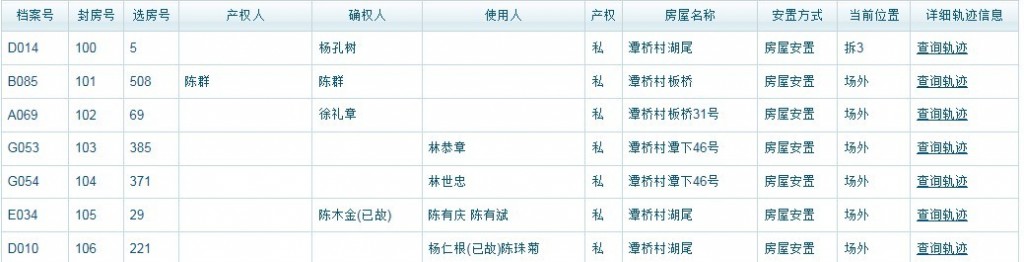
我的问题就是我想把列表中安置方式属于“场外”的行的字体用红色字体显示,这个要怎么实现???
[解决办法]
<th scope="col">
<%--安置方式--%>
<asp:LinkButton ID="LinkButton2" runat="server" Text="安置方式" CommandName="Sort" CommandArgument="REAL_SETTLE_WAY" ToolTip="排序" style='<%# Eval("REAL_SETTLE_WAY").ToString()=="场外" ? "color:red":"color:black" %>'/>
</th>