
android GridView实现图库预览图,多选模式下右上角打勾
看到有初学者有这样的需求: GridView实现图库预览图,多选模式下右上角打勾。(4.0图库的预览图多选时,多了个蓝色边框,其实是蓝色背景)
GridView在自己实际开发中也没用到过,就想试着实现下,写个demo供初学者参考,高手略过。
先来个效果图吧:
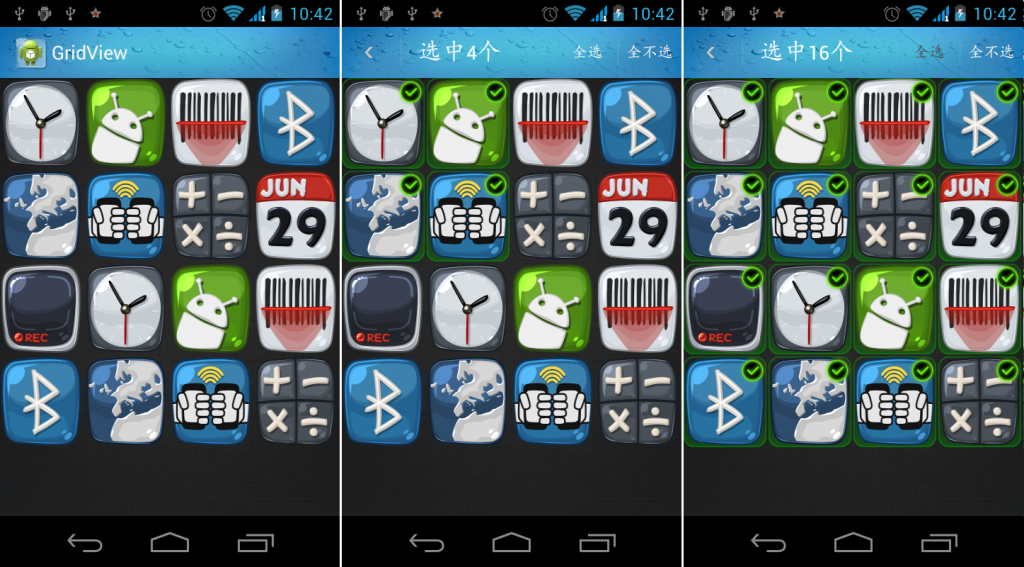
实现起来不复杂,就2个文件。 首先看看GridView继承关系:
<?xml version="1.0" encoding="utf-8"?><RelativeLayout xmlns:android="http://schemas.android.com/apk/res/android" android:layout_width="fill_parent" android:layout_height="fill_parent" > <ImageView android:id="@+id/img_view" android:layout_width="fill_parent" android:layout_height="fill_parent" android:scaleType="fitXY" /> <ImageView android:id="@+id/select" android:layout_width="wrap_content" android:layout_height="wrap_content" android:layout_alignParentRight="true" android:layout_alignParentTop="true" android:background="@drawable/icon_choice" android:visibility="gone" /></RelativeLayout> 就这么多啦。左上角的勾,就是控制 ImageView 显示与不显示的问题。
源码路径:http://download.csdn.net/detail/zhouyuanjing/4916510
~~完~~
Android 学习交流群:90680848