
Android事件分发onInterceptTouchEvent与onTouchEvent
最近在做一个项目,需要定制一个View,类似于Launcher中水平滚动效果。当初仿照Workspace类来实现。然而在针对一个子View响应Scroll事件时,这个子View死活都不响应触摸事件。分析了一天,最后给这个子View的属性中添加android:clickable="true", 问题就被搞定了。 Android平台事件分发的两个函数onInterceptTouchEvent与onTouchEvent,还是比较复杂的。关键点还是在于其返回值。现将网上的一些帖子借鉴,使用一个简单的demo,进行一些分析。onInterceptTouchEvent()是ViewGroup的一个方法,目的是在系统向该ViewGroup及其各个childView触发onTouchEvent()之前对相关事件进行一次拦截.1.down事件首先会传递到onInterceptTouchEvent()方法。2.如果该ViewGroup的onInterceptTouchEvent()在接收到down事件处理完成之后return false,那么后续的move,up等事件将继续会先传递给该ViewGroup,之后才和down事件一样传递给最终的目标view的onTouchEvent()处理。3.如果该ViewGroup的onInterceptTouchEvent()在接收到down事件处理完成之后return true,那么后续的move, up等事件将不再传递给onInterceptTouchEvent(),而是和down事件一样传递给该ViewGroup的onTouchEvent()处理。并且,childView将接收不到任何事件。4.如果最终需要处理事件的view的onTouchEvent()返回了false,表示事件没有被消耗,那么该事件将被传递至其上一层次的view的onTouchEvent()处理。5.如果最终需要处理事件的view 的onTouchEvent()返回了true,那么后续事件将可以继续传递给该view的onTouchEvent()处理。 通过一个简单的demo,对上述几条信息进行逐一讲解。三个类自定义类分别继承于LinearLayout,ALayout BLayout CLayout(仅仅贴出ALayout类的代码,其他类的代码类似)public class ALayout extends LinearLayout{public ALayout(Context context) {super(context);// TODO Auto-generated constructor stub}public ALayout(Context context, AttributeSet attrs) {super(context, attrs);// TODO Auto-generated constructor stub}
public ALayout(Context context, AttributeSet attrs, int defStyle) {super(context, attrs, defStyle);// TODO Auto-generated constructor stub}
@Overridepublic boolean onInterceptTouchEvent(MotionEvent ev) {// TODO Auto-generated method stubfinal int action = ev.getAction();switch (action & MotionEvent.ACTION_MASK) {case MotionEvent.ACTION_DOWN:Log.e("ALayout","onInterceptTouchEvent ACTION_DOWN called,return = " + super.onInterceptTouchEvent(ev));break;case MotionEvent.ACTION_MOVE:break;case MotionEvent.ACTION_UP:break;}return super.onInterceptTouchEvent(ev);}@Overridepublic boolean onTouchEvent(MotionEvent event) {// TODO Auto-generated method stubfinal int action = event.getAction();switch (action & MotionEvent.ACTION_MASK) {case MotionEvent.ACTION_DOWN:Log.e("ALayout","onTouchEvent ACTION_DOWN called,return = " + super.onTouchEvent(event));break;case MotionEvent.ACTION_MOVE:break;case MotionEvent.ACTION_UP:break;}return super.onTouchEvent(event);}}
布局文件main.xml如下:
程序运行后效果如下所示:<RelativeLayout xmlns:android="http://schemas.android.com/apk/res/android"xmlns:tools="http://schemas.android.com/tools"android:layout_width="match_parent"android:layout_height="match_parent" ><com.example.touchtest.ALayoutandroid:id="@+id/view_a"android:layout_width="fill_parent"android:layout_height="fill_parent"android:background="#ffff0000"android:gravity="center" ><com.example.touchtest.BLayoutandroid:id="@+id/view_b"android:layout_width="250dip"android:layout_height="250dip"android:background="#ff00ff00"android:gravity="center" ><com.example.touchtest.CLayoutandroid:id="@+id/view_c"android:layout_width="150dip"android:layout_height="150dip"android:background="#ff0000ff"android:gravity="center" ></com.example.touchtest.CLayout></com.example.touchtest.BLayout></com.example.touchtest.ALayout></RelativeLayout>
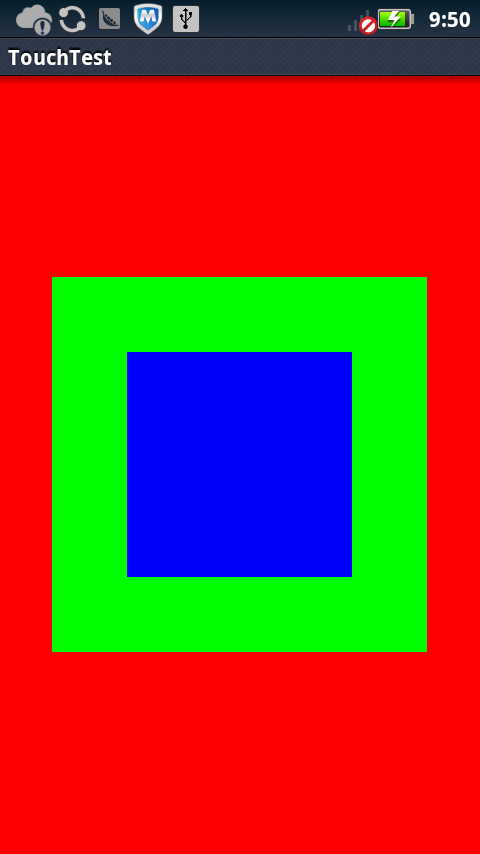
应用运行效果如左图所示。红色背景为ALayout,绿色为BLayout,蓝色为CLayout.点击蓝色(CLayout)区域时,查看log如下:
E/ALayout(10407): onInterceptTouchEvent ACTION_DOWN called,return = false
E/BLayout(10407): onInterceptTouchEvent ACTION_DOWN called,return = false
E/CLayout(10407): onInterceptTouchEvent ACTION_DOWN called,return = false
E/CLayout(10407): onTouchEvent ACTION_DOWN called,return = false
E/BLayout(10407): onTouchEvent ACTION_DOWN called,return = false
E/ALayout(10407): onTouchEvent ACTION_DOWN called,return = false
通过log得知,ACTION_DOWN事件最开始是由onInterceptTouchEvent函数进行处理。之后传递给onTouchEvent函数。这两个函数默认的返回值为false。由于A,B和C三个View均没有消耗掉这个ACTION_DOWN事件,则这个事件也就不了了之了。现在修改一点内容,将BLayout的属性中添加一条android:clickable="true",即布局文件为:<RelativeLayout xmlns:android="http://schemas.android.com/apk/res/android" xmlns:tools="http://schemas.android.com/tools" android:layout_width="match_parent" android:layout_height="match_parent" > <com.example.touchtest.ALayout android:id="@+id/view_a" android:layout_width="fill_parent" android:layout_height="fill_parent" android:background="#ffff0000" android:gravity="center" > <com.example.touchtest.BLayout android:id="@+id/view_b" android:layout_width="250dip" android:layout_height="250dip"android:clickable="true"
android:background="#ff00ff00" android:gravity="center" > <com.example.touchtest.CLayout android:id="@+id/view_c" android:layout_width="150dip" android:layout_height="150dip" android:background="#ff0000ff" android:gravity="center" > </com.example.touchtest.CLayout> </com.example.touchtest.BLayout> </com.example.touchtest.ALayout></RelativeLayout>运行后,点击蓝色区域,显示的log信息为:
由于只有BLayout响应click事件,onTouchEvent函数捕获到DOWN事件后,消耗掉此事件。接下来的MOVE和UP事件均传递给BLayout了。由此可以得出结论: onTouchEvent 中,返回值是 true ,则说明消耗掉了这个事件,返回值是 false ,则没有消耗掉,会继续传递下去。 接下来,做第三个测试。在CLayout上,添加一个Button。布局文件如下所示:<RelativeLayout xmlns:android="http://schemas.android.com/apk/res/android" xmlns:tools="http://schemas.android.com/tools" android:layout_width="match_parent" android:layout_height="match_parent" > <com.example.touchtest.ALayout android:id="@+id/view_a" android:layout_width="fill_parent" android:layout_height="fill_parent" android:background="#ffff0000" android:gravity="center" > <com.example.touchtest.BLayout android:id="@+id/view_b" android:layout_width="250dip" android:layout_height="250dip" android:clickable="true" android:background="#ff00ff00" android:gravity="center" > <com.example.touchtest.CLayout android:id="@+id/view_c" android:layout_width="150dip" android:layout_height="150dip" android:clickable="false" android:background="#ff0000ff" android:gravity="center" > <Button android:id="@+id/button1" android:layout_width="wrap_content" android:layout_height="wrap_content" android:text="Button" /> </com.example.touchtest.CLayout> </com.example.touchtest.BLayout> </com.example.touchtest.ALayout></RelativeLayout>响应的Activity中添加Button响应事件处理 mBtn = (Button) findViewById(R.id.button1); mBtn.setOnClickListener(new OnClickListener() {public void onClick(View v) {// TODO Auto-generated method stubLog.e("","mBtn was click...");}});运行后,效果如图所示E/ALayout(10764): onInterceptTouchEvent ACTION_DOWN called,return = falseE/BLayout(10764): onInterceptTouchEvent ACTION_DOWN called,return = falseE/CLayout(10764): onInterceptTouchEvent ACTION_DOWN called,return = falseE/CLayout(10764): onTouchEvent ACTION_DOWN called,return = falseE/BLayout(10764): onTouchEvent ACTION_DOWN called,return = true
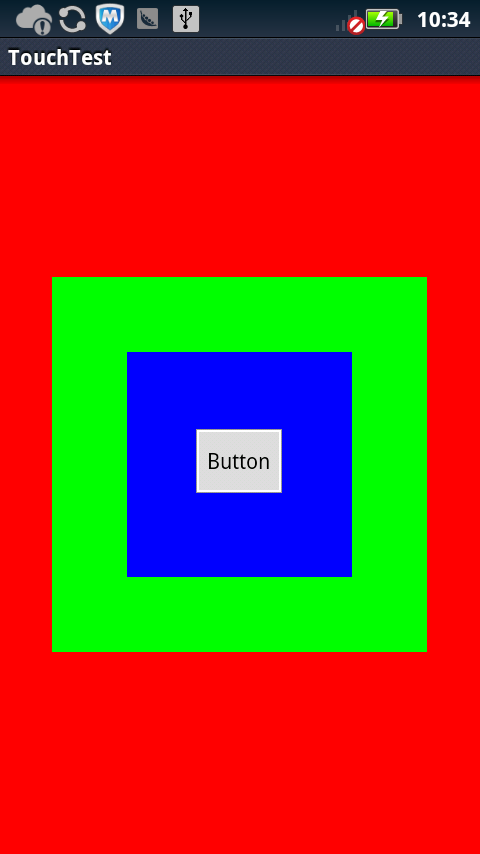
点击Button后,log信息如下
E/ALayout(10856):onInterceptTouchEvent ACTION_DOWN called,return = false
E/BLayout(10856): onInterceptTouchEvent ACTION_DOWN called,return = false
E/CLayout(10856): onInterceptTouchEvent ACTION_DOWN called,return = false
E/(10856): mBtn was click...
从log分析得知,Button处于最上层的一个View,有Btn截获点击事件,不在传递给B,C,A。
第三个测试,说明了"江湖流言"4,5两条
4.如果最终需要处理事件的view的onTouchEvent()返回了false,表示事件没有被消耗,那么该事件将被传递至其上一层次的view的onTouchEvent()处理。5.如果最终需要处理事件的view 的onTouchEvent()返回了true,那么后续事件将可以继续传递给该view的onTouchEvent()处理。 接着做第四个测试。依旧使用上面的代码,但要在ALayout的View中添加一条属性。android:clickable="true"。并且ALayout中的onInterceptTouchEvent函数返回值为true。其修改后的代码如下所示:ALayout.Java文件@Overridepublic boolean onInterceptTouchEvent(MotionEvent ev) {// TODO Auto-generated method stubfinal int action = ev.getAction();switch (action & MotionEvent.ACTION_MASK) {case MotionEvent.ACTION_DOWN:Log.e("ALayout","onInterceptTouchEvent ACTION_DOWN called,return = true");break;case MotionEvent.ACTION_MOVE:break;case MotionEvent.ACTION_UP:break;}// return super.onInterceptTouchEvent(ev);return true;}布局文件为:<RelativeLayout xmlns:android="http://schemas.android.com/apk/res/android" xmlns:tools="http://schemas.android.com/tools" android:layout_width="match_parent" android:layout_height="match_parent" > <com.example.touchtest.ALayout android:id="@+id/view_a" android:layout_width="fill_parent" android:layout_height="fill_parent" android:background="#ffff0000" android:clickable="true" android:gravity="center" > <com.example.touchtest.BLayout android:id="@+id/view_b" android:layout_width="250dip" android:layout_height="250dip" android:clickable="true" android:background="#ff00ff00" android:gravity="center" > <com.example.touchtest.CLayout android:id="@+id/view_c" android:layout_width="150dip" android:layout_height="150dip" android:clickable="true" android:background="#ff0000ff" android:gravity="center" > <Button android:id="@+id/button1" android:layout_width="wrap_content" android:layout_height="wrap_content" android:text="Button" /> </com.example.touchtest.CLayout> </com.example.touchtest.BLayout> </com.example.touchtest.ALayout></RelativeLayout>运行后,点击Button,log信息如下所示:12-19 22:49:34.722: E/ALayout(11032): onInterceptTouchEvent ACTION_DOWN called,return = true12-19 22:49:34.722: E/ALayout(11032): onTouchEvent ACTION_DOWN called,return = true由第四个测试印证了"江湖流言"2,3两条。2.如果该ViewGroup的onInterceptTouchEvent()在接收到down事件处理完成之后return false,那么后续的move, up等事件将继续会先传递给该ViewGroup,之后才和down事件一样传递给最终的目标view的onTouchEvent()处理。3.如果该ViewGroup的onInterceptTouchEvent()在接收到down事件处理完成之后return true,那么后续的move, up等事件将不再传递给onInterceptTouchEvent(),而是和down事件一样传递给该ViewGroup的onTouchEvent()处理。并且,childView将接收不到任何事件PS:关于事件分发机制的深入研究,最好还是从源码着手。以上测试例子,仅仅从结果入手,并没有做到“知其所以然”。