
flex3+struts2+spring2+hibernate3+mysql(在web项目里面建flex,而不是flex工程)
贴几个重要的文件
1。在原有的web项目中,添加flex步骤:
首先,安装flex插件。详细见http://apps.hi.baidu.com/share/detail/20337120,只到安装即可。
后面建工程就不要了。
2。新建web工程,把struts2+spring2+hibernate3的所有包,和所有配置文件写好。(这个做web开发
的都比较熟悉,在我的包里都有,就不说了)
--------接下来就是添加flex了。
右键点击工程名:如右图
把flex工程加进去,在遇到新增完成的最后一步要记得取消“web.xml”那个选项。不然就覆盖了原来的web.xml了。
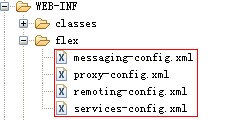
3。把blazeds(是在tomcat/webapp/你的项目下,你安装flex插件后,建flex工程时,要用到blazeds.war这个文件,当你启动tomcat的时候会自动生成blazeds文件夹)里面的几个xml文件放到工程里面。如下图
4。修改web-xml文件,加入如下:
?<!-- Http Flex Session attribute and binding listener support -->
?<listener>
??<listener-class>flex.messaging.HttpFlexSession</listener-class>
?</listener>
?<!-- MessageBroker Servlet -->
?<servlet>
??????? <servlet-name>MessageBrokerServlet</servlet-name>
?????????? <servlet-class>
??????????????? flex.messaging.MessageBrokerServlet
??????? </servlet-class>
??????? <init-param>
??????????????? <param-name>
??????????????????????? services.configuration.file
??????????????? </param-name>
??????????????? <param-value>
??????????????????????? /WEB-INF/flex/services-config.xml
??????????????? </param-value>
??????? </init-param>
??????? <load-on-startup>1</load-on-startup>
</servlet>
<servlet-mapping>
??????? <servlet-name>MessageBrokerServlet</servlet-name>
??????? <url-pattern>/messagebroker/*</url-pattern>
</servlet-mapping>
5。修改remoting-config.xml(配置flex访问java类的标记)和services-config.xml(配置swf访问路径)
6。建立class文件,注意要有一个flex的映射文件以as结尾。
7。修改mxml文件。我的文件如下:
<?xml version="1.0" encoding="utf-8"?>?
<mx:Application xmlns:mx="http://www.adobe.com/2006/mxml"??
?????????????? xmlns:locdg="com.flex.*"?
?????????????? creationComplete="initApp()"
?????????????? minWidth="955" minHeight="600">?
<mx:RemoteObject id="goodsdata" destination="goodsDao" result="onResult(event)" fault="onFault(event)" ></mx:RemoteObject>?
<mx:RemoteObject id="addgoodsdata" destination="goodsDao" result="addResult(event)" fault="addFault(event)" />?
<mx:RemoteObject id="deletegoodsdata" destination="goodsDao" result="deleteResult(event)" fault="deleteFault(event)" />
<mx:RemoteObject id="updategoodsdata" destination="goodsDao" result="updateResult(event)" fault="updateFault(event)" />?
<mx:Script>
?<![CDATA[
???import com.shop.flex.GoodsFlex;
???import com.shop.flex.DoubleClickDataGrid;
??????????? import mx.collections.ArrayCollection;?
??????????? import mx.controls.Alert;?
??????????? import mx.managers.CursorManager;?
??????????? import mx.rpc.events.FaultEvent;?
??????????? import mx.rpc.events.ResultEvent;
???????????
??????????? public var goodsFlex:GoodsFlex = new GoodsFlex();?
??????????? public var result:Object = new Object();?
??????????? [Bindable]?
??????????? public var goods:ArrayCollection = new ArrayCollection();
??????????? public function initApp():void{?
?????????? //?? goodsdata.getGoodsList();?
??????????? }
??????????? public function click_handler(event:Event):void{?
??????????????? CursorManager.setBusyCursor();?
??????????????? info.text = "正在查 询...";?
??????????????? goodsdata.getGoodsList();???
??????????? }?
?
??????????? public function onResult(event:ResultEvent):void{?
??????????????? goods = event.result as ArrayCollection;?
??????????????? CursorManager.removeBusyCursor();?
??????????????? if(goods.length==0){?
??????????????????? info.text="取数据成功,为空";?
??????????????????? //Alert.show("取数据成功,为空");
??????????????? }else{?
??????????????????? //info.text = " 取数据成功";
???????????????????? info.text = "取数据成功";
??????????????? }?
???????????? }?
??????????? public function onFault(event:FaultEvent):void{?
??????????????? CursorManager.removeBusyCursor();?
??????????????? info.text="取数据失败";
???????????????? //Alert.show("取数据失败");
??????????? }
???????????
??????????? public function addgoods_handler(event:Event):void{?
??????????????? if(goodsName.text != ""){?
??????????????????? CursorManager.setBusyCursor();?
??????????????????? goodsFlex.goodsName = goodsName.text;?
??????????????????? addgoodsdata.addGoods(goodsFlex);?
??????????????? }else{
??????????????? ?addinfo.text = "没有填写数据";??
??????????????? }?
??????????? }
??????????? public function addResult(event:ResultEvent):void{?
??????????????? CursorManager.removeBusyCursor();?
??????????????? goodsdata.getGoodsList();?
??????????????? goodsName.text = "";?
??????????????? //Alert.show("添加成功");
??????????????? addinfo.text = "添加成功";
??????????????? //????????????? info.text = "取数据成功";?
??????????? }?
??????????? public function addFault(event:FaultEvent):void{?
??????????????? CursorManager.removeBusyCursor();?
??????????????? addinfo.text = "新增失败";?
??????????? }
???public function deleteGoods(event:Event):void{
????CursorManager.removeBusyCursor();
????goodsFlex.goodsId = goods_data.selectedItem.goodsId;?
??????????????? deletegoodsdata.deleteGoods(goodsFlex);?
???}
???
???public function deleteResult(event:ResultEvent):void{?
??????????????? CursorManager.removeBusyCursor();?
??????????????? goodsdata.getGoodsList();???
??????????????? //info.text = "刪除数据成 功";?
??????????? }?
??????????? public function deleteFault(event:FaultEvent):void{?
??????????????? CursorManager.removeBusyCursor();?
??????????????? //info.text="刪除数据失败";?
??????????? }
???????????
???????????? public function updateGoods(event:Event):void{?
??????????????? if(goods_data.selectedItem.goodsName != ""){?
??????????????????? CursorManager.setBusyCursor();?
??????????????????? info.text = "正在 更新...";?
??????????????????? goodsFlex.goodsId = goods_data.selectedItem.goodsId;?
??????????????????? goodsFlex.goodsName = goods_data.selectedItem.goodsName;?
??????????????????? updategoodsdata.updataGoods(goodsFlex);?
??????????????? }?
??????????? }
???????????
???????????? public function updateResult(event:ResultEvent):void{?
??????????????? CursorManager.removeBusyCursor();?
??????????????? goodsdata.getGoodsList();??
??????????????? info.text = "修改数据成功";?
??????????? }?
??????????? public function updateFault(event:FaultEvent):void{?
??????????????? CursorManager.removeBusyCursor();?
??????????????? info.text="修改数据失败";?
??????????? }
?
?]]>
</mx:Script>
?<mx:DataGrid dataProvider="{goods}" width="400" id="goods_data"
?fontSize="12" borderStyle="inset" fontWeight="bold" textAlign="center" alternatingItemColors="[#F1B6B6, #F2EB37]" height="210" editable="true">
? ?<mx:columns>?
? ?? <mx:DataGridColumn headerText="ID号" dataField="goodsId" editable="false"/>?
???????????? <mx:DataGridColumn headerText="账号" dataField="goodsName" editable="true"/>
????????????
???????????? <mx:DataGridColumn headerText="修改" width="50" editable="false">
???????????????? <mx:itemRenderer>
???????????????? ?<mx:Component>
???????????????? ??<mx:LinkButton toolTip="修改" click="outerDocument.updateGoods(event)" icon="@Embed('icon_06.gif')">????
???????????????? ??</mx:LinkButton>
???????????????? ?</mx:Component>
???????????????? </mx:itemRenderer>
???????????? ?
???????????? </mx:DataGridColumn>
????????????
???????????? <mx:DataGridColumn headerText="删除" width="50" editable="false">
???????????????? <mx:itemRenderer>
???????????????? ?<mx:Component>
???????????????? ??<mx:LinkButton toolTip="删除" click="outerDocument.deleteGoods(event)" icon="@Embed('icon_03.gif')">????
???????????????? ??</mx:LinkButton>
???????????????? ?</mx:Component>
???????????????? </mx:itemRenderer>
???????????? ?
???????????? </mx:DataGridColumn>
?????? </mx:columns>
??? </mx:DataGrid>
??? <mx:Button x="491" y="189" label="取数据" click="click_handler(event)" />?
??? <mx:Text x="606" y="189" id="info" text="点击按钮取数据"/>?
??? <mx:Form x="163" y="72" borderStyle="solid" >?
??????? <mx:FormItem label="用户名" borderStyle="solid">?
??????????? <mx:TextInput id="goodsName" />?
??????? </mx:FormItem>?
??? </mx:Form>?
??? <mx:Button x="444" y="100" label="添 加" click="addgoods_handler(event)"/>
??? <mx:Text x="544" y="100" width="100" height="40" id="addinfo" text="请添加"/>
</mx:Application>?
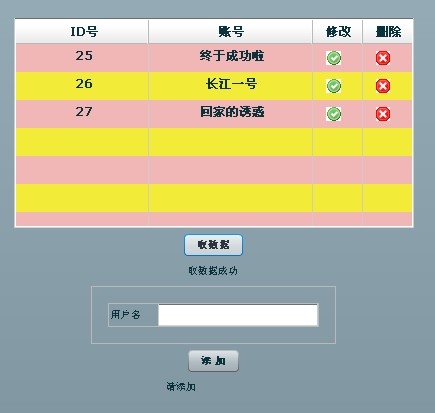
实现了增删改查的所有功能。如下图
我把工程放在文件下载里,lib比较大分4个rar放的,不明白联系QQ:654865674
1 楼 java_xiaoyi 2011-03-18 排版不咋的。。。。 2 楼 hellostory 2011-03-18 这排版让人没有继续看下去的欲望... 3 楼 s929498110 2011-03-18 flex感觉不好用我学了一段时间, 感觉除了对编程人员有好感外
对于用户,系统神马的都没有太大的用处, 在中国的网络上是不是flash更多啊?
flex刚出确实让编程人员耳目一新,比flash简单太多了,好感期一过,就各种问题出现 4 楼 rekoe.net 2011-03-18 哪里看到有sping的事! 5 楼 chrislee1982 2011-03-18 晕!!
使用blazeds作远程访问,竟然是直接调用Dao?!
另外,如果使用了blazeds的话,根本没必要使用struts2了
楼主快改标题吧,免得被人笑死! 6 楼 elvishehai 2011-03-18 放在一个文件里吧,这样看很晕呀, 7 楼 qiyueguxing 2011-03-18 标题有点吓人,讲的就是flex bds 用法。