
javascript实现螺旋数组javascript版本,可直接粘贴到chrome控制台下运行, 二维数组方式实现最后是一行一行
javascript实现螺旋数组
javascript版本,可直接粘贴到chrome控制台下运行,
二维数组方式实现最后是一行一行打印的;
支持顺时针和逆时针旋转;
不大喜欢递归,时间空间开销都大,而且还不易修改,算位置的话就纯数学了,我的数学不大好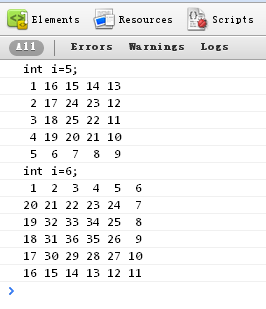
(function(){ var RIGHT = 0, DOWN = 1, LEFT = 2, UP = 3;//闭包常量 //初始化参数 positonManager = function(length,clockwise){ this.length = length;this.clockwise=clockwise; this.cx = 0;//当前x坐标 this.cy = 0;//当前y坐标 this.cn = 1;//当前数值 this.cm = clockwise?RIGHT:DOWN;//当前移动方向 this.positions = new Array(length);//空的二维数组 for (var i = 0; i < length; i++) { this.positions[i] = new Array(length); } this.positions[0][0] = ' 1'; } positonManager.prototype = { moveNext: function(){ if (this.addNewNum(this.cm)) {//继续上次方向 return true; } else if (this.addNewNum((this.cm + (this.clockwise?1:3))%4)) {//因为是个螺旋,转向只能按照固定次序进行循环! return true; } return false;//无路可走了! }, //根据方向获取下一地点后判断是否已占位,未占位则赋值,已占位返回false addNewNum: function(m){ var xy = this.getNewPosition(m); if (xy !== false && this.positions[xy[1]][xy[0]] == undefined) { this.cn++; this.positions[xy[1]][xy[0]] = this.cn < 10 ? ' ' + this.cn : '' + this.cn; this.cx = xy[0]; this.cy = xy[1]; this.cm = m; return true; } return false; }, //根据方向获取下一地点,越界返回false getNewPosition: function(dir){ switch (dir) { case RIGHT: return (this.cx + 1 == this.length ? false : [this.cx + 1, this.cy]); case DOWN: return (this.cy + 1 == this.length ? false : [this.cx, this.cy + 1]); case LEFT: return (this.cx == 0 ? false : [this.cx - 1, this.cy]); case UP: return (this.cy == 0 ? false : [this.cx, this.cy - 1]); } }, printAll: function(){ var i, j,line; while (this.moveNext()){} for (i=0; i < this.length; i++) {line=''; for (j=0; j < this.length; j++) { line+=this.positions[i][j]+' '; }console.log(line); } } }})()console.log('int i=5;');var thread1 = new positonManager(5,false);thread1.printAll();console.log('int i=6;');var thread = new positonManager(6,true);thread.printAll();