Ext3.0学习笔记messageBox和grid
html代码:
<!DOCTYPE html PUBLIC "-//W3C//DTD XHTML 1.0 Transitional//EN" "http://www.w3.org/TR/xhtml1/DTD/xhtml1-transitional.dtd">
<html xmlns="http://www.w3.org/1999/xhtml">
<head>
<meta http-equiv="Content-Type" content="text/html; charset=gb2312" />
<title>无标题文档</title>
<link rel="stylesheet" type="text/css" href="css/ext-all.css" />
<script type="text/javascript" src="js/ext-base.js"></script>
<script type="text/javascript" src="js/ext-all.js"></script>
<script type="text/javascript">
? Ext.onReady(function(){
??? var myDiv = Ext.get("myDiv");
?//高亮显示,然后渐退
?//myDiv.highlight();
?myDiv.addClass("red");
?//使层居中(上下左右都居中)
?//myDiv.center();
?myDiv.setOpacity(.25);
?//Ext.select('p').highlight();
?
?Ext.get("myButton").on("click",function(){
?? alert("You click the button!");
?});
?
?/*
?//使用匿名函数
?Ext.select("p").on("click",function(){
??? alert("You click the p");
?});
?//使用有名字的函数,有利于代码重用。
?var paragraphclicked = function(){
?? alert("You click the paragraph");
?}
?Ext.select("p").on("click",paragraphclicked);*/
?
?//得到事件响应所在的DOM节点
?var paraClicked = function(e){
?? //Ext.get(e.target).highlight();
?? var paragraph = Ext.get(e.target);
?? paragraph.highlight();
?? Ext.Msg.show({
???? title:'paragraph clicked',
??msg:paragraph.dom.innerHTML,
??width:400,
??//buttons设置:Ext.Msg.OK,Ext.Msg.OKCANCEL,Ext.Msg.CAMCEL,Ext.Msg.YESNO,Ext.Msg.YESNOCANCEL
??buttons:Ext.Msg.OK,
??//对话框弹出和关闭时的动画效果。
??animEl:paragraph,
??//关闭对话框后执行的函数
??fn:okalert,
??//icon:弹出框内容前面的图标,取值为Ext.MessageBox.INFO,Ext.MessageBox.ERROR,Ext.MessageBox.WARNING,Ext.MessageBox.QUESTION
??icon:Ext.MessageBox.INFO,
??multiline:true
?? });
?}
?Ext.select("p").on("click",paraClicked);
? });
? function okalert(){
?? alert("关闭对话框后显示!");
? }
?
? Ext.onReady(function(){
??? var myData = [
?? ['Apple',29.89,0.24,0.81,'9/1 12:00am'],
?? ['Ext',83.81,0.28,0.34,'9/12 12:00am'],
?? ['Google',71.72,0.02,0.03,'10/1 12:00am'],
?? ['Microsoft',52.55,0.01,0.02,'7/4 12:00am'],
?? ['Yahoo!',29.01,0.42,1.47,'5/22 12:00am']
?];
?var ds = new Ext.data.Store({
?? proxy:new Ext.data.MemoryProxy(myData),
?? reader:new Ext.data.ArrayReader({id:0},[
???? {name:'company'},
??{name:'price',type:'float'},
??{name:'change',type:'float'},
??{name: 'pctChange', type: 'float'},?
??{name: 'lastChange', type: 'date', dateFormat: 'n/j h:ia'}
?? ])
?});
?ds.load();
?var colModel= new Ext.grid.ColumnModel([
?? {header:"company",width:120,sortable:true,dataIndex:"company"},
?? {header: "Price", width: 90, sortable: true, dataIndex: 'price'},
?? {header: "Change", width: 90, sortable: true, dataIndex: 'change'},?
?? {header:? "%? Change",? width:? 90,? sortable:? true,? dataIndex: 'pctChange'},?
????? {header: "Last Updated", width: 120, sortable: true, renderer:? Ext.util.Format.dateRenderer('m/d/Y'),? dataIndex: 'lastChange'}
?]);
?/*
?//grid没有这个构造方法
?var grid1 = new Ext.grid.Grid('grid-example', {ds: ds, cm: colModel});
?grid1.render();
?grid1.getSelectionModel().selectFirstRow();*/
?var grid = new Ext.grid.GridPanel({
? //当grid初始显示在el:Ext.getBody()时,renderTo无效;当el设为某个控件时,renderTo正常;当el不设置时,renderTo显示出来的内容应用了myDiv的样式。
? //el:Ext.getBody(),
? el:'gridDiv',
? //renderTo:指出grid构造出来之后要在哪里呈现,
? //renderTo: "myDiv",
? width:514,
? height:160,
???? ds: ds,
? //间隔行
? stripeRows: true,
? title: 'Array Grid',
???? cm: colModel
??? });
?? grid.render();
? });
</script>
<style type="text/css">
<!--
? .red{
? color:#FF0000;
? }
? #myDiv{
? width:500px;
? }
? #gridDiv{
? position:relative;
? left:100px;
? }
-->
</style>
</head>
<body>
<div id="myDiv">sdfsdf
</div>
<p>aaaaaaaaaaaaaaaaa</p>
<p>bbbbbbbbbbbbbbbbbb</p>
<input type="button" id="myButton" value="Click Me" />
<div id="gridDiv"> </div>
</body>
</html>
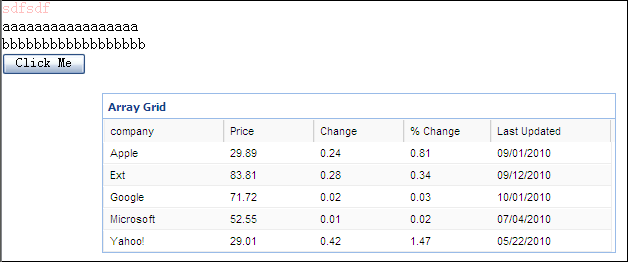
效果:
见附件。