使用JDK1.6的JAX-WS编写WebService1. Web services概念Web services是客户端和服务端通过万维网的HTTP协议
使用JDK1.6的JAX-WS编写WebService
1. Web services概念
Web services是客户端和服务端通过万维网的HTTP协议进行交互.
3.JAX-WS实现简单的Web services
3.1 建一个名为HelloServer的Web应用作为Webservice客户端
3.2 在HelloServer应用下新建一个类:
package helloservice.endpoint;import javax.jws.WebMethod;import javax.jws.WebService;@WebServicepublic class Hello {private String message = new String("Hello, ");public void Hello() {}@WebMethodpublic String sayHello(String name) {return message + name + "."; }}3.3 在weblogic下发布HelloServer应用,应用名为WebRoot
3.4 在IE里面打开http://localhost:7001/WebRoot/HelloService?wsdl
如果可以查看到wsdl的内容说明发布成功.比如:
<?xml version="1.0" encoding="UTF-8" ?> - <!-- Published by JAX-WS RI at http://jax-ws.dev.java.net. RI's version is Oracle JAX-WS 2.1.3-07/10/2008 08:41 PM(bt). --> - <!-- Generated by JAX-WS RI at http://jax-ws.dev.java.net. RI's version is Oracle JAX-WS 2.1.3-07/10/2008 08:41 PM(bt). --> - <definitions xmlns:soap="http://schemas.xmlsoap.org/wsdl/soap/" xmlns:tns="http://endpoint.helloservice/" xmlns:xsd="http://www.w3.org/2001/XMLSchema" xmlns="http://schemas.xmlsoap.org/wsdl/" targetNamespace="http://endpoint.helloservice/" name="HelloService">- <types>- <xsd:schema> <xsd:import namespace="http://endpoint.helloservice/" schemaLocation="http://localhost:7001/WebRoot/HelloService?xsd=1" /> </xsd:schema> </types>- <message name="sayHello"> <part name="parameters" element="tns:sayHello" /> </message>- <message name="sayHelloResponse"> <part name="parameters" element="tns:sayHelloResponse" /> </message>- <portType name="Hello">- <operation name="sayHello"> <input message="tns:sayHello" /> <output message="tns:sayHelloResponse" /> </operation> </portType>- <binding name="HelloPortBinding" type="tns:Hello"> <soap:binding transport="http://schemas.xmlsoap.org/soap/http" style="document" /> - <operation name="sayHello"> <soap:operation soapAction="" /> - <input> <soap:body use="literal" /> </input>- <output> <soap:body use="literal" /> </output> </operation> </binding>- <service name="HelloService">- <port name="HelloPort" binding="tns:HelloPortBinding"> <soap:address location="http://localhost:7001/WebRoot/HelloService" /> </port> </service> </definitions>
3.5 运行wsimport
wsimport是JDK1.6特有的,[JAVA_HOME]/bin下.
3.5.1 在E:\Program Files\PowerCmd>目录下,新建一个文件夹generate.
3.5.2 运行如下命令:
wsimport -s generate http://localhost:7001/WebRoot/HelloService?wsdl
如果返回
parsing WSDL...
generating code...
说明运行成功.
3.5.3 查看generate目录,可以看到生成了JAVA文件,与generate同级的目录下,还有class文件.(这里生成的JAVA文件,客户端需要用到)
生成的HelloService.java如下:
package helloservice.endpoint;import java.net.MalformedURLException;import java.net.URL;import javax.xml.namespace.QName;import javax.xml.ws.Service;import javax.xml.ws.WebEndpoint;import javax.xml.ws.WebServiceClient;import javax.xml.ws.WebServiceFeature;/** * This class was generated by the JAX-WS RI. * JAX-WS RI 2.1.1 in JDK 6 * Generated source version: 2.1 * */@WebServiceClient(name = "HelloService", targetNamespace = "http://endpoint.helloservice/", wsdlLocation = "http://localhost:7001/WebRoot/HelloService?wsdl")public class HelloService extends Service{ private final static URL HELLOSERVICE_WSDL_LOCATION; static { URL url = null; try { url = new URL("http://localhost:7001/WebRoot/HelloService?wsdl"); } catch (MalformedURLException e) { e.printStackTrace(); } HELLOSERVICE_WSDL_LOCATION = url; } public HelloService(URL wsdlLocation, QName serviceName) { super(wsdlLocation, serviceName); } public HelloService() { super(HELLOSERVICE_WSDL_LOCATION, new QName("http://endpoint.helloservice/", "HelloService")); } /** * * @return * returns Hello */ @WebEndpoint(name = "HelloPort") public Hello getHelloPort() { return (Hello)super.getPort(new QName("http://endpoint.helloservice/", "HelloPort"), Hello.class); } /** * * @param features * A list of {@link javax.xml.ws.WebServiceFeature} to configure on the proxy. Supported features not in the <code>features</code> parameter will have their default values. * @return * returns Hello */ @WebEndpoint(name = "HelloPort") public Hello getHelloPort(WebServiceFeature... features) { return (Hello)super.getPort(new QName("http://endpoint.helloservice/", "HelloPort"), Hello.class, features); }}3.6 建一个名为HelloClient的Web应用作为WebService客户端
3.7 将3.5.3生成的JAVA文件复制到HelloClient的src下.
3.8 新建一个HelloServlet文件,如下:
package webclient;import helloservice.endpoint.HelloService;import java.io.IOException;import java.io.PrintWriter;import javax.servlet.ServletException;import javax.servlet.annotation.WebServlet;import javax.servlet.http.HttpServlet;import javax.servlet.http.HttpServletRequest;import javax.servlet.http.HttpServletResponse;import javax.xml.ws.WebServiceRef;@WebServlet(name = "HelloServlet", urlPatterns = { "/HelloServlet" })public class HelloServlet extends HttpServlet {@WebServiceRef(wsdlLocation = "http://localhost:7001/WebRoot/HelloService?wsdl")private HelloService service;/** * Constructor of the object. */public HelloServlet() {super();}/** * Destruction of the servlet. <br> */public void destroy() {super.destroy(); // Just puts "destroy" string in log// Put your code here}/** * The doGet method of the servlet. <br> * * This method is called when a form has its tag value method equals to get. * * @param request the request send by the client to the server * @param response the response send by the server to the client * @throws ServletException if an error occurred * @throws IOException if an error occurred */public void doGet(HttpServletRequest request, HttpServletResponse response)throws ServletException, IOException {processRequest(request, response);}/** * The doPost method of the servlet. <br> * * This method is called when a form has its tag value method equals to post. * * @param request the request send by the client to the server * @param response the response send by the server to the client * @throws ServletException if an error occurred * @throws IOException if an error occurred */public void doPost(HttpServletRequest request, HttpServletResponse response)throws ServletException, IOException {processRequest(request, response);}/** * Initialization of the servlet. <br> * * @throws ServletException if an error occurs */public void init() throws ServletException {// Put your code here}/** * Processes requests for both HTTP <code>GET</code> and <code>POST</code> * methods. * * @param request * servlet request * @param response * servlet response * @throws ServletException * if a servlet-specific error occurs * @throws IOException * if an I/O error occurs */protected void processRequest(HttpServletRequest request,HttpServletResponse response) throws ServletException, IOException {response.setContentType("text/html;charset=UTF-8");PrintWriter out = response.getWriter();try {out.println("<html lang="en">");out.println("<head>");out.println("<title>Servlet HelloServlet</title>");out.println("</head>");out.println("<body>");out.println("<h1>Servlet HelloServlet at "+ request.getContextPath() + "</h1>");out.println("<p>" + sayHello("world") + "</p>");out.println("</body>");out.println("</html>");} finally {out.close();}}// doGet and doPost methods, which call processRequest, and// getServletInfo methodprivate String sayHello(java.lang.String arg0) {helloservice.endpoint.Hello port = service.getHelloPort();return port.sayHello(arg0);}}3.9 配置HelloClient的Web.xml,增加如下代码:
<servlet> <description>HelloServlet</description> <display-name>HelloServlet</display-name> <servlet-name>HelloServlet</servlet-name> <servlet-class>webclient.HelloServlet</servlet-class> </servlet><servlet-mapping> <servlet-name>HelloServlet</servlet-name> <url-pattern>/servlet/HelloServlet</url-pattern> </servlet-mapping>
3.10 发布HelloClient应用
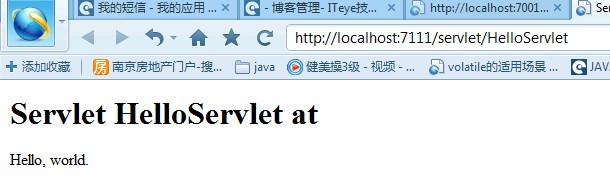
3.11 在IE录入http://localhost:7111/servlet/HelloServlet
页面内容如下说明WebService调用成功!