
使用jquery动态修改dom元素属性在IE下的问题今天在做程序的过程中,遇到一个问题,就是处理修改click属性的
使用jquery动态修改dom元素属性在IE下的问题
今天在做程序的过程中,遇到一个问题,就是处理修改click属性的时候出现的,当使用jquery动态的修改onclick属性的时候,有的时候会出现不好用的情况
于是到网上找到了对应的解决方案
Js代码 复制代码
1. $(“#some_element”).attr(‘onclick’,"//some new operation");
$(“#some_element”).attr('onclick',"//some new operation");
但是这段代码在FireFox下会按我们的意图正确执行,但是在IE下什么动静都没有。关于问题的描述,可以参考:
http://www.nabble.com/onClick-prepend-td15194791s27240.html
http://ajaxian.com/archives/evaling-with-ies-windowexecscript
解决的方法也很简单:
Js代码 复制代码
1. $(“#some_element”).unbind(‘click’).removeAttr(‘onclick’).click(function(){
2. //new operation
3. });
经过修改后的代码如下:
//弹出添加device窗体 function addDevice(){win.window('open');form.form('clear');$('#btn-save').unbind('click').removeAttr('onclick').click(function(){form.form('submit',{url:"/moon/device/device.do?method=addDevices",onSubmit:function(){},success:function(data){eval('data='+data);if (data.success){grid.datagrid('reload');win.window('close');} else {$.messager.alert('错误',data.msg,'error');} }});});}修改的代码如下:
function editDevice(){var row = grid.datagrid('getSelected');if (row){win.window('open');form.form('load', '/moon/device/device.do?method=getDevicesById&id='+row.id);$('#btn-save').unbind('click').removeAttr('onclick').click(function(){form.form('submit',{url:'/moon/device/device.do?method=updateDevice&id='+row.id,onSubmit:function(){},success:function(data){eval('data='+data);if (data.success){grid.datagrid('reload');win.window('close');} else {$.messager.alert('错误',data.msg,'error');} }});});}else{$.messager.show({title:'警告', msg:'请先选择要修改的记录。'});}}修改后界面如下
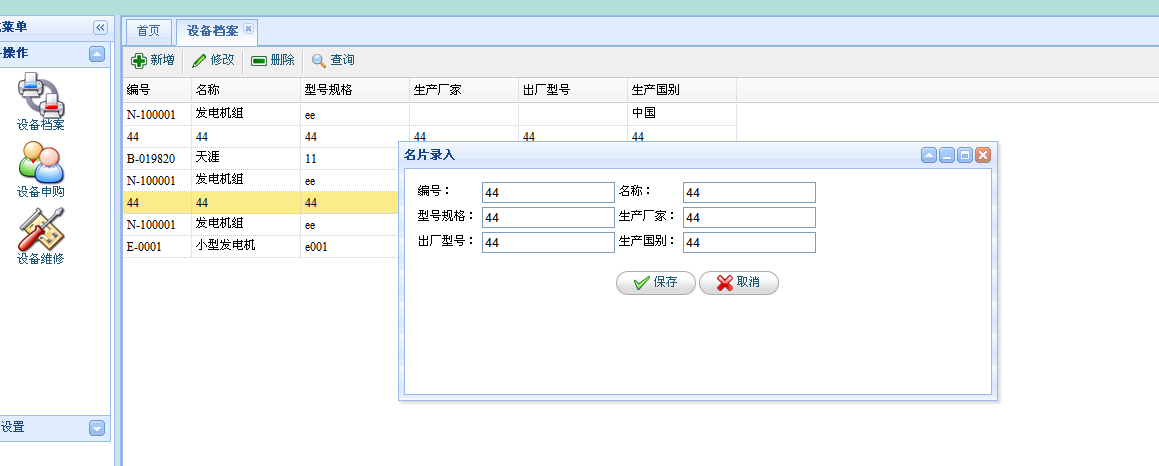
可以实现CRUD操作了!!!