
使用LocalConnection进行swf之间的数据交互(附helloWorldDemo)
许多时候,我们需要在2个或多个swf文件之间进行数据交互,比如说坐标定位,数据通讯等.这里Adobe公司已经考虑到了这个问题了,他提供给我们localConnection这个类拱用户进行不同swf文件间的数据交互.
数据间的交互也包括多种情况
同一个域的情况下:
这是使用 LocalConnection 对象最简单的情况,它只允许在位于同一个域中的 LocalConnection 对象间通信,这是因为默认情况下,应用程序允许同域通信。当同一个域中的两个 文件通信时,无需实施任何特殊的安全措施,而只需将 connectionName 参数的同一个值传递给 connect() 和 send() 方法。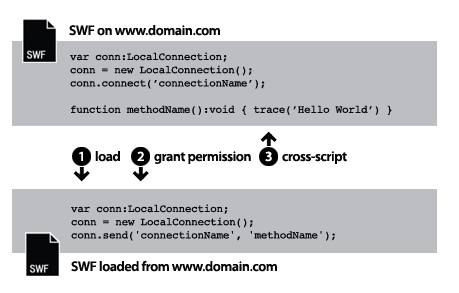
具有可预知域名的不同域:
当不同域中的两个 SWF 文件通信时,需要通过调用 allowDomain() 方法来允许在这两个不同域之间进行通信。还需要在 send() 方法中使用接收方 LocalConnection 对象的域名限定连接名: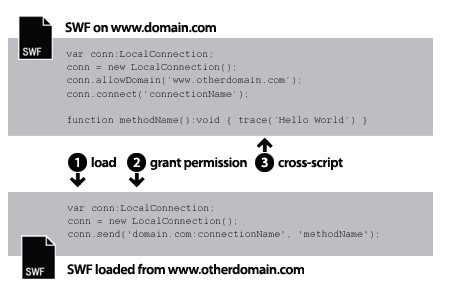
具有不可预知域名的不同域
有时候,可能希望具有接收方 LocalConnection 对象的 文件在域之间具有更好的可移植性。若要避免在 send() 方法中指定域名,但要指出接收方和发送方 LocalConnection 对象不在同一个域中,可在 connect() 和 send() 调用中的连接名称之前加一个下划线 (_)。若要允许在这两个不同域之间通信,请调用 allowDomain() 方法并传递您希望允许 LocalConnection 调用的域。或者,也可以传递通配符 (*) 参数来允许从所有域调用: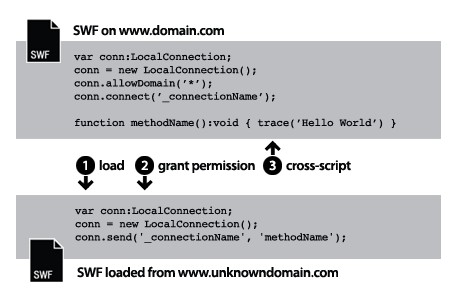
这里因为只是为了快速上手,所以就简单介绍了在同一个域内2个不同swf文件之间的交互
首先就是划分2个交互文件谁为信息发送者,谁为信息接收者,这里我首先创建了一个接收方
接收方的名称为LocalConnectionReceiverExample:
<?xml version="1.0" encoding="utf-8"?><mx:Application xmlns:mx="http://www.adobe.com/2006/mxml" layout="absolute" applicationComplete="localConnectionReceiver()"><mx:Script><![CDATA[import mx.controls.Alert; private var conn:LocalConnection; public function localConnectionReceiver():void { conn = new LocalConnection(); conn.client = this; try { conn.connect("myConnection"); } catch (error:ArgumentError) { trace("Can't connect...the connection name is already being used by another SWF"); } } public function lcHandler(msg:String):void { getText.text = msg; }]]></mx:Script><mx:Label x="52" y="237" text="接收到的数据:" fontSize="12"/><mx:Text x="155" y="237" width="183" fontSize="12" id="getText"/></mx:Application>只是一个文本框.
在接收者中,首先得 创建一个LocalConnection ,然后申明该文件为能够提供方法给外来swf进行调用
conn.client = this;
接着创建一个连接通道
conn.connect("myConnection");以及提供一个给外来swf调用的方法
public function lcHandler(msg:String):void { getText.text = msg; }这里接收方就创建完毕,然后是发送方
发送方的名称为LocalConnectionSenderExample:
<?xml version="1.0" encoding="utf-8"?><mx:Application xmlns:mx="http://www.adobe.com/2006/mxml" layout="absolute" applicationComplete="localConnectionSender()"><mx:Script><![CDATA[private var conn:LocalConnection;public function localConnectionSender():void { sendBtn.addEventListener(MouseEvent.CLICK, sendMessage); conn = new LocalConnection(); conn.addEventListener(StatusEvent.STATUS, onStatus); } private function sendMessage(event:MouseEvent):void { conn.send("myConnection", "lcHandler", message.text); } private function onStatus(event:StatusEvent):void { switch (event.level) { case "status": trace("LocalConnection.send() succeeded"); break; case "error": trace("LocalConnection.send() failed"); break; } }]]></mx:Script><mx:Label x="52" y="237" text="接收到的数据:" fontSize="12"/><mx:TextInput x="155" y="237" fontSize="12" id="message"/><mx:Button x="346" y="237" label="发送" fontSize="12" id="sendBtn"/></mx:Application>发送方结构也很简单,只是一个输入框和一个发送按钮,这里要做的就是把输入的内容,发送到接收方的swf文件中.
发送方同样需要创建一个LocalConnection对象
conn = new LocalConnection();conn.addEventListener(StatusEvent.STATUS, onStatus);
这里做了一个连接到接收方的监听,以判定接收方的状态.
然后就是向接收方发送数据:
conn.send("myConnection", "lcHandler", message.text);这里第一个参数就是接收方创建的接口通道,第二个参数就是接收方提供的调用方法,第三个参数就是传递的参数.(localconnection的send方法还有几个参数,具体参见api).
不过这种交互方式需要2个swf同时运行的情况下才能成功,所以还存在一个问题.