
Android实现更改头像前段时间就做的这个项目,一直没能运行成功,说是空指针异常。。今天突然看到,又小小研究
Android实现更改头像
前段时间就做的这个项目,一直没能运行成功,说是空指针异常。。今天突然看到,又小小研究了一番,终于运行成功~写篇博客和大家分享一下,希望大家不要犯和我一样的错误哦~
阶段一:进行主界面的布局
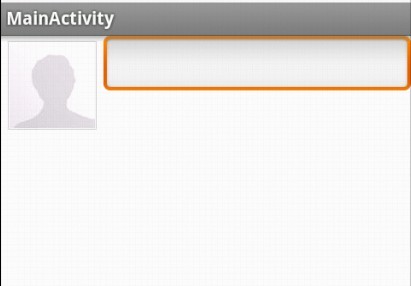
具体代码如下:
<LinearLayout xmlns:android="http://schemas.android.com/apk/res/android" xmlns:tools="http://schemas.android.com/tools" android:layout_width="match_parent" android:layout_height="match_parent" android:orientation="horizontal" > <ImageButton android:id="@+id/head" android:layout_width="80dp" android:layout_height="80dp" android:src="@drawable/image0" /> <EditText android:layout_width="fill_parent" android:layout_height="wrap_content" android:inputType="text" /></LinearLayout>
阶段二:新建dialog.xml文件,实现对话框的布局,具体代码如下:
<?xml version="1.0" encoding="utf-8"?><LinearLayout xmlns:android="http://schemas.android.com/apk/res/android" android:layout_width="match_parent" android:layout_height="match_parent" > <Gallery android:id="@+id/gallery" android:layout_width="fill_parent" android:layout_height="60dp" android:background="#55000000" android:spacing="10dp" /></LinearLayout>
阶段三:编写Activity,查找组件并进行相应的事件处理(点击imageButton弹出更改头像对话框)。具体代码如下:
package com.lks.changeimage;import android.os.Bundle;import android.app.Activity;import android.app.AlertDialog;import android.content.DialogInterface;import android.content.res.TypedArray;import android.view.LayoutInflater;import android.view.Menu;import android.view.MenuItem;import android.view.View;import android.view.View.OnClickListener;import android.view.ViewGroup;import android.widget.AdapterView;import android.widget.AdapterView.OnItemClickListener;import android.widget.BaseAdapter;import android.widget.Gallery;import android.widget.ImageButton;import android.widget.ImageView;public class MainActivity extends Activity implements OnItemClickListener{private ImageButton avatar;private Gallery gallery;private int[] images = { R.drawable.image1, R.drawable.image2,R.drawable.image3, R.drawable.image4,R.drawable.image5 };@Overridepublic void onCreate(Bundle savedInstanceState) {super.onCreate(savedInstanceState);setContentView(R.layout.main);avatar = (ImageButton) this.findViewById(R.id.head);avatar.setOnClickListener(new OnClickListener() {public void onClick(View v) {LayoutInflater inflater = LayoutInflater.from(MainActivity.this);final View dialogView = inflater.inflate(R.layout.dialog, null);AlertDialog.Builder builder = new AlertDialog.Builder(MainActivity.this);gallery = (Gallery) dialogView.findViewById(R.id.gallery);gallery.setAdapter(new ImageAdapter());gallery.setSelection(images.length / 2);gallery.setOnItemClickListener(MainActivity.this);builder.setIcon(android.R.drawable.ic_dialog_dialer).setTitle("更改头像").setView(dialogView).setPositiveButton("确定",new DialogInterface.OnClickListener() {public void onClick(DialogInterface dialog,int which) {}}).setNegativeButton("取消",new DialogInterface.OnClickListener() {public void onClick(DialogInterface dialog,int which) {}}).create().show();}});}@Overridepublic boolean onCreateOptionsMenu(Menu menu) {getMenuInflater().inflate(R.menu.main, menu);return true;} /** * 负责产生gallery中的图片 */private class ImageAdapter extends BaseAdapter {private int mGalleryItemBackground;public ImageAdapter(){TypedArray typedArray=obtainStyledAttributes(R.styleable.HelloGallery); mGalleryItemBackground=typedArray.getResourceId(R.styleable.HelloGallery_android_galleryItemBackground, 0); typedArray.recycle();}// 返回图片的个数,比如你想得到图片的个数@Overridepublic int getCount() {return images.length;}@Overridepublic Object getItem(int position) {return images[position];}@Overridepublic long getItemId(int position) {return position;}@Overridepublic View getView(int position, View convertView, ViewGroup parent) {ImageView imageView = new ImageView(MainActivity.this);imageView.setImageResource(images[position]);imageView.setBackgroundResource(mGalleryItemBackground);return imageView;}}@Overridepublic void onItemClick(AdapterView<?> adapterview, View view, int postion,long id) {avatar.setImageResource(images[postion]);}}关于空指针异常的错误就出现在查找gallery组件的时候:
gallery = (Gallery) dialogView.findViewById(R.id.gallery); //查找组件必须从当前对话框的布局中查找,否则就出现了空指针异常
阶段四:运行结果显示
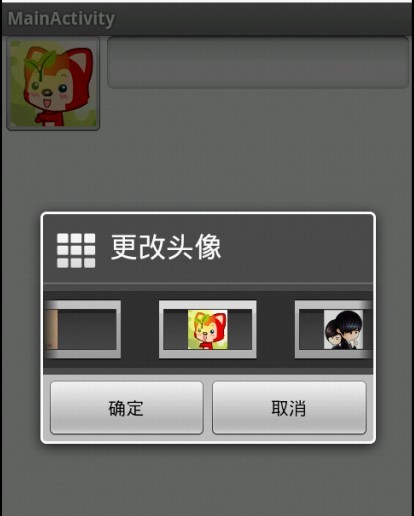
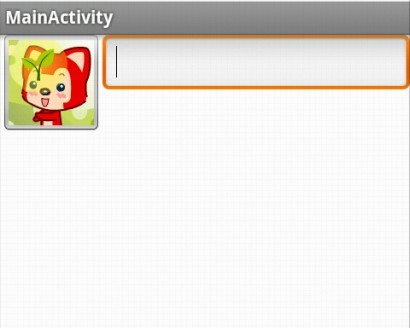
对应的完整项目已上传到资源~