
sencha-touch 入门 二 Ext.form.FormPanelsencha-touch代码设计很像Extjs。?Ext.form.FormPanel在google浏
sencha-touch 入门 二 Ext.form.FormPanel
sencha-touch代码设计很像Extjs。
?
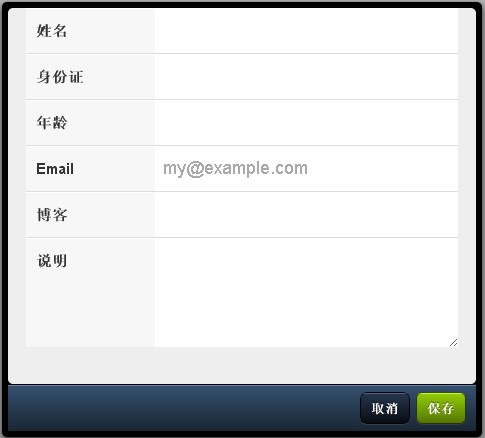
Ext.form.FormPanel在google浏览器的效果图:
?
form代码:
Ext.setup({ icon: '../icon.png', tabletStartupScreen: '../tablet_startup.png', phoneStartupScreen: '../phone_startup.png', glossOnIcon: false, onReady: function() { var formBase = { scroll: 'vertical', items: [ { xtype: 'textfield', name : 'name', label: '姓名', useClearIcon: true }, { xtype: 'textfield', name : 'idCard', label: '身份证', useClearIcon: true }, { xtype: 'numberfield', name : 'age', label: '年龄', useClearIcon: true }, { xtype: 'emailfield', name : 'email', label: 'Email', placeHolder: 'my@example.com', useClearIcon: true }, { xtype: 'urlfield', name : 'url', label: '博客', useClearIcon: true }, { xtype: 'textareafield', name : 'remark', label: '说明' } ], dockedItems : [ { xtype: 'toolbar', dock: 'bottom', items: [ {xtype: 'spacer'}, { text: '取消', handler: function() { form.reset(); } }, { text: '保存', ui: 'confirm', handler: function() { if(formBase.user){ form.updateRecord(formBase.user, true); } form.submit({ waitMsg : {message:'Submitting', cls : 'demos-loading'} }); } } ] } ]};if (Ext.is.Phone) { formBase.fullscreen = true; } else { Ext.apply(formBase, { autoRender: true, floating: true, modal: true, centered: true, hideOnMaskTap: false, height: 435, width: 480 }); } var form = new Ext.form.FormPanel(formBase);form.show(); }});? 1 楼 zhangdaiping 2011-01-12 现在正在开这个呢。望楼主发点有深度的东西上来看看 2 楼 zyengogo 2011-02-10 没用过来看看
3 楼 lqy_2019 2011-10-14 如何将这个表单提交到servlet呢???? 4 楼 czpae86 2011-10-16 你可以获取表单值通过Ajax传过去、也可以调用表单的submit方法提交 5 楼 lqy_2019 2011-10-20 谢谢楼上,知道了。。