ExtJs实践:支持返回Json格式的ComboBox(转)假如我们程序中有产品(Product)和产品分类(Category)这2个类,前
ExtJs实践:支持返回Json格式的ComboBox(转)
假如我们程序中有产品(Product)和产品分类(Category)这2个类,前端使用ExtJs,通过JSON格式同后端进行通讯:
public class Category{ public string Id { get; set; } public string Name { get; set; }}public class Product{ public string Id { get; set; } public string Name { get; set; } public Category Category { get; set; }}在产品添加页面,会有一个ComboBox来选择产品所属的分类(当然实际工作中产品的Id是不会让用户输入的):
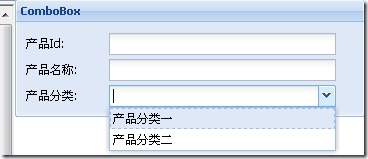
如果使用ExtJs传统的ComboBox:
Ext.onReady(function() { Ext.QuickTips.init(); var store = new Ext.data.ArrayStore({ fields: ['Id', 'Name'], data: [['1', '产品分类一'], ['2', '产品分类二']] }); var form = new Ext.FormPanel({ labelWidth: 75, frame: true, title: 'ComboBox', bodyStyle: 'padding:5px 5px 0', width: 350, defaults: { width: 230 }, defaultType: 'textfield', items: [ { fieldLabel: '产品Id', name: 'Id' }, { fieldLabel: '产品名称', name: 'Name' }, new Ext.form.ComboBox({ fieldLabel: '产品分类', name: 'Category', hiddenName:'CategoryId', store: store, displayField: 'Name', mode: 'local', valueField: 'Id' })], buttons: [{ text: '保存', handler: function() { var values = form.form.getValues(); alert(Ext.util.JSON.encode(values)); } }] }); form.render(document.body); });如果在上面的表单中输入产品Id为“1”,产品名称为“产品1”,产品类别选择“产品分类一”,点击保存按钮,那么将得到一个json格式的字符串如下:
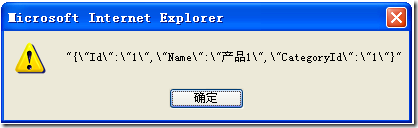
即:{"Id“:"1”,"Name”:"产品1”,"CategoryId”:"1"},而这个json字符串传到服务端是不能被完整的反序列化成一个Product的实例的,因为丢失了Category的信息,能够被完整地反序列化成一个Product的json字符串应该是下面这样的:
{"Id“:"1”,"Name”:"产品1”,"Category”:{"Id“:"1”,"Name”:"产品分类一"}}
那么我们就来改造ExtJs的ComboBox,让它能够返回JSON格式的值,继承Ext的ComboBox,增加一个表明是否是Json格式的属性和两个方法如下:
JsonComboBox = Ext.extend(Ext.form.ComboBox, { isJsonFormat: true, getName: function() { if (this.hiddenName) return this.hiddenName; return this.name; }, getJson: function() { var o = {}; if (this.valueField) o[this.valueField] = this.value; if (this.displayField) o[this.displayField] = this.lastSelectionText; return o; }});同时也要对FormPanel进行如下改造,同样增加一个是否是Json格式的属性和一个获取表单Json格式字符串的方法:
JsonForm = Ext.extend(Ext.form.FormPanel, { isJsonFormat: true, getJsonString: function() { var f = this; var values = f.form.getValues(); if (this.isJsonFormat === true) { f.items.each(function(c) { if (c.isJsonFormat === true) { values[c.getName()] = c.getJson(); } }, f); } var data = Ext.util.JSON.encode(values); return data; } });使用方法如下,注意,JsonCombobox只需要定义一个Name属性就可以了:
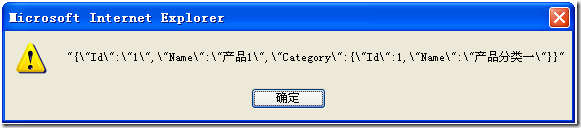
Ext.onReady(function() { Ext.QuickTips.init(); var store = new Ext.data.ArrayStore({ fields: ['Id', 'Name'], data: [['1', '产品分类一'], ['2', '产品分类二']] }); var form = new JsonForm({ labelWidth: 75, frame: true, title: 'JsonComboBox', bodyStyle: 'padding:5px 5px 0', width: 350, defaults: { width: 230 }, defaultType: 'textfield', items: [ { fieldLabel: '产品Id', name: 'Id' }, { fieldLabel: '产品名称', name: 'Name' }, new JsonComboBox({ fieldLabel: '产品分类', name: 'Category', store: store, displayField: 'Name', mode: 'local', valueField: 'Id' })], buttons: [{ text: '保存', handler: function() { var values = form.getJsonString(); alert(values); } }] }); form.render(document.body); });看看字符串是不是我们需要的格式: