
WebService框架整理(一) Axis1
Axis用过一段时间后就听说Axis2横空出世,继而接触了CXF,如果不赶紧整理,怕是都要遗忘了,今天咱就先整理一下Axis1。
Axis1终于1.4版本,此后转为Axis2。
先搭建一个简单的Axis1,日后根据需要逐步求精。
相关链接:
WebService框架整理(一) Axis1
WebService框架整理(二) Axis1+Spring
在开始构建前,我们需要获得以下jar包:
<?xml version="1.0" encoding="UTF-8"?><deploymentxmlns="http://xml.apache.org/axis/wsdd/"xmlns:java="http://xml.apache.org/axis/wsdd/providers/java"><transportname="http"><requestFlow><handlertype="java:org.apache.axis.handlers.http.URLMapper" /></requestFlow></transport><transportname="local"><responseFlow><handlertype="java:org.apache.axis.transport.local.LocalResponder" /></responseFlow></transport><servicename="Version"provider="java:RPC"><parametername="allowedMethods"value="getVersion" /><parametername="className"value="org.apache.axis.Version" /></service></deployment>
我们将测试Axis1内部的Version服务。
接下来,我们构建web.xml文件,如下所示:
<?xml version="1.0" encoding="UTF-8"?><web-appxmlns:xsi="http://www.w3.org/2001/XMLSchema-instance"xmlns="http://java.sun.com/xml/ns/javaee"xmlns:web="http://java.sun.com/xml/ns/javaee/web-app_2_5.xsd"xsi:schemaLocation="http://java.sun.com/xml/ns/javaee http://java.sun.com/xml/ns/javaee/web-app_2_5.xsd"id="WebApp_ID"version="2.5"><display-name>Apache-Axis</display-name><servlet><display-name>Apache-Axis Servlet</display-name><servlet-name>axis</servlet-name><servlet-class>org.apache.axis.transport.http.AxisServlet</servlet-class><load-on-startup>0</load-on-startup></servlet><servlet-mapping><servlet-name>axis</servlet-name><url-pattern>/services/*</url-pattern></servlet-mapping></web-app>
所有以/services/开头的请求都将转交给AxisServlet处理。
构建一个测试用例,如下所示:
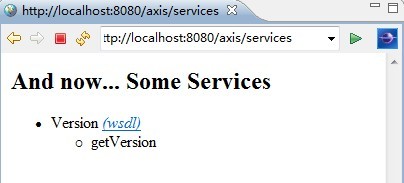
import static org.junit.Assert.*;import java.net.URL;import javax.xml.namespace.QName;import org.apache.axis.client.Call;import org.apache.axis.client.Service;import org.junit.Before;import org.junit.Test;/** * WebService测试 * * @author 梁栋 * @version 1.0 * @since 1.0 */public class WebServiceTest {private String namespaceUri = "http://localhost:8080/axis/services/Version";private String wsdlUrl = namespaceUri + "?wsdl";/** * 测试 * * @throws Exception */@Testpublic final void test() throws Exception {// 创建调用对象Service service = new Service();Call call = (Call) service.createCall();// 调用 远程方法call.setOperationName(new QName(namespaceUri, "getVersion"));// 设置URLcall.setTargetEndpointAddress(new URL(wsdlUrl));// 执行远程调用,同时获得返回值String version = (String) call.invoke(new Object[] {});// 打印信息System.err.println(version);// 验证assertNotNull(version);}}启动服务,访问地址http://localhost:8080/axis/services,得到如下页面:
单击getVersion服务,进入WSDL页面,如图所示:
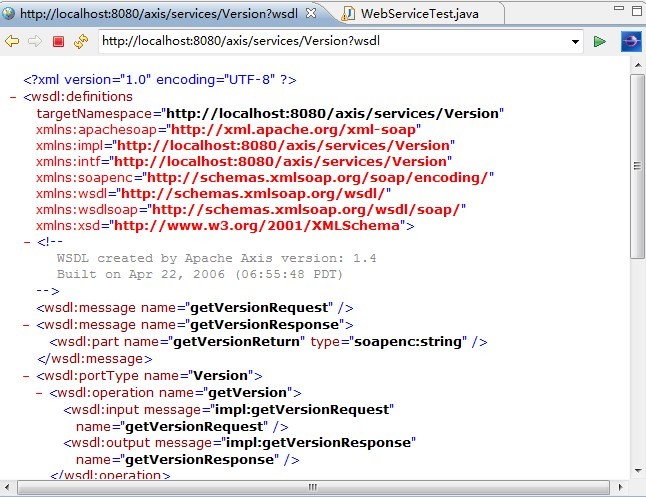
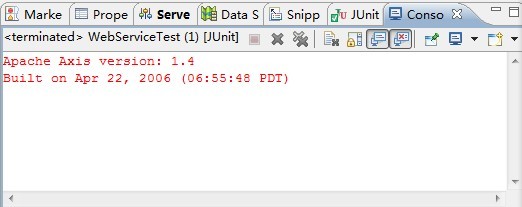
我们已经能够正常访问该服务了,执行测试用例,如果我们正常获得版本信息则认为验证通过!
Axis就这么简单!
控制台得到如下信息,如图所示:
其实,在Eclipse中我们可以直接使用IDE提供的工具进行WebService验证,按下图步骤执行操作:
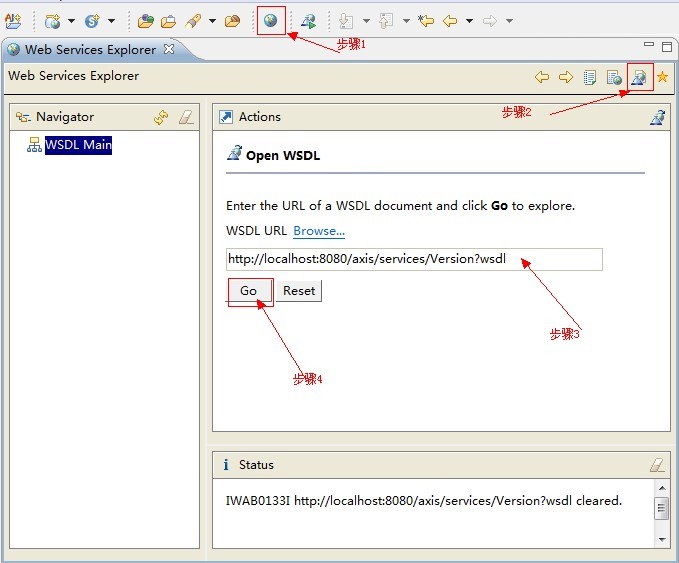
得到一个页面,如图所示:
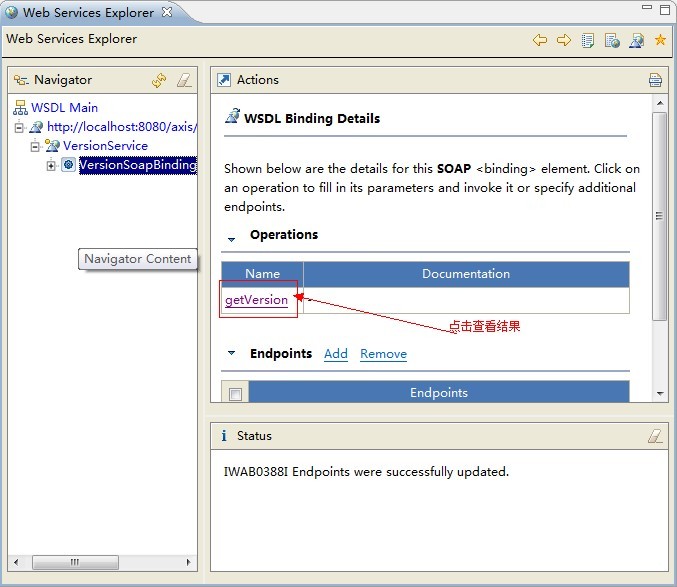
继续按步骤点击,看看得到什么内容:
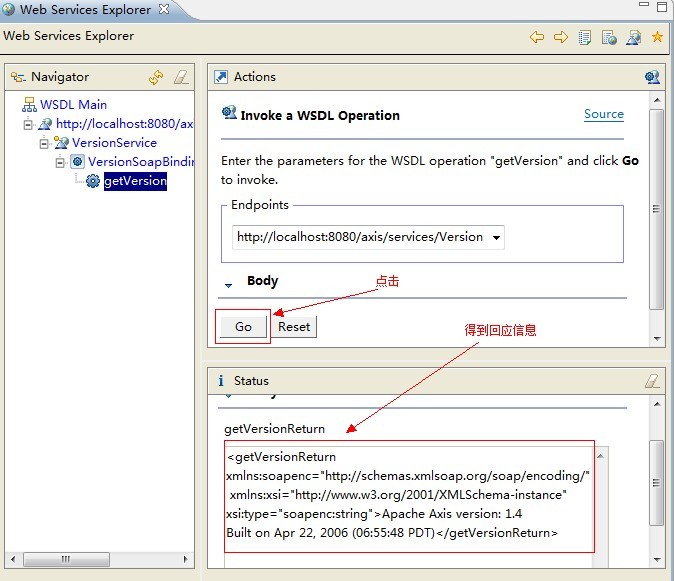
在Eclipse中,即便我们没有测试用例,也可使用IDE自带的工具进行验证!

朋友可以下载这个简单的实例,见附件!
WebService框架整理(一) Axis1
WebService框架整理(二) Axis1+Spring