
JQuery easyUI拖拽效果运用到排班?? 最近做了一个医院的项目,项目中有一个功能是排班,具体的意思就是将某
JQuery easyUI拖拽效果运用到排班
?? 最近做了一个医院的项目,项目中有一个功能是排班,具体的意思就是将某个医生或护士排在周几的门诊或病房值班,公司领导要求用拖动来实现排班,正好项目中运用的前台框架是easyUI,easyUI中有拖动的功能。
??? 先截几张图让大家了解一下流程:
1.选择科室
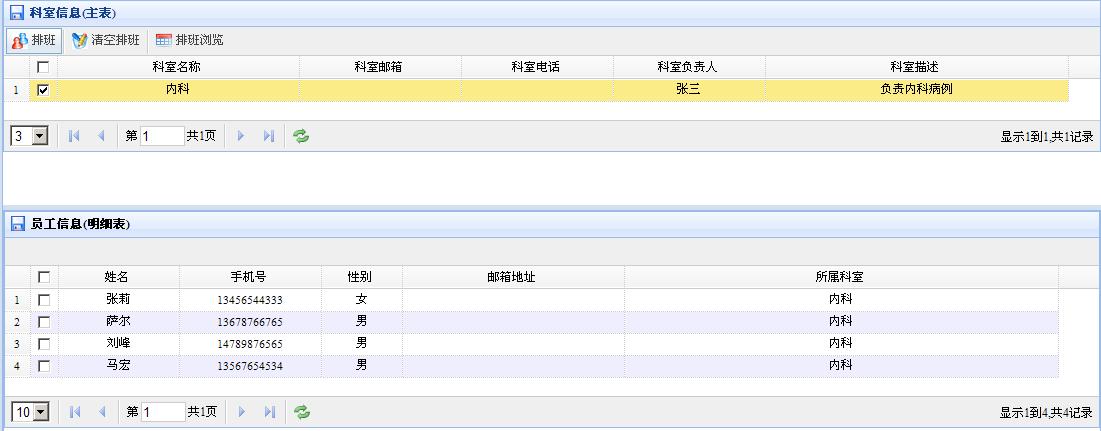
2.点击排班按钮后进入排班页面
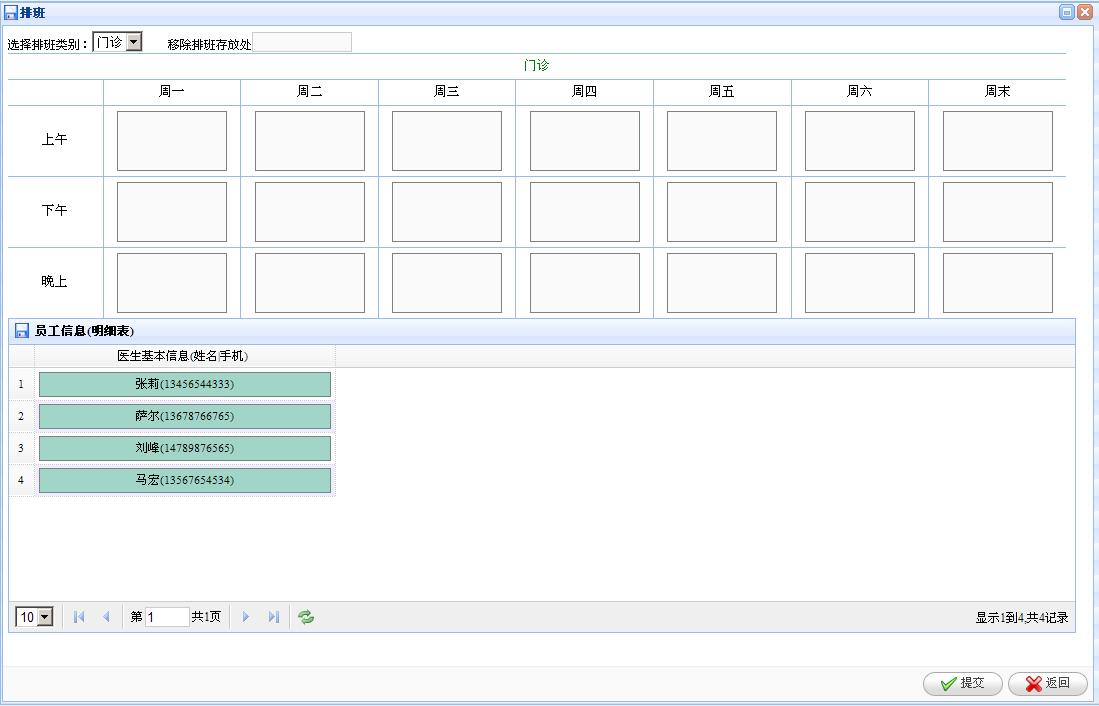
3.鼠标放到某个员工上时鼠标将变为可拖动的形状,可按住鼠标将其拖到想要放入的框中,效果如下图:
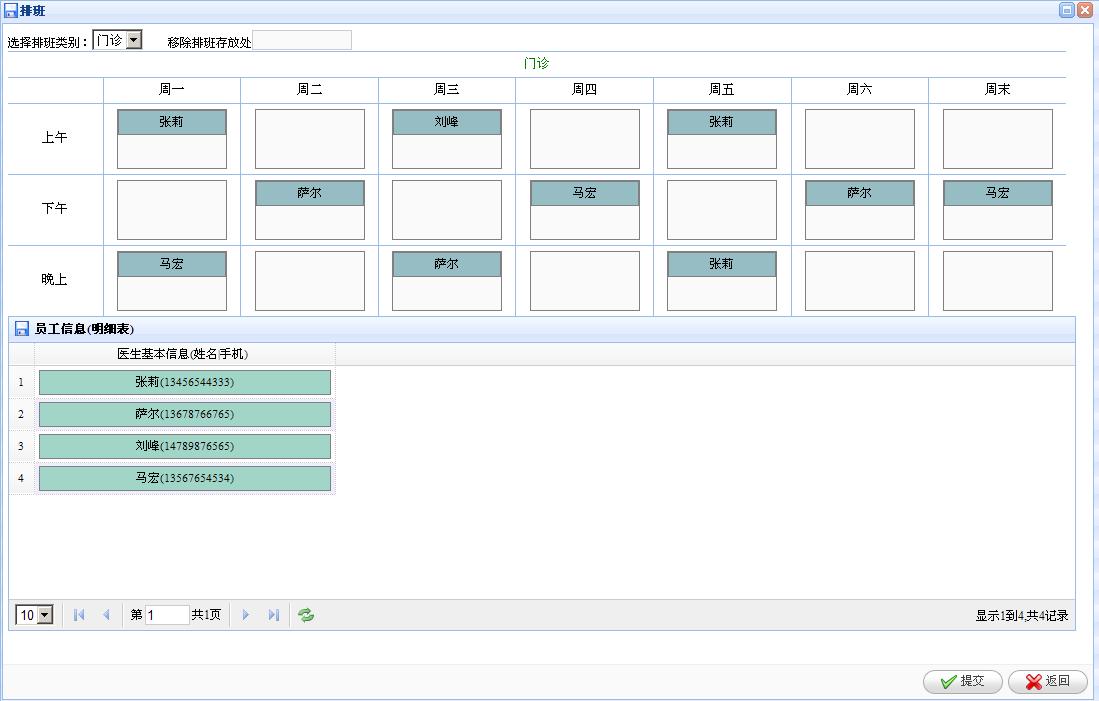
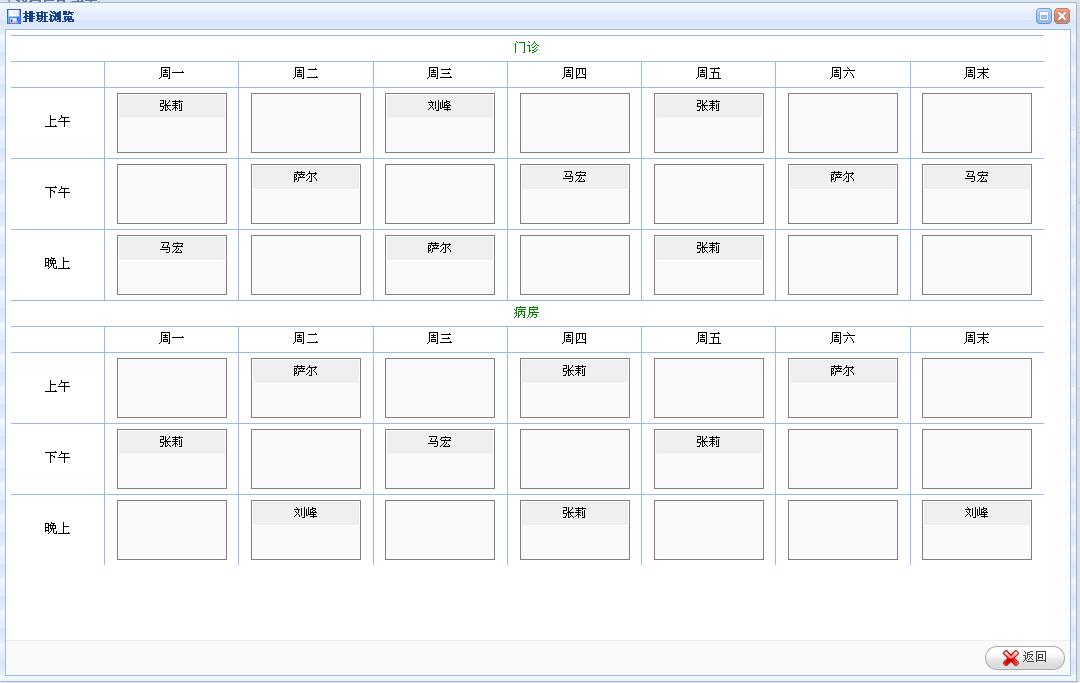
4.点击提交按钮后可将排好的信息进行保存,回到选择科室界面,点击排班浏览,效果如下图:
?
上面是做出来的效果。代码实现如下:(只贴出实现拖动那部分代码)
?
?
//打开排班窗口function openDepartmentScheduleDialog (data) {//将部门ID的隐藏域中赋值$("#bumenId").val(data.id);//清空垃圾箱的数据$("#target").empty();//移除排班至垃圾箱的方法delPanBan();//获得排班信息$.getJSON("getDoctorById.do",{"bumenId":data.id},function(doctors){if (null == doctors || "" == doctors) {$("#departmentSchedule .targetarea").empty();//$.messager.alert('提示消息','数据加载失败!','info');} else {showPanBan1(doctors);}});$("#departmentSchedule").css("width",$(window).width()-20);$("#departmentSchedule").css("height",$(window).height()-20);$("#PbBlock").css("height",$(window).height()-100);//hasData = true;//加载员工列表数据$('#employee').datagrid({title:'<font color="black"> 医生列表</font>',iconCls: 'icon-save',width:'140',height:$(window).height()-100,nowrap: false,striped: true,url:'../employeeConnectBook/pageAllQueryEmployee.do',sortName: 'id',sortOrder: 'desc',idField:'id',columns:[[{field:'emName',title:'姓名',width:80,align:'center',formatter:function(value, rec) {//alert(value+"===="+rec.telPhone);return '<div name="doc" style="color:black;width: 70px;height:23px;background-color:#a1d5c8;line-height:23px;border:1px gray solid;"><input type="hidden" name="docid" value="'+rec.id+'"/>'+value+'</div>';}}]],onBeforeLoad:function(){$('#employee').datagrid('clearSelections');},onLoadSuccess:function(){//员工数据加载完成后使之可以拖动,并让排班框可以存放排班人员有个全局标识,标识为TRUE时表示有数据了//然后让定时器执行排班方法,排班方法中再让标识变为FALSEhasData = true;if(hasData == true) {setInterval('doPanBan()',1000);}},rownumbers:true, singleSelect:false,queryParams:{"id":data.id}//查询条件});//if(hasData == true) {//setInterval('doPanBan()',1000);//}$("#departmentSchedule").dialog({title:"排班"});$('#departmentSchedule').dialog({onClose:function(){if($.browser.msie&&$.browser.version=='6.0'){this.href = '#';}location.href="departmentSchedule.html";},buttons:[{text:'提交',iconCls:'icon-ok',handler:function(){//在对医生排班之后会生成一个隐藏域,存放的值的格式是(排班类别_时段_周几_医生ID)//alert($("#aa").html());$("#addDoctor").submit();//$.messager.alert('提示消息','排班成功!','info');//$('#departmentSchedule').dialog('close');if($.browser.msie&&$.browser.version=='6.0'){this.href = '#';}location.href="departmentSchedule.html";}},{ text:'返回',iconCls:'icon-cancel',handler:function(){if($.browser.msie&&$.browser.version=='6.0'){this.href = '#';}location.href="departmentSchedule.html";}}]});}//显示排班数据的方法function showPanBan1(data) {//将所有的框框清空$("#departmentSchedule .targetarea").empty();//解析从后台获取的数据,将对应的人员放入对应的框中for(var i = 0; i < data.length; i ++) {//alert(data[i].id);var svalue = data[i].type+"_"+data[i].sect+"_"+data[i].weekday;var ovalue = svalue+"_"+data[i].docId;var obj = $('<div name="doc" style="color:black;width: 100%;height:23px;background-color:#d8e4fe;line-height:23px;border:1px gray solid;" id='+ovalue+'><input type="hidden" name="docid" value="'+ovalue+'"/>'+data[i].ryname+'</div>');$("#departmentSchedule .targetarea").each(function(){var tvalue = $(this).attr("value");if(tvalue == svalue) {$(this).append(obj);}});}}//将人员拖入垃圾箱的方法function delPanBan(){$('#departmentSchedule').find("div:[name='doc']").each(function(){$(this).draggable({proxy:'clone',revert:true,cursor:'auto',onStartDrag:function(){$(this).draggable('options').cursor='auto';$(this).draggable('proxy').addClass('dp');},onStopDrag:function(){$(this).draggable('options').cursor='auto';}});});$('#target').droppable({onDragEnter:function(e,source){$(source).draggable('options').cursor='auto';$(source).draggable('proxy').css('border','1px solid red');},onDragLeave:function(e,source){if($(source).children().val().indexOf("_")!="-1") {$(source).draggable('options').cursor='not-allowed';$(source).draggable('proxy').css('border','1px solid #ccc');}},onDrop:function(e,source){if($(source).children().val().indexOf("_")!="-1") {$(this).append(source);$(source).css("display","none");}}});}//显示排班function showPanBan2(data) {$("#viewDepartmentSchedule .targetarea").empty();for(var i = 0; i < data.length; i ++) {//alert(data[i].id);var svalue = data[i].type+"_"+data[i].sect+"_"+data[i].weekday;var ovalue = svalue+"_"+data[i].docId;var obj = $('<div name="doc" style="color:black;width: 100%;height:23px;background-color:#efefef;line-height:23px;border:1px white solid;" id='+ovalue+'><input type="hidden" name="docid" value="'+ovalue+'"/>'+data[i].ryname+'</div>');$("#viewDepartmentSchedule .targetarea").each(function(){var tvalue = $(this).attr("value");if(tvalue == svalue) {$(this).append(obj);}});}}//执行排班function doPanBan(){if(hasData == true) {//alert($("div:[name='doc']").length);//alert("doPanBan() running..");if($("div:[name='doc']").length>=0) {$("div:[name='doc']").each(function(){$(this).draggable({revert:true,deltaX:10,deltaY:10,proxy:function(source){var n = $('<div /> 有例子观摩就好了