
带下拉菜单的文本框程序需要做一个带下拉菜单的文本框以方便用户输入,大概类似于下图中这种TextBox:?控件
带下拉菜单的文本框
程序需要做一个带下拉菜单的文本框以方便用户输入,大概类似于下图中这种TextBox:
?
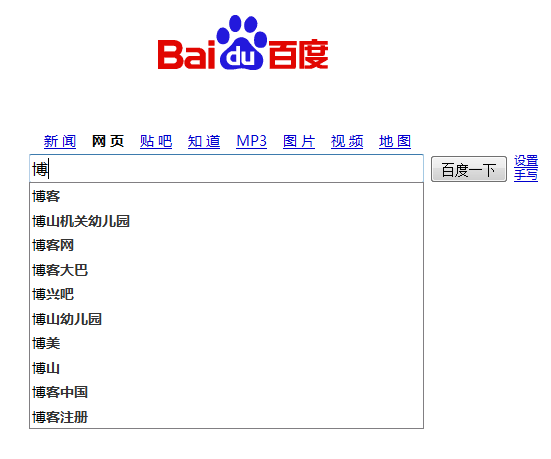
控件有一个数据源,用的DataTable格式,还有一个值columnName来表示用Table中的哪一列数据,控件将根据这一列的数据来进行下拉框提示.
界面只添加了一个文本框和一个ListBox,
组件生成器中的代码为:
?
#region 组件设计器生成的代码 /// <summary> /// 设计器支持所需的方法 - 不要 /// 使用代码编辑器修改此方法的内容。 /// </summary> private void InitializeComponent() { this.textBox1 = new System.Windows.Forms.TextBox(); this.listBox1 = new System.Windows.Forms.ListBox(); this.SuspendLayout(); // // textBox1 // this.textBox1.Dock = System.Windows.Forms.DockStyle.Top; this.textBox1.Location = new System.Drawing.Point(0, 0); this.textBox1.Name = "textBox1"; this.textBox1.Size = new System.Drawing.Size(189, 21); this.textBox1.TabIndex = 0; this.textBox1.TextChanged += new System.EventHandler(this.textBox1_TextChanged); this.textBox1.KeyDown += new System.Windows.Forms.KeyEventHandler(this.textBox1_KeyDown); this.textBox1.Leave += new System.EventHandler(this.textBox1_Leave); // // listBox1 // this.listBox1.Dock = System.Windows.Forms.DockStyle.Fill; this.listBox1.FormattingEnabled = true; this.listBox1.ItemHeight = 12; this.listBox1.Location = new System.Drawing.Point(0, 21); this.listBox1.Name = "listBox1"; this.listBox1.Size = new System.Drawing.Size(189, 4); this.listBox1.TabIndex = 1; this.listBox1.Leave += new System.EventHandler(this.listBox1_Leave); this.listBox1.DoubleClick += new System.EventHandler(this.listBox1_DoubleClick); this.listBox1.KeyDown += new System.Windows.Forms.KeyEventHandler(this.listBox1_KeyDown); // // TextBoxWithDataPick // this.AutoScaleDimensions = new System.Drawing.SizeF(6F, 12F); this.AutoScaleMode = System.Windows.Forms.AutoScaleMode.Font; this.Controls.Add(this.listBox1); this.Controls.Add(this.textBox1); this.Name = "TextBoxWithDataPick"; this.Size = new System.Drawing.Size(189, 25); this.Load += new System.EventHandler(this.TextBoxWithDataPick_Load); this.ResumeLayout(false); this.PerformLayout(); } #endregion private System.Windows.Forms.TextBox textBox1; private System.Windows.Forms.ListBox listBox1;?
?
类代码为:
?
?
view plaincopy to clipboardprint?- public?partial?class?TextBoxWithDataPick?:?UserControl??????{??
- ????????public?TextBoxWithDataPick()??????????{??
- ????????????InitializeComponent();??????????}??
- ????????///?<summary>文本</summary>?? ??????????public?string?text??
- ????????{?get{?return?textBox1.Text;?}????????????set{?textBox1.Text?=?value;}??
- ????????}??????????///?<summary>可供用户选择的数据集</summary>??? ??
- ????????public?DataTable?dataSource?=?null;??????????///?<summary>在dataSource中的列名</summary>??? ??
- ????????public?string?columnName?=?"";??????????private?void?TextBoxWithDataPick_Load(object?sender,?EventArgs?e)??
- ????????{??????????????//控件载入时,将高度缩为与TextBox相等 ??
- ????????????this.Height?=?textBox1.Height;??????????}??
- ????????private?void?textBox1_TextChanged(object?sender,?EventArgs?e)??????????{??
- ????????????if?(this.textBox1.Text?==?""?)??????????????{??????????????????
- ????????????????this.Height?=?textBox1.Height;??????????????????this.listBox1.Visible?=?false;??
- ????????????????this.SendToBack();??????????????????return;??
- ????????????}??????????????//这些情况下,不弹出选择框 ??
- ????????????if?(dataSource?==?null?||?columnName?==?""?||?!dataSource.Columns.Contains(columnName))??????????????????return;??
- ????????????//根据用户当前输入的内容,筛选出与内容相符的记录,显示在列表框中 ??????????????this.listBox1.Items.Clear();??
- ????????????for?(int?i?=?0;?i?<?dataSource.Rows.Count;?i++)??????????????{??
- ????????????????if?(dataSource.Rows[i][columnName].ToString().IndexOf(textBox1.Text)?==?0)??????????????????{??
- ????????????????????listBox1.Items.Add(dataSource.Rows[i][columnName].ToString());??????????????????}??
- ????????????}??????????????//如果记录数不为0,则将列表显示出来 ??
- ????????????if?(listBox1.Items.Count?==?0)??????????????{??
- ????????????????this.Height?=?textBox1.Height;??????????????????this.listBox1.Visible?=?false;??
- ????????????????this.SendToBack();??????????????}??
- ????????????else??????????????{??
- ????????????????if?(listBox1.Items.Count?==?1)??????????????????{??
- ????????????????????this.Height?=?textBox1.Height?+?20?*?listBox1.Items.Count;??????????????????????this.listBox1.Visible?=?true;??
- ????????????????????this.BringToFront();??????????????????}??
- ????????????????else?if?(listBox1.Items.Count<8)??????????????????{??
- ????????????????????this.Height?=?textBox1.Height?+?14?*?listBox1.Items.Count;??????????????????????this.listBox1.Visible?=?true;??
- ????????????????????this.BringToFront();??????????????????}??
- ????????????????else??????????????????{??
- ????????????????????this.Height?=?textBox1.Height?+?108;??????????????????????this.listBox1.Visible?=?true;??
- ????????????????????this.BringToFront();??????????????????}??
- ????????????}??????????}??
- ????????//用户在焦点为listBox1时按下回车,将当前选中的内容提交到TextBox中,并隐藏ListBox ??????????private?void?listBox1_KeyDown(object?sender,?KeyEventArgs?e)??
- ????????{??????????????if?(e.KeyValue?==?(int)Keys.Enter)??
- ????????????{??????????????????this.textBox1.Text?=?listBox1.SelectedItem.ToString();??
- ????????????????this.Height?=?textBox1.Height;??????????????????this.listBox1.Visible?=?false;??
- ????????????????this.SendToBack();??????????????}??
- ????????}??????????//用户双击listBox1某项时,将当前选中的内容提交到TextBox中,并隐藏ListBox ??
- ????????private?void?listBox1_DoubleClick(object?sender,?EventArgs?e)??????????{??
- ????????????if?(listBox1.SelectedItem?!=?null)??????????????{??
- ????????????????this.textBox1.Text?=?listBox1.SelectedItem.ToString();??????????????????this.Height?=?textBox1.Height;??
- ????????????????this.listBox1.Visible?=?false;??????????????????this.SendToBack();??
- ????????????}??????????}??
- ????????//用户在TextBox中点击向下箭头时,将焦点交给ListBox,使用户能够选择其中的项 ??????????private?void?textBox1_KeyDown(object?sender,?KeyEventArgs?e)??
- ????????{??????????????if?(e.KeyValue?==?(int)Keys.Down)??
- ????????????{??????????????????if?(listBox1.Items.Count?!=?0)??
- ????????????????{??????????????????????listBox1.Focus();??
- ????????????????????listBox1.SelectedIndex?=?0;??????????????????}??
- ????????????}??????????}??
- ????????//TextBox失去焦点时,隐藏ListBox ??????????private?void?textBox1_Leave(object?sender,?EventArgs?e)??
- ????????{??????????????if?(listBox1.Focused?==?false)??
- ????????????{??????????????????this.Height?=?textBox1.Height;??
- ????????????????this.listBox1.Visible?=?false;??????????????????this.SendToBack();??
- ????????????}??????????}??
- ????????private?void?listBox1_Leave(object?sender,?EventArgs?e)??????????{??
- ????????????if?(textBox1.Focused?==?false)??????????????{??
- ????????????????this.Height?=?textBox1.Height;??????????????????this.listBox1.Visible?=?false;??
- ????????????????this.SendToBack();??????????????}??
- ????????}????????????
- ????}??