
iframe使用总结和小例子 + window.open
从frame中跳出并转向:
parent.window.location.href = "<%=basePath%>package.do";
或top.window.location.href = "<%=basePath%>package.do";
?
?
<iframe name="myFrame" src="child.html"></iframe>
1、方法调用:
父窗口调用子窗口:myFrame.window.functionName();
子窗品调用父窗口:parent.functionName();
2、属性调用:
1、IE中使用方法:
父窗口调用子窗口:iframe_ID.iframe_document_object.object_attribute = attribute_value
例子:onClick="iframe_text.myH1.innerText='http://www.pint.com';"
子窗口调用父窗口:parent.parent_document_object.object_attribute = attribute_value
例子:onclick="parent.myH1.innerText='http://www.pint.com';"
2、Firefox中使用方法:
上面在IE下没有问题,但在firefox下不正常。在firefox下,应该是如下调用方法:
父窗口调用子窗口:window.frames["iframe_ID"].document.getElementById("iframe_document_object"-).object_attribute = attribute_value
例: window.frames["iframe_text"].document.getElementById("myH1").innerHTML= "http://hi.wonsoft.cn ";
子窗口调用父窗口:parent.document.getElementById("parent_document_object").object_attribute = attribute_value
例: parent.document.getElementById("myH1").innerHTML = "http://wonsoft.cn ";
参考:http://keyknight.blog.163.com/blog/static/36637840200973101612654/
?
点击前页面:
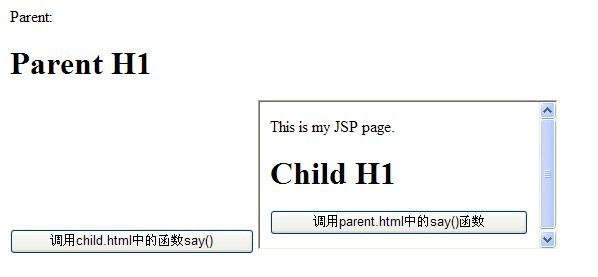
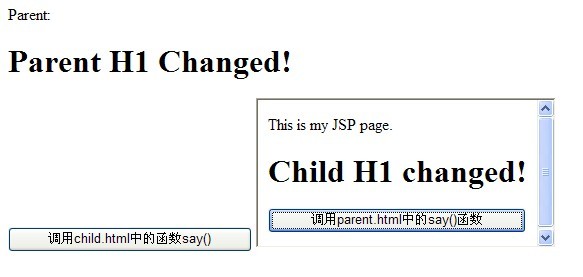
分别点击后页面:
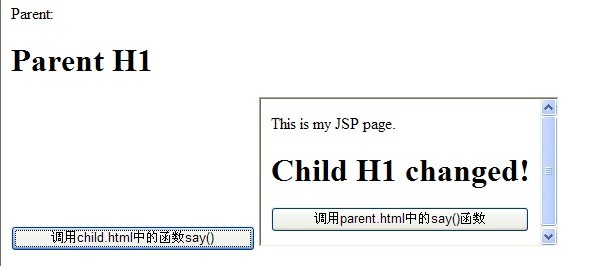
?
父窗口iframe.jsp:
<script> function say() { alert("I'm at parent.html"); } function callChild(){ ifr.window.say(); //调用iframe中say方法 //修改iframe中属性值 ifr.myH2.innerHTML = "Child H1 changed!"; //IE //ifr.document.getElementById("myH2").innerHTML = "Child H1 changed!"; //IE下两种方法都可以 //window.frames["ifr"].document.getElementById("myH2").innerHTML = "Child H1 changed in FireFox!" ; //FireFox} </script> <body> Parent: <h1 id="myH1">Parent H1</h1> <input type=button value="调用child.html中的函数say()" onclick="callChild()"/> <iframe id="ifr" name="ifr" src="child.jsp" scrolling="auto"></iframe> </body>?子窗口child.jsp:
<script type="text/javascript"> function say() { alert("I'm at child.html"); } function callParent() { parent.say(); //调用父窗口say方法 parent.myH1.innerHTML = "Parent H1 Changed!"; //IE //parent.document.getElementById("myH1").innerHTML = "Parent H1 changed in FireFox!" ; //FireFox } </script> </head> <body> This is my JSP page. <br> <h1 id="myH2">Child H1</h1> <input type=button value="调用parent.html中的say()函数" onclick="callParent()"> </body>?
自适应高度:
function iFrameHeight() { //var subWeb = document.frames ? document.frames["ifr"].document : ifm.contentDocument; var subWeb = document.frames ? document.frames["ifr"].document : ifm.contentWindow.document; var ifm= document.getElementById("ifr"); if(ifm != null && subWeb != null) {//alert(subWeb.body.scrollHeight); setTimeout(function(){ifm.height = subWeb.body.scrollHeight;},1000); //需要使用延迟方法,否则第一次时不会自动适应高度 //不用延迟方法用alert()也可以 ,但一般不需要alert } }?。。。
?
Window.open:
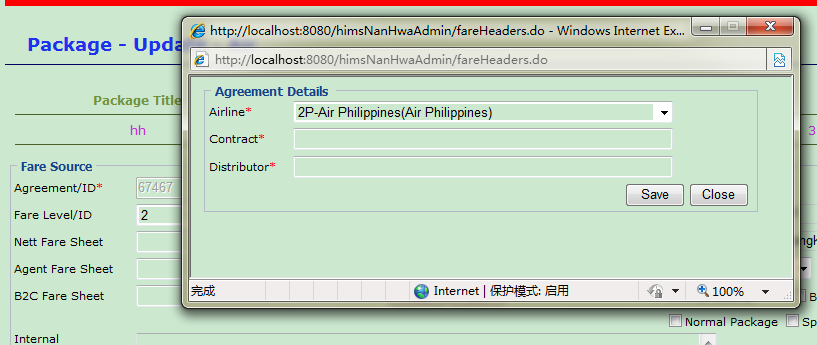
window.open("<%=basePath %>fareHeaders.do","upload","menubar=no,status=no,resizable=no,scrollbars=1,width=600,height=200pt,top=200,left=300");?
打开的页面:
var parentWin = window.dialogArguments?window.dialogArguments : window.opener;window.onload = function(){ var mm = "${MESSAGE}"; if(null != mm && mm == "Save Ok!"){ var line = $("fareHeadersBean.marketingAirline").value; var refId = $("fareHeadersBean.refId").value; var dis = $("fareHeadersBean.distributor").value; parentWin.doaddrefId(line,refId,dis); //调用父页面方法doaddrefId window.close(); } }?
子页面点击Save后,request.setAttribute(MyConstants.MESSAGE_KEY, "Save Ok!");再进入子页面后,mm不为空,可传值给父页面。
?
模态窗口:
var returnValue = window.showModalDialog('<%=basePath%>package/fareLevel.jsp',"fareLevel","status:false;dialogWidth:350px;dialogHeight:150px");?
子页面:
<html><head><base href="<%=basePath%>"><title>Fare level</title><script type="text/javascript">function doConfirm(){var fareLevel = document.getElementById("fareLevel");if(fareLevel.value==""){alert(" Please input !");return false;}window.returnValue=fareLevel.value;window.close();}</script></head><body style="text-align: center;"><div ><br>Fare Level:<input type="text" id="fareLevel" /><br> <br/><input type="button" onclick="return doConfirm();" style="width: 60" value="OK"></div></body></html>?。。。
?
?
?
?
?