
v4_04 使用DataGrid控件v4_04 Creating and formatting the DataGrid control 使用DataGrid控件 ?ex4_04Da
v4_04 使用DataGrid控件
v4_04 Creating and formatting the DataGrid control 使用DataGrid控件 ?ex4_04
DataGrid像一个电子表格那样在行和列上显示数据它继承于ListBase类的MX组件,它的功能如下:可调整大小的列可自定义的列和标题能够将列设置成可编辑的能够创建自定义单元格显示能够允许多个选择实现分页数据拖放功能?1.简单的显示所有列??
<mx:DataGrid dataProvider="{employeeList}"/>??2.只显示需要的列需要在DataGrid 中使用columns ,把需要显示的列以DataGridColumn 对象声明 <mx:DataGrid dataProvider="{employeeList}"><mx:columns ><mx:DataGridColumn dataField="lastName"headerText="Last Name"/><mx:DataGridColumn dataField="hireDate"headerText="hireDate"/></mx:columns></mx:DataGrid>? 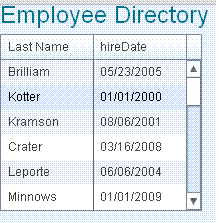 ?3.将两列的值显示到一列上需要建一个处理函数,来实现列对象处理item表示employee对象,column为控件中的列对象
 private function employeeName(item:Object,column:DataGridColumn):String{return item.firstName + " " + item.lastName;}? ?<mx:DataGrid dataProvider="{employeeList}"><mx:columns ><mx:DataGridColumn labelFunction="employeeName"headerText="Employee Name"/><mx:DataGridColumn dataField="hireDate"headerText="hireDate"/></mx:columns></mx:DataGrid>? 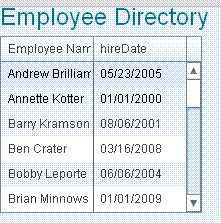 ?4.格式化日期列增加一个格式化函数,在DataGridColumn 中使用它
 private function dateFormat(item:Object,column:DataGridColumn):String{return employeeDateFormatter.format(item.hireDate);}? ?<mx:DataGrid dataProvider="{employeeList}"><mx:columns ><mx:DataGridColumn labelFunction="employeeName"headerText="Employee Name"/><mx:DataGridColumn labelFunction="dateFormat"headerText="hireDate"/></mx:columns></mx:DataGrid>? ?5.另一种写法使用column读取数据时,DataGridColumn 中还是需要dataField="hireDate " private function dateFormat(item:Object,column:DataGridColumn):String{return employeeDateFormatter.format(item[column.dataField]);}? ?<mx:DataGrid dataProvider="{employeeList}"><mx:columns ><mx:DataGridColumn labelFunction="employeeName"headerText="Employee Name"/><mx:DataGridColumn dataField="hireDate"labelFunction="dateFormat"headerText="hireDate"/></mx:columns></mx:DataGrid>?