
Android Services使用示例Android开发中,当需要创建在后台运行的程序的时候,就要使用到Service。Service 可
Android Services使用示例
Android开发中,当需要创建在后台运行的程序的时候,就要使用到Service。Service 可以分为有无限生命和有限生命两种。
特别需要注意的是Service跟Activities是不同的(简单来说可以理解为后台与前台的区别),例如,如果需要使用Service的话,需要调用startService(),从而利用startService()去调用Service中的OnCreate()和onStart()方法来启动一个后台的Service。
?
启动一个Service的过程如下:
context.startService() ?->onCreate()- >onStart()->Service running
其中onCreate()可以进行一些服务的初始化工作,onStart()则启动服务。
?
停止一个Service的过程如下:
context.stopService() | ->onDestroy()?->Service stop
?
?
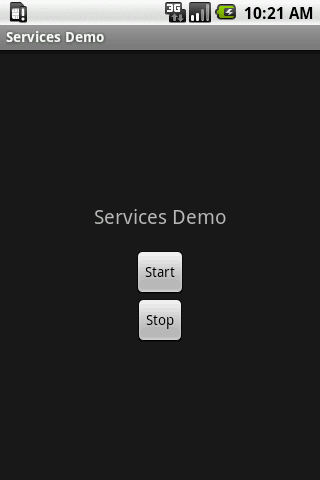
接下来的实例是一个利用后台服务播放音乐的小例子,点击start运行服务,点击stop停止服务。
?
程序运行界面:
?
代码:
定义服务,MyService.java
?
package com.example;import android.app.Service;import android.content.Intent;import android.media.MediaPlayer;import android.os.IBinder;import android.util.Log;import android.widget.Toast;public class MyService extends Service {private static final String TAG = "MyService";MediaPlayer player;@Overridepublic IBinder onBind(Intent intent) {return null;}@Overridepublic void onCreate() {Toast.makeText(this, "My Service Created", Toast.LENGTH_LONG).show();Log.d(TAG, "onCreate");player = MediaPlayer.create(this, R.raw.braincandy);//运行例子是,需要替换音乐的名称player.setLooping(false); // Set looping}@Overridepublic void onDestroy() {Toast.makeText(this, "My Service Stopped", Toast.LENGTH_LONG).show();Log.d(TAG, "onDestroy");player.stop();}@Overridepublic void onStart(Intent intent, int startid) {Toast.makeText(this, "My Service Started", Toast.LENGTH_LONG).show();Log.d(TAG, "onStart");player.start();}}?
除此之外还要在Manifest里面声明服务:
?
<?xml version="1.0" encoding="utf-8"?><manifest xmlns:android="http://schemas.android.com/apk/res/android" package="com.example" android:versionCode="1" android:versionName="1.0"> <application android:icon="@drawable/icon" android:label="@string/app_name"> <activity android:name=".ServicesDemo" android:label="@string/app_name"> <intent-filter> <action android:name="android.intent.action.MAIN" /> <category android:name="android.intent.category.LAUNCHER" /> </intent-filter> </activity> <service android:enabled="true" android:name=".MyService" /> </application> <uses-sdk android:minSdkVersion="3" /></manifest>?
?定义Activity,ServicesDemo.java
?
package com.example;import android.app.Activity;import android.content.Intent;import android.os.Bundle;import android.util.Log;import android.view.View;import android.view.View.OnClickListener;import android.widget.Button;public class ServicesDemo extends Activity implements OnClickListener { private static final String TAG = "ServicesDemo"; Button buttonStart, buttonStop; @Override public void onCreate(Bundle savedInstanceState) { super.onCreate(savedInstanceState); setContentView(R.layout.main); buttonStart = (Button) findViewById(R.id.buttonStart); buttonStop = (Button) findViewById(R.id.buttonStop); buttonStart.setOnClickListener(this); buttonStop.setOnClickListener(this); } public void onClick(View src) { switch (src.getId()) { case R.id.buttonStart: Log.d(TAG, "onClick: starting srvice"); startService(new Intent(this, MyService.class)); break; case R.id.buttonStop: Log.d(TAG, "onClick: stopping srvice"); stopService(new Intent(this, MyService.class)); break; } }}?翻译整理自:http://www.planetandroid.com/
1 楼 wylsx 2010-01-15 停止一个Service的过程如下:应该是 context.stopService() | ->Service stop ->onDestroy() 吧 呵呵! 2 楼 raymondlueng 2010-01-15 wylsx 写道停止一个Service的过程如下:
应该是 context.stopService() | ->Service stop ->onDestroy() 吧 呵呵!
不是的,是context.stopService() | ->onDestroy() ->Service stop
你可以在onDestroy()中作一些资源回收的工作! 3 楼 happyljt 2010-01-27 raymondlueng 写道wylsx 写道停止一个Service的过程如下:
应该是 context.stopService() | ->Service stop ->onDestroy() 吧 呵呵!
不是的,是context.stopService() | ->onDestroy() ->Service stop
你可以在onDestroy()中作一些资源回收的工作!
UP 4 楼 wafj1984 2010-02-10 这个不是apidemo里边有吗? 5 楼 zhikook 2010-03-02 很多好的例子,都是SDK ,不过大家很多学习角度的不同 6 楼 飞扬云 2011-09-18 楼主 列举的例子很好,看起来很顺,很容易懂。
非常感谢了!
向你学习!