
1.设置JBean WebApp的Maven环境
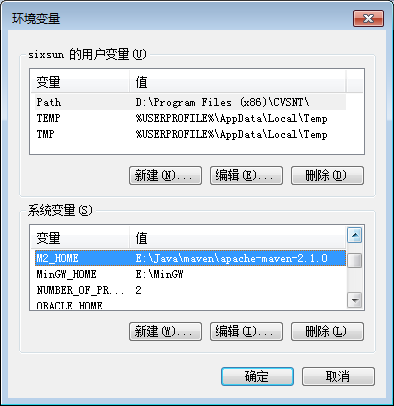
2.Add the M2_HOME environment variable by opening up the system properties (WinKey + Pause), selecting the "Advanced" tab, and the "Environment Variables" button, then adding the M2_HOME variable in the user variables with the value E:\Java\maven\apache-maven-2.1.0. Be sure to omit any quotation marks around the path even if it contains spaces. Note: For Maven < 2.0.9, also be sure that the M2_HOME doesn't have a '\' as last character.
?
3.In the same dialog, add the M2 environment variable in the user variables with the value %M2_HOME%\bin.

4.Optional: In the same dialog, add the MAVEN_OPTS environment variable in the user variables to specify JVM properties, e.g. the value -Xms256m -Xmx512m. This environment variable can be used to supply extra options to Maven.
5.In the same dialog, update/create the Path environment variable in the user variables and prepend the value %M2% to add Maven available in the command line.
6.In the same dialog, make sure that JAVA_HOME exists in your user variables or in the system variables and it is set to the location of your JDK, e.g. C:\Program Files\Java\jdk1.5.0_02 and that %JAVA_HOME%\bin is in your Path environment variable.
7.Open a new command prompt (Winkey + R then type cmd) and run mvn --version to verify that it is correctly installed.

- Maven2 modify the configuration file
- configuration file
example:
e:\java\maven\apache-maven-2.1.0\conf\settings.xml
- modify the configuration file
is Maven's local resource path, a path you can customize
?
example:
<localRepository>E:/Java/maven/local/repository</localRepository>
?
?