
android中listview改变选中行背景图片?目标:当item选中时,改变其背景图片。效果图如下:直接在listview的xml
android中listview改变选中行背景图片
?目标:当item选中时,改变其背景图片。效果图如下:
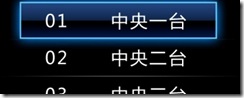
直接在listview的xml文件中使用listselector:
?
<ListView android:id="@+id/myListView" android:layout_weight="1" android:paddingTop="40dp" android:layout_below="@id/myTextView" android:layout_height="wrap_content" android:layout_width="match_parent" android:background="@drawable/shortcut_bg_bar" android:listSelector="@anim/tvitembg" android:focusable="true" />
?
然后另外定义,tvitembg.xml文件定义其背景图片:
<?xml version="1.0" encoding="utf-8" ?><selector xmlns:android="http://schemas.android.com/apk/res/android"><!-- 没有焦点时的背景图片 --><!--<item android:state_window_focused="false"/> --><!-- 非触摸模式下获得焦点并单击时的背景图片 --><item android:state_focused="true" android:state_pressed="true"android:drawable="@drawable/shortcut_bar" /><!-- 触摸模式下单击时的背景图片 --><!--<item android:state_focused="false" android:state_pressed="true"android:drawable="@drawable/pic3" />--><!--选中时的图片背景 --><item android:state_selected="true" android:drawable="@drawable/shortcut_bar" /><!--获得焦点时的图片背景 --><item android:state_focused="true" android:drawable="@drawable/shortcut_bar" /></selector>
?
如此简单...
1 楼 jscoolstar 2011-11-18 怎么按这个写没效果,只是按下时不会出现自带的黄色了,但是没有显示自己定义的颜色,还有这个XML是在anmi下的?2 楼 wenjundiandian 2012-01-05 我的会报错,listview是取id的,如果是直接定义的就不会出错。 3 楼 ynvince 2012-03-02 有没有源码供研究, 我按上述来做,无法选中