
跟我学JQuery---------------第四课今天终于有时间推出第四课了,下个个礼拜末就要去武汉出差了,可能就 没
跟我学JQuery---------------第四课
今天终于有时间推出第四课了,下个个礼拜末就要去武汉出差了,可能就 没时间了,所以争取出差前把Jquery基础知识讲完。
回来后就进入JQuery进阶课程。话不多说,先来复习第三课的重点知识:main a和.main > a的不同之处,toggle方法,.slideDown,slideUp,slideToggle,show(),hide(),大家看到这些api能知道是干什么用,有什么区别,对第三课的知识点就掌握得不错了。
?
第四课案例: Tab页
?
tab.html
<!DOCTYPE html PUBLIC "-//W3C//DTD HTML 4.01 Transitional//EN" "http://www.w3.org/TR/html4/loose.dtd"><html><head><title>JQuery实例-标签页效果</title><meta http-equiv="Content-Type" content="text/html; charset=UTF-8"><link type="text/css" rel="stylesheet" href="css/tab.css" /><script type="text/javascript" src="js/jquery.js"></script><script type="text/javascript" src="js/tab.js"></script></head><body><ul id="tabfirst"><li src="images/img-loading.gif" /><div id="realcontent"></div></div></body></html>
?
?
tab.css
?
ul,li {margin: 0;padding: 0;list-style: none;}#tabfirst li {float: left;background-color: #868686;color: white;padding: 5px;margin-right: 2px;border: 1px solid white;}#tabfirst li.tabin {background-color: #6E6E6E;border: 1px solid #6E6E6E;}div.contentfirst {clear: left;background-color: #6E6E6E;color: white;width: 300px;height: 100px;padding: 10px;display: none;}div.contentin {display: block;}#tabsecond li {float: left;background-color: white;color: blue;padding: 5px;margin-right: 2px;cursor: pointer;}#tabsecond li.tabin {background-color: #F2F6FB;border: 1px solid black;border-bottom: 0;z-index: 100;position: relative;}#contentsecond {width: 500px;height: 200px;padding: 10px;background-color: #F2F6FB;clear: left;border: 1px solid black;position: relative;top: -1px;}img {display: none;}?
?
tab.js
?
var timoutid;$(document).ready(function(){//找到所有的标签/*$("li").mouseover(function(){//将原来显示的内容区域进行隐藏$("div.contentin").hide();//当前标签所对应的内容区域显示出来});*/$("#tabfirst li").each(function(index){//每一个包装li的jquery对象都会执行function中的代码//index是当前执行这个function代码的li对应在所有li组成的数组中的索引值//有了index的值之后,就可以找到当前标签对应的内容区域$(this).mouseover(function(){var liNode = $(this);timoutid = setTimeout(function(){//将原来显示的内容区域进行隐藏$("div.contentin").removeClass("contentin");//对有tabin的class定义的li清除tabin的class$("#tabfirst li.tabin").removeClass("tabin");//当前标签所对应的内容区域显示出来//$("div").eq(index).addClass("contentin");$("div.contentfirst:eq(" + index + ")").addClass("contentin");liNode.addClass("tabin");},300);}).mouseout(function(){clearTimeout(timoutid);});});//在整个页面装入完成后,标签效果2的内容区域需要装入静态的html页面内容$("#realcontent").load("TabLoad.html");//找到标签2效果对应的三个标签,注册鼠标点击事件$("#tabsecond li").each(function(index){$(this).click(function(){$("#tabsecond li.tabin").removeClass("tabin");$(this).addClass("tabin");if (index == 0) {//装入静态完成页面$("#realcontent").load("TabLoad.html");} else if (index == 1) {//装入动态部分页面$("#realcontent").load("TabLoad.jsp h2");} else if (index == 2) {//装入远程数据(这里也是一个动态页面输出的数据)$("#realcontent").load("TabData.jsp")}});});//对于loading图片绑定ajax请求开始和交互结束的事件$("#contentsecond img").bind("ajaxStart",function(){//把div里面的内容清空$("#realcontent").html("");//整个页面中任意ajax交互开始前,function中的内容会被执行$(this).show();}).bind("ajaxStop",function(){//整个页面中任意ajax交互结束后,function中的内容会被执行$(this).slideUp("1000");});});?
?
?
images
?
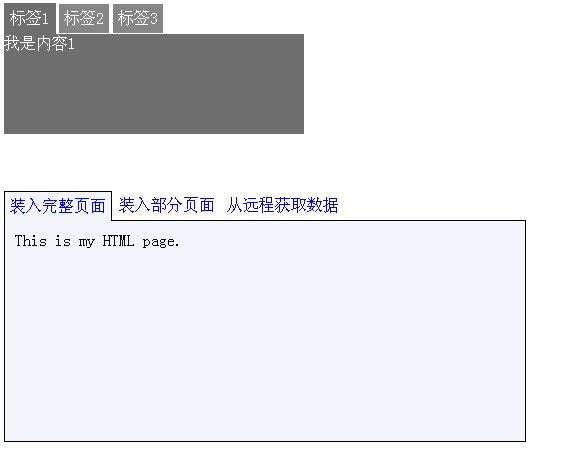
案例效果图:
?
?
?
?
总结:
?