
REST WebService简单应用? 最近项目中WebService采用REST风格的WebService实现。?? 官方文档地址:http://je
REST WebService简单应用
? 最近项目中WebService采用REST风格的WebService实现。
?? 官方文档地址:
http://jersey.java.net/nonav/documentation/latest/index.html
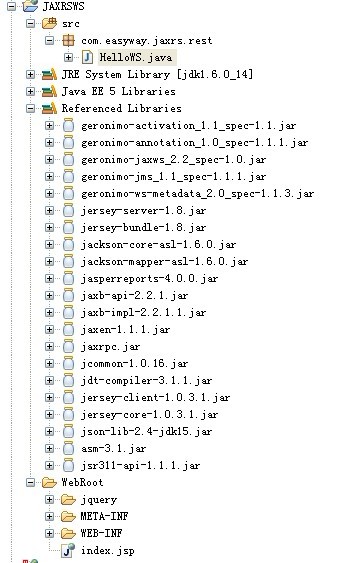
简单demo的结构如下:
?
?
?
?
?简单的开发代码如下:
?
package com.easyway.jaxrs.rest;import javax.ws.rs.GET;import javax.ws.rs.Path;import javax.ws.rs.Produces;import javax.ws.rs.core.MediaType;/** * 采用JAX-RS方式 * @author longgangbai * http://localhost:8080/JAXRSWS/services/hello * * * @Path 注解访问的路径 * @GET Http请求的方式 * @Produces 响应结果的形式 * */@Path("/hello") public class HelloWS {/** * 通过HTTP访问到WebService到方式 * * http://localhost:8080/JAXRSWS/services/hello * * 文本格式返回给客户端 * @return */@GET @Produces(MediaType.TEXT_PLAIN)public String sayPlainTextHello() {return "Hello Jersey";}/** * xml格式返回给客户端 * @return */@GET@Produces(MediaType.TEXT_XML)public String sayXMLHello() {return "<?xml version="1.0"?>" + "<hello> Hello Jersey" + "</hello>";}/** * html格式的接受 * @return */@GET@Produces(MediaType.TEXT_HTML)public String sayHtmlHello() {return "<html> " + "<title>" + "Hello Jersey" + "</title>"+ "<body><h1>" + "Hello Jersey" + "</body></h1>" + "</html> ";}}?
?Web.xml配置如下:
<?xml version="1.0" encoding="UTF-8"?><web-app version="2.5" xmlns="http://java.sun.com/xml/ns/javaee" xmlns:xsi="http://www.w3.org/2001/XMLSchema-instance" xsi:schemaLocation="http://java.sun.com/xml/ns/javaee http://java.sun.com/xml/ns/javaee/web-app_2_5.xsd"> <servlet> <display-name>JAX-RS REST Servlet</display-name> <servlet-name>JAX-RS REST Servlet</servlet-name> <servlet-class> com.sun.jersey.spi.container.servlet.ServletContainer </servlet-class> <init-param> <param-name>com.sun.jersey.config.property.packages</param-name> <param-value>com.easyway.jaxrs.rest</param-value> </init-param> <load-on-startup>1</load-on-startup> </servlet> <servlet-mapping> <servlet-name>JAX-RS REST Servlet</servlet-name> <url-pattern>/services/*</url-pattern> </servlet-mapping> <welcome-file-list> <welcome-file>index.jsp</welcome-file> </welcome-file-list></web-app>
?
?
?
index.jsp页面如下:
<%@ page language="java" import="java.util.*" pageEncoding="UTF-8"%><%String path = request.getContextPath();String basePath = request.getScheme()+"://"+request.getServerName()+":"+request.getServerPort()+path+"/";%><!DOCTYPE HTML PUBLIC "-//W3C//DTD HTML 4.01 Transitional//EN"><html> <head> <base href="<%=basePath%>"> <title>My JSP 'index.jsp' starting page</title><meta http-equiv="pragma" content="no-cache"><meta http-equiv="cache-control" content="no-cache"><meta http-equiv="expires" content="0"> <meta http-equiv="keywords" content="keyword1,keyword2,keyword3"><meta http-equiv="description" content="This is my page"><script type="text/javascript" src="jquery/jquery-1.4.2.js"></script><!--<link rel="stylesheet" type="text/css" href="styles.css">--><script type="text/javascript"><!--js 调用JAXRS WS 服务返回文本-->function txtverity() { $.ajax({ type : "POST", url : "<%=request.getContextPath()%>/services/hello?tmp="+(new Date()), dataType : "text", success : textcallback }); }function textcallback(data) { alert("text="+data);} function xmlverity() { alert("aa"); $.ajax({ type : "POST", url : "<%=request.getContextPath()%>/services/sayXMLHello?tmp="+(new Date()), dataType : "html", success : xmlcallback }); } function xmlcallback(data) { alert("text="+data);}</script> </head> <body> <input type="button" id="txtbtn" onclick="txtverity()" value="文本" /> <input type="button" id="jsonbtn" onclick="txtverity()" value="JSON文本"/> <input type="button" id="xmlbtn" onclick="xmlverity()" value="XML文本"/> </body></html>?