
【Android开发】TextSwitcher 使用详解
TextSwitcher 字面理解是文字交换器,是ViewSwitcher的子类,从ViewSwitcher来看,是View交换器,TextSwitcher继承自ViewSwitcher,显然是交换TextView。
?
效果图: 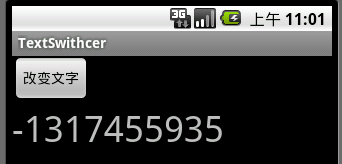
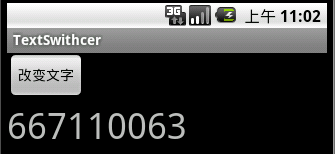
应用分为三步:
1.得到 TextSwitcher 实例对象
? TextSwitcher switcher = (TextSwitcher) findViewById(R.id.textSwitcher);
2.为switcher指定ViewSwitcher.ViewFactory工厂,该工厂会产生出转换时需要的View
? switcher.setFactory(this);
3.为switcher设定显示的内容,该方法执行,就会切换到下个View
? switcher.setText(String.valueOf(new Random().nextInt()));
其中 要实现ViewSwitcher.ViewFactory中的makeView()方法
// 重写 ViewSwitcher.ViewFactory 的 makeView()方法,返回一个 View,TextSwitcher 交换时使用
@Override
public View makeView() {
TextView textView = new TextView(this);
textView.setTextSize(36);
return textView;
}
如果不适用ViewSwitcher.ViewFactory,也可以使用下面的方式代替
//如果不用switcher.setFactory()方法设置转换时的View,也可以调用两次switcher.addView(view,index,params);
//其中view为要切换的View,index为索引,params是添加时的宽,高参数
// TextView textView1 = new TextView(this);
// textView1.setTextSize(36);
// textView1.setTextColor(Color.RED);
// TextView textView2 = new TextView(this);
// textView2.setTextSize(36);
// textView2.setTextColor(Color.YELLOW);
// switcher.addView(textView1, 0,new LayoutParams(LayoutParams.WRAP_CONTENT,LayoutParams.WRAP_CONTENT));
// switcher.addView(textView2, 1,new LayoutParams(LayoutParams.WRAP_CONTENT,LayoutParams.WRAP_CONTENT));
代码:
 public View makeView() { TextView tv = new TextView(this); tv.setTextSize(36); tv.setTextColor(Color.BLACK); return tv; }
 ?
修改TextSwitcher的makeView()中的 tv.setTextColor(Color.BLACK);? ?就好了。
?
?
?
?
?
?
?
?
?
?
?