
Android Launcher开发之自动添加桌面快捷方式及实际开发中常见问题的解决方案最近做到的应用做刚好需要添
Android Launcher开发之自动添加桌面快捷方式及实际开发中常见问题的解决方案
最近做到的应用做刚好需要添加快捷方式的功能, 在参考了源代码和网上一些其他资料后做了出来.
在做的时候遇到两个问题,
一. 程序卸载后桌面快捷方式仍然存在:
关于此问题, 网上的资料和实际中很多应用程序的老版本或者当前版本仍存在. 参考源代码后,我找出了解决方案: 创建shortcut时需要设置 Extre_ShortCut_Intent 的action.和category,使创建的shortcut与自己的应用产生绑定的关系:
二. 需要判断快捷方式是否存在,快捷方式的信息,在系统应用launcher中以contentprovider的形式提供数据.
需要从com.android.launcher的launcher.db的favorites表中读取快捷方式的信息
对于lancher 的provider节点中的AUTHORITY属性,在 Android属性中变成了"com.android.launcher2.settings". 而2.2之前的版本为"com.android.launcher.settings"
如果应用程序需要兼容2.2以下的机器,需要获取当前手机系统的版本号,更改Uri中的AUTHORITY.
解决了如上两个问题,该功能就完善了,需要的朋友可以直接加到要上线的应用中.
效果如图;
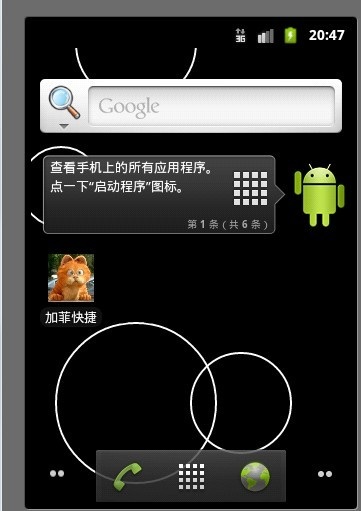
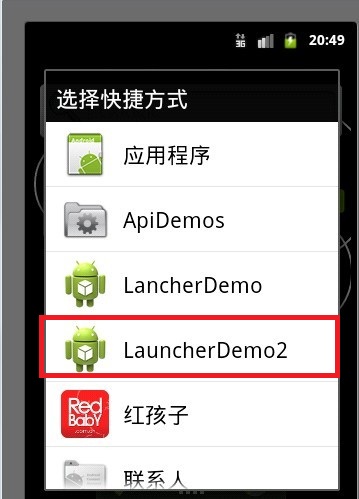
全部代码如下,已经加入了详细的注解:
1. AndroidManifest.xml
package com.android.autoLancher;import android.app.Activity;import android.app.AlertDialog;import android.app.AlertDialog.Builder;import android.content.ContentResolver;import android.content.DialogInterface;import android.content.DialogInterface.OnClickListener;import android.content.Intent;import android.database.Cursor;import android.net.Uri;import android.os.Bundle;public class LauncherDemo2Activity extends Activity { public void onCreate(Bundle savedInstanceState) { super.onCreate(savedInstanceState); setContentView(R.layout.main); boolean flag =isShortcutInstalled();//如果已经创建,则不需要在创建 if(flag==false){ AlertDialog.Builder builder = new Builder(LauncherDemo2Activity.this); builder.setTitle("是否为此应用创建桌面快捷方式"); builder.setPositiveButton("是", new OnClickListener() { public void onClick(DialogInterface dialog, int which) { addShortcutToDesktop(); } }); builder.setNegativeButton("否", new OnClickListener() { public void onClick(DialogInterface dialog, int which) { } }); builder.create().show(); } } private void addShortcutToDesktop() { Intent shortcut = new Intent( "com.android.launcher.action.INSTALL_SHORTCUT"); // 不允许重建 shortcut.putExtra("duplicate", false); // 设置名字 shortcut.putExtra(Intent.EXTRA_SHORTCUT_NAME, "加菲快捷"); // 设置图标 shortcut.putExtra(Intent.EXTRA_SHORTCUT_ICON_RESOURCE, Intent.ShortcutIconResource.fromContext(this, R.drawable.cat)); // 设置意图和快捷方式关联程序 Intent intent = new Intent(this, this.getClass()); // 桌面图标和应用绑定,卸载应用后系统会同时自动删除图标 intent.setAction("android.intent.action.MAIN"); intent.addCategory("android.intent.category.LAUNCHER"); shortcut.putExtra(Intent.EXTRA_SHORTCUT_INTENT, intent); // 发送广播 sendBroadcast(shortcut); } /** * 快捷方式信息是保存在com.android.launcher的launcher.db的favorites表中 * * @return */ public boolean isShortcutInstalled() { boolean isInstallShortcut = false; final ContentResolver cr = LauncherDemo2Activity.this .getContentResolver(); // 2.2系统是”com.android.launcher2.settings”,网上见其他的为"com.android.launcher.settings" String AUTHORITY = null; /* * 根据版本号设置Uri的AUTHORITY */ if(getSystemVersion()>=8){ AUTHORITY = "com.android.launcher2.settings"; }else{ AUTHORITY = "com.android.launcher.settings"; } Uri CONTENT_URI = Uri.parse("content://" + AUTHORITY + "/favorites?notify=true"); Cursor c = cr.query(CONTENT_URI, new String[] { "title", "iconResource" }, "title=?", new String[] { getString(R.string.app_name) }, null);// XXX表示应用名称。 if (c != null && c.getCount() > 0) { isInstallShortcut = true; System.out.println("已创建"); } return isInstallShortcut; } /** * 获取系统的SDK版本号 * @return */ private int getSystemVersion(){ return Build.VERSION.SDK_INT; } }- 1楼yishidefenglin131417昨天 23:51
- 很好,正好是我遇到的问题,收藏了;