
Android FlingGallery类完美手势拖动实现网上找了很多关于FlingGallery类拖动的例子,还是很不错的,但是感
Android FlingGallery类完美手势拖动实现
网上找了很多关于FlingGallery类拖动的例子,还是很不错的,但是感觉不是很完美,拖动的只能是界面一致的布局,很不灵活,我觉得如果能够拖动不同的布局页面,就是拖动一下换一个页面布局,那就很完美了,于是我就在原有的基础上修改了一点点代码,最终被我给解决了这个问题。下面我就给大家看看我修改后的代码:
先贴上几张图
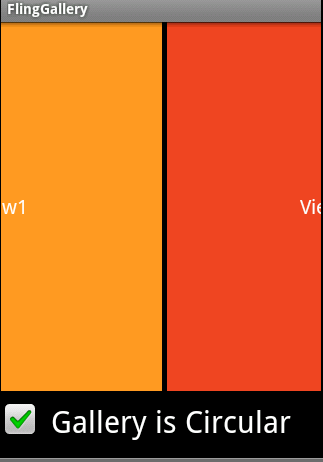
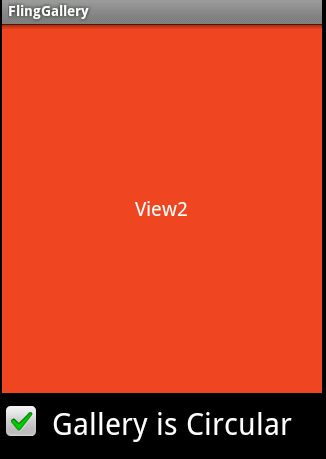
FlingGalleryActivity.java 实现类:
package com.droidful.flinggallery;import android.app.Activity;import android.content.Context;import android.os.Bundle;import android.util.Log;import android.view.MotionEvent;import android.view.View;import android.view.View.OnClickListener;import android.view.ViewGroup;import android.widget.ArrayAdapter;import android.widget.CheckBox;import android.widget.LinearLayout;import android.widget.TableLayout;import android.widget.TextView;import android.widget.Toast;public class FlingGalleryActivity extends Activity{ private final String[] mLabelArray = {"View1", "View2", "View3", "View4"};private FlingGallery mGallery;private CheckBox mCheckBox;private TextView t1; // Note: The following handler is critical to correct function of // the FlingGallery class. This enables the FlingGallery class to // detect when the motion event has ended by finger being lifted @Override public boolean onTouchEvent(MotionEvent event){ return mGallery.onGalleryTouchEvent(event); } public void onCreate(Bundle savedInstanceState) { super.onCreate(savedInstanceState); mGallery = new FlingGallery(this); mGallery.setPaddingWidth(5); mGallery.setAdapter(new ArrayAdapter<String>(getApplicationContext(), android.R.layout.simple_list_item_1, mLabelArray) { @Override public View getView(int position, View convertView, ViewGroup parent) { Log.d("msg", "count="+position);// if (convertView != null && convertView instanceof GalleryViewItem)// {// GalleryViewItem galleryView = (GalleryViewItem) convertView;//// galleryView.mEdit1.setText("");// galleryView.mText1.setText(mLabelArray[position]);// galleryView.mText1.setBackgroundColor(mColorArray[position]);// galleryView.mText2.setText(mLabelArray[position]);// galleryView.mText2.setBackgroundColor(mColorArray[position]);// Log.d("msg", "count="+position); // return galleryView;// } return new GalleryViewItem(getApplicationContext(), position); } }); LinearLayout layout = new LinearLayout(getApplicationContext()); layout.setOrientation(LinearLayout.VERTICAL);LinearLayout.LayoutParams layoutParams = new LinearLayout.LayoutParams(LinearLayout.LayoutParams.MATCH_PARENT,LinearLayout.LayoutParams.MATCH_PARENT);//layoutParams.setMargins(10, 10, 10, 10);layoutParams.weight = 1.0f; layout.addView(mGallery, layoutParams); mCheckBox = new CheckBox(getApplicationContext()); mCheckBox.setText("Gallery is Circular"); mCheckBox.setPadding(50, 10, 0, 10); mCheckBox.setTextSize(30); mCheckBox.setChecked(true); mCheckBox.setOnClickListener(new OnClickListener() {@Overridepublic void onClick(View view){mGallery.setIsGalleryCircular(mCheckBox.isChecked());} }); layout.addView(mCheckBox, new LinearLayout.LayoutParams( LinearLayout.LayoutParams.MATCH_PARENT, LinearLayout.LayoutParams.WRAP_CONTENT)); setContentView(layout); }private class GalleryViewItem extends TableLayout{public GalleryViewItem(Context context, int position){super(context);this.setOrientation(LinearLayout.VERTICAL);this.setLayoutParams(new LinearLayout.LayoutParams( LinearLayout.LayoutParams.WRAP_CONTENT, LinearLayout.LayoutParams.WRAP_CONTENT)); if(position==0){ View view = (View)getLayoutInflater().inflate(R.layout.main01,null); //给里面控件设置事件监听 t1 = (TextView)view.findViewById(R.id.main_view01); t1.setOnClickListener(new OnClickListener() { @Override public void onClick(View v) { Toast.makeText(getApplicationContext(), t1.getText().toString(), Toast.LENGTH_SHORT).show(); } }); this.addView(view,new LinearLayout.LayoutParams( LinearLayout.LayoutParams.FILL_PARENT, LinearLayout.LayoutParams.FILL_PARENT)); }else if(position==1){ View view = (View)getLayoutInflater().inflate(R.layout.main02,null); this.addView(view,new LinearLayout.LayoutParams( LinearLayout.LayoutParams.FILL_PARENT, LinearLayout.LayoutParams.FILL_PARENT)); }else if(position==2){ View view = (View)getLayoutInflater().inflate(R.layout.main03,null); this.addView(view,new LinearLayout.LayoutParams( LinearLayout.LayoutParams.FILL_PARENT, LinearLayout.LayoutParams.FILL_PARENT)); }else if(position==3){ View view = (View)getLayoutInflater().inflate(R.layout.main04,null); this.addView(view,new LinearLayout.LayoutParams( LinearLayout.LayoutParams.FILL_PARENT, LinearLayout.LayoutParams.FILL_PARENT)); }}}}FlingGallery.java 工具类
<?xml version="1.0" encoding="utf-8"?><LinearLayout xmlns:android="http://schemas.android.com/apk/res/android" android:id="@+id/main" android:orientation="vertical" android:layout_width="fill_parent" android:layout_height="fill_parent" android:background="#ddeeff" android:gravity="center" ><TextView android:id="@+id/main_view01" android:layout_width="wrap_content" android:layout_height="wrap_content" android:gravity="center" android:text="View4" android:textSize="20dp" android:textColor="#FFFFFF" /></LinearLayout>
如果大家有更好的解决方法,望大家提出来一起交流! 欢迎加QQ:871250730!