块级元素在这是overflow:hidden后浮动在ie6、7下的异常解析这是普遍做列表的时候,希望列表内容超宽的时候
块级元素在这是overflow:hidden;后浮动在ie6、7下的异常解析
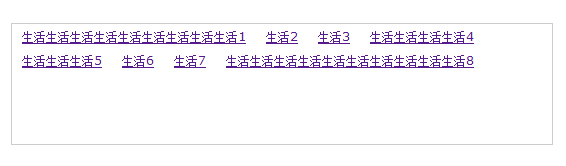
这是普遍做列表的时候,希望列表内容超宽的时候以省略号做代替显示的一个例子。现在用jquery对该容器做一些特效,即当鼠标放置于容器上的时候,容器将展开到一定的长度,这里是240px,并且,容器内的内容将float:left;除ie6、7外的浏览器都显示是正常的,如图正常显示效果
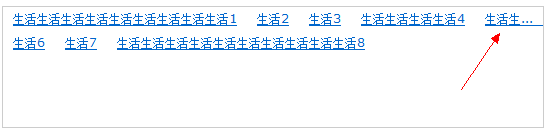
在ie7下显示效果为
最后是以省略号来显示超宽的文字的。
找到的解决办法是:
首先,当不对overflow进行设置的时候,overflow的默认值为visible。所以,我们在js中,让overflow设置为visible,就可解决此省略号问题。
一下是修改的代码
<style type="text/css">body , p {margin:0;padding:0;}body {font:12px/24px Verdana, Geneva, sans-serif;}.demo {width:120px;height:120px;overflow-x:hidden;overflow-y:auto;margin:100px;border:solid 1px #CCC;}.demo a {display:block;height:24px;padding:0 10px;overflow:hidden;white-space:nowrap;word-break:keep-all;text-overflow:ellipsis;}.demo a.flow {float:left;overflow:visible;}</style><script type="text/javascript" src="js/jQuery-1.7.1.js"></script><script type="text/javascript">$(function() {$('.demo').hover(function() {$(this).find('a').addClass('flow');$(this).stop(true, true).animate({width: '540px'} , 500 , function() {});} , function() {$(this).find('a').removeClass('flow');$(this).stop(true, true).animate({width: '120px'} , 500 , function() {});});});</script>