
玩转Android---UI篇---TextView(文本框)
TextView比较简单,不能够用来进行编辑,只能够用来显示信息
?
布局文件里的一些常用的XML属性
android:gravity---用来设置控件内文本的对齐方式
android:layout_gravity---相对于父控件来说,用于设置控件的对齐方式
android:text---用来设置控件文本信息
android:layout_width---用来设置控件的宽度
android:layout_height---用来设置控件的高度
android:background---用来设置控件的背景色
android:textColor---用来设置控件内文本的颜色
android:textSize---用来设置控件的文本字体大小
android:width和android:height---功能与android:layout_width相似
区别:
android:layout_width只能设置fill_parent(横向填充整个屏幕)或
?
wrap_content(横向填充控件本身大小)
android:width设置具体控件的横向大小 单位是像素
?
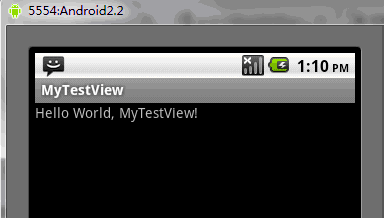
例如:TextView显示
?
main.xml布局文件
<?xml version="1.0" encoding="utf-8"?>
<LinearLayout xmlns:android="http://schemas.android.com/apk/res/android"
?? ?android:orientation="vertical"
?? ?android:layout_width="fill_parent"
?? ?android:layout_height="fill_parent"
?? ?>
<TextView ?
?? ?android:layout_width="fill_parent"?
?? ?android:layout_height="wrap_content"?
?? ?android:text="@string/hello"
?? ?/>
</LinearLayout>
string.xml文件<?xml version="1.0" encoding="utf-8"?><resources>?? ?<string name="hello">Hello World, MyTestView!</string>?? ?<string name="app_name">MyTestView</string></resources>MyTextView.java文件package org.loulijun.MyTestView;import android.app.Activity;import android.os.Bundle;
public class MyTestView extends Activity {?? ?/** Called when the activity is first created. */?? ?@Override?? ?public void onCreate(Bundle savedInstanceState) {?? ? ? ?super.onCreate(savedInstanceState);?? ? ? ?setContentView(R.layout.main);?? ?}}
运行结果:
?