
使用Axis2开发WebService-示例本文介绍如何开发一个基本的WebService,不涉及具体IDE.首先,编写一个WSDL文
使用Axis2开发WebService-示例
本文介绍如何开发一个基本的WebService,不涉及具体IDE.
首先,编写一个WSDL文件.
hello.wsdl
<?xml version="1.0" encoding="UTF-8"?><wsdl:definitions name="hello" targetNamespace="http://www.bisoft.tl/hello/" xmlns:wsdl="http://schemas.xmlsoap.org/wsdl/" xmlns:tns="http://www.bisoft.tl/hello/" xmlns:xsd="http://www.w3.org/2001/XMLSchema" xmlns:soap="http://schemas.xmlsoap.org/wsdl/soap/"><wsdl:types><xsd:schema xmlns:xsd="http://www.w3.org/2001/XMLSchema"targetNamespace="http://www.bisoft.tl/hello/"><xsd:element name="helloRequest"><xsd:complexType><xsd:sequence><xsd:element name="msg" type="xsd:string"></xsd:element></xsd:sequence></xsd:complexType></xsd:element><xsd:element name="helloResponse"><xsd:complexType><xsd:sequence><xsd:element name="rtn" type="xsd:string"></xsd:element></xsd:sequence></xsd:complexType></xsd:element></xsd:schema></wsdl:types><wsdl:message name="helloRequest"><wsdl:part name="helloRequest" element="tns:helloRequest"></wsdl:part></wsdl:message><wsdl:message name="helloResponse"><wsdl:part name="helloResponse" element="tns:helloResponse"></wsdl:part></wsdl:message><wsdl:portType name="HelloService"><wsdl:operation name="hello"><wsdl:input message="tns:helloRequest"></wsdl:input><wsdl:output message="tns:helloResponse"></wsdl:output></wsdl:operation></wsdl:portType><wsdl:binding name="binding1" type="tns:HelloService"><soap:binding style="document"transport="http://schemas.xmlsoap.org/soap/http" /><wsdl:operation name="hello"><soap:operation soapAction="http://www.bisoft.tl/hello/hello" /><wsdl:input><soap:body use="literal" /></wsdl:input><wsdl:output><soap:body use="literal" /></wsdl:output></wsdl:operation></wsdl:binding><wsdl:service name="WebService"><wsdl:port name="Port1" binding="tns:binding1"><soap:address location="http://localhost:8080/services" /></wsdl:port></wsdl:service></wsdl:definitions>
下面是定义的Web服务的名字,Axi2根据这个生成对应的服务端骨架类WebServiceSkeleton和客户端存根类WebServiceStub.location定义Web服务发布的路径.此处既是http://localhost:8080/services/WebService.
<wsdl:service name="WebService"><wsdl:port name="Port1" binding="tns:binding1"><soap:address location="http://localhost:8080/services" /></wsdl:port></wsdl:service>
从上面可以看出,一个WSDL文件由TYPES, MESSAGE, PORTTYPE, BINDING, PORT, SERVICE 六部分组成.
其次,利用工具类生成服务端骨架类及消息对应的POJO等.
1.将hello.wsdl放入工程的resources目录下
2.创建工具类CodeGenerator
package std.ws.util;import org.apache.axis2.wsdl.WSDL2Code;public class CodeGenerator {public static void main(String[] args) throws Exception {WSDL2Code.main(new String[] {"-ss","-sd","-S", "src","-R", "src/META-INF","-ns2p", "http://www.bisoft.tl/hello=tl.bisoft.hello","-uri", "resources/hello.wsdl" });System.out.println("Done!");}}运行工具类,刷新工程,会在src目录下生成服务端骨架类及消息对应的POJO及资源文件.
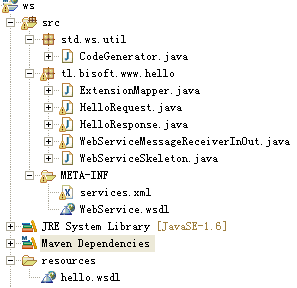
注意引入工程所依赖的包,推荐使用Maven.
最后,部署服务端:
在工程内导出JAR包,对应的lib中的JAR文件,资源文件.
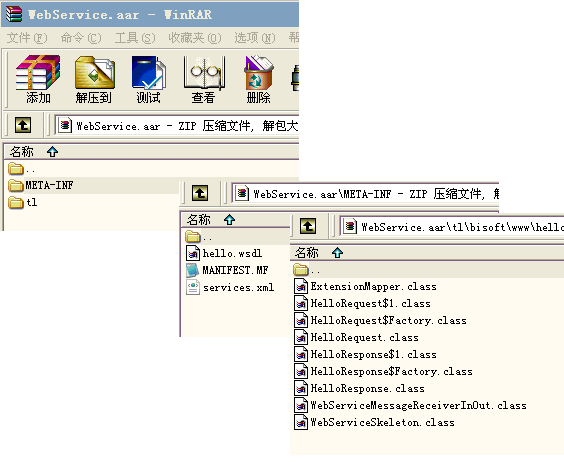
将导出的JAR包重命名为WebService.aar. 这是的名字注意与WSDL中定义的相同.
下载Aix2 Server,
http://219.239.26.9/download/1615051/1709442/2/zip/68/224/1257570511428_224/axis2-1.5.1-bin.zip
解压并将WebService.aar部署到axis2-1.5.1\repository\services\目录下,启动Aix2 Server.运行axis2-1.5.1\bin\axis2server.bat.
打开浏览器,
http://localhost:8080/axis2/services
显示如下:
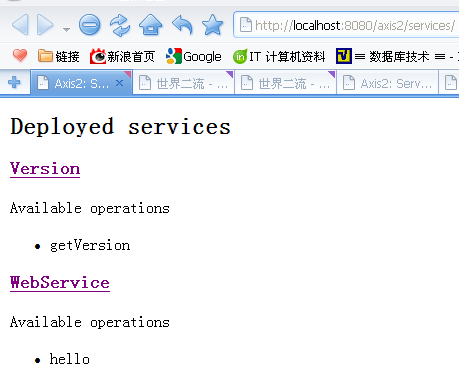
服务端已经成功部署.
接下来是客户端.
1. 在另一个工程中,创建resources目录,并将服务端的hello.wsdl复制过来.创建工具类生成客户端存根.
package std.ws.client.util;import org.apache.axis2.wsdl.WSDL2Code;public class CodeGenerator {public static void main(String[] args) throws Exception {WSDL2Code.main(new String[] { "-S", "src", "-R", "src/META-INF", "-ns2p", "http://www.bisoft.tl/hello=tl.bisoft.hello", "-uri", "resources/hello.wsdl" });System.out.println("Done!");}}2. 编写测试类
package std.ws.client;import java.rmi.RemoteException;import tl.bisoft.www.hello.WebServiceStub;import tl.bisoft.www.hello.WebServiceStub.HelloRequest;import tl.bisoft.www.hello.WebServiceStub.HelloResponse;public class WSClient {public static void main(String[] args) throws RemoteException {String endpoint = "http://localhost:8080/axis2/services/WebService";WebServiceStub stub = new WebServiceStub(endpoint);HelloRequest request = new HelloRequest();request.setMsg("hello, bisoft!");HelloResponse reponse = new HelloResponse();reponse = stub.hello(request);String rtn = reponse.getRtn();System.out.println(rtn);}}3.运行测试类,在控制台输出测试结果为:
hello, bisoft!
4.去Aisx2服务端也会输出:
server recv: hello, bisoft!
Axis2服务端默认会生成异步与同步方法,因此异步处理只修改客户端即可.
异步处理客户端:
public class WSClient {public static void main(String[] args) throws IOException {String endpoint = "http://localhost:8080/axis2/services/WebService";WebServiceStub stub = new WebServiceStub(endpoint);HelloRequest request = new HelloRequest();request.setMsg("hello, bisoft!");WebServiceCallbackHandler callback = new WebServiceCallbackHandler() {public void receiveResulthello(HelloResponse response) {String rtn = response.getRtn();System.out.println("async message!");System.out.println(rtn);}};stub.starthello(request, callback);System.out.println("Please enter to exit!");new BufferedReader(new InputStreamReader(System.in)).readLine();}}