A eclipse foding plugin -- Coffee BytesInstall pluginDownload the Coffee Bytes Folding plugin from
A eclipse foding plugin -- Coffee Bytes
- Install plugin
- Download the Coffee Bytes Folding plugin from the download section
- Unpack the downloaded file eclipse-folding-plugin.tar.gz
- Copy the contents of the:
- features folder => eclipse features folder
- plugins folder => eclipse plugins folder
- Configure plugin in Eclipse:
- Select "Windows->Preferences"
- Select "Java->Editor->Folding"
- Check the "Enable folding" option
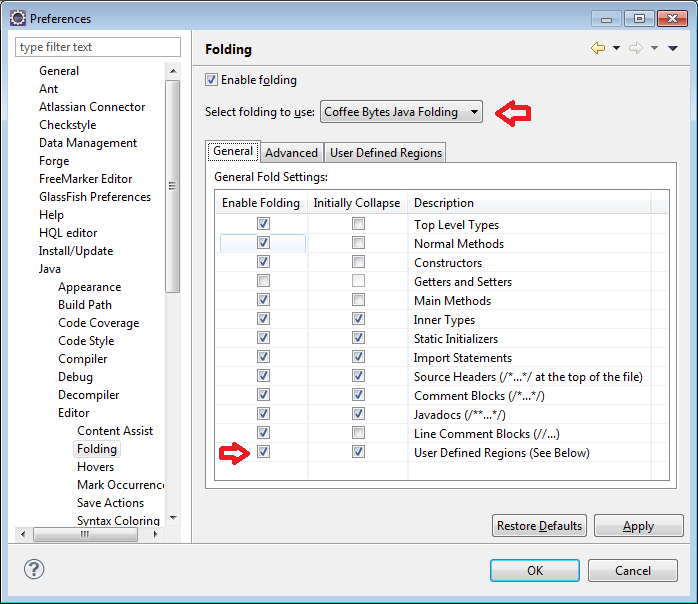
- Select "Coffee Bytes Java Folding" in the "Select folding to use:" option
- Check "User Defined Regions" in the "General Fold Setting:" option
Download url:
http://code.google.com/p/academic-cloud/downloads/detail?name=eclipse-folding-plugin.tar.gz&can=2&q=
Firstly, you'll need to configure Coffee Bytes Java folding as the folding scheme to use, and then enable User Defined Regions, as shown below.
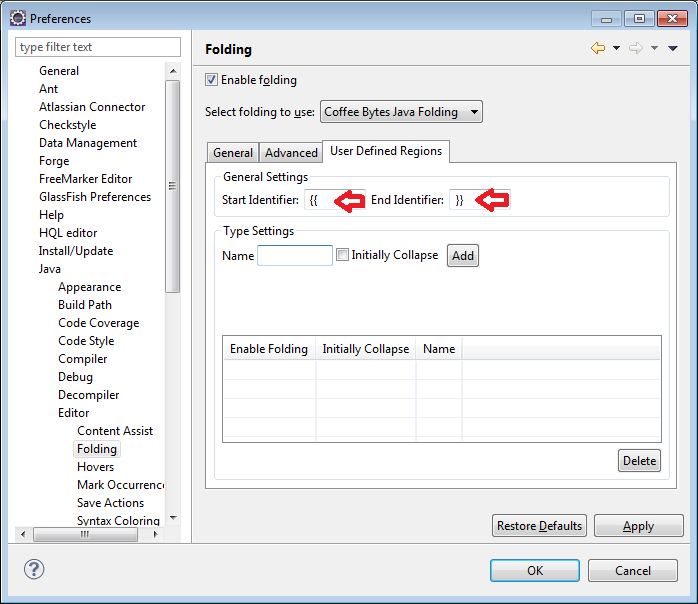
Secondly, you'll need to configure the start and end identifiers that will be used to identify the beginning and termination of regions in your code. In this case, I've chosen {{ and }} as it fits well with the Apache Isis templates that I use.
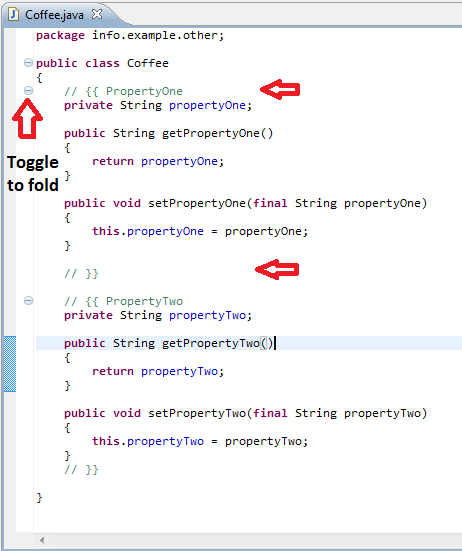
Finally, I use the same start and end identifiers in my code to demarcate regions and to trigger the Coffee Bytes folding plugin to recognize the same.