
Android自定义控件实现及其布局
Android自定义控件实现及其布局
Android自定义控件一般要继承View类,因此控件的实现及其相应的布局需要完成:
1. 继承View类,并实现参数为(Context context,AttributeSet attrs)的构造函数
2. 在布局文件xml中设置属性的时候,应以(<包名.类名 />)的格式进行。
3. 声明一个自定义控件的变量,用findViewById将其与布局文件关联起来。
举例:以下是自定义的MyView控件,用于显示2张图片;
源代码:http://download.csdn.net/detail/nuptboyzhb/4509472
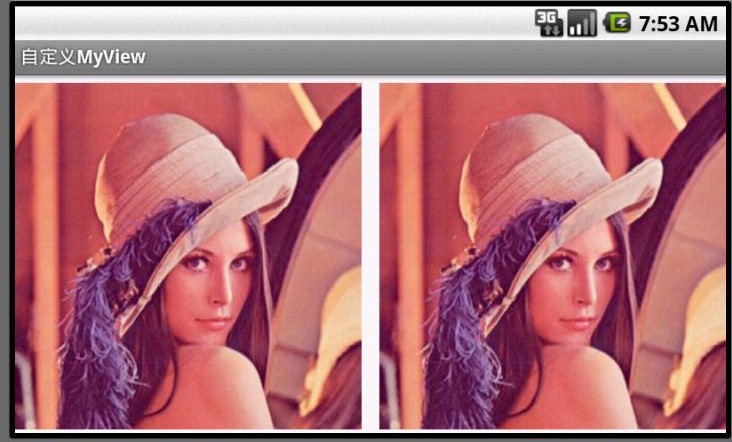
MyView.java代码
package com.example.njupt.zhb.myselfview;import android.content.Context;import android.graphics.Bitmap;import android.graphics.Canvas;import android.graphics.RectF;import android.util.AttributeSet;import android.view.View;public class MyView extends View { public Bitmap bitmap1=null;public Bitmap bitmap2=null;public int myInterval=10;/*一定要重写这个构造方法*/ public MyView(Context context,AttributeSet attrs) { super(context,attrs); } /*重写onDraw()*/ @Override protected void onDraw(Canvas canvas) { super.onDraw(canvas); int myViewWidth=getWidth()-myInterval*2; int myViewHeight=getHeight()-myInterval; int lessLen=myViewWidth/2<myViewHeight?myViewWidth/2:myViewHeight; /*画位图1*/ if (bitmap1!=null) { RectF dst1=new RectF(0,myInterval,lessLen,lessLen+myInterval); canvas.drawBitmap(bitmap1, null, dst1, null);} /*画位图2*/ if(bitmap2!=null){ RectF dst2=new RectF(lessLen+myInterval*2,myInterval,lessLen*2+myInterval*2,lessLen+myInterval); canvas.drawBitmap(bitmap2, null, dst2, null); } } } MainActivity.java代码
package com.example.njupt.zhb.myselfview;import android.os.Bundle;import android.app.Activity;import android.graphics.Bitmap;import android.graphics.BitmapFactory;import android.view.Menu;public class MainActivity extends Activity { MyView myView; @Override public void onCreate(Bundle savedInstanceState) { super.onCreate(savedInstanceState); setContentView(R.layout.activity_main); setTitle("自定义MyView"); Bitmap bitmap=BitmapFactory.decodeResource(getResources(), R.drawable.lenna); myView=(MyView)findViewById(R.id.myview); myView.bitmap1=bitmap; myView.bitmap2=bitmap; }}
activity_main.xml代码
<RelativeLayout xmlns:android="http://schemas.android.com/apk/res/android"
xmlns:tools="http://schemas.android.com/tools"
android:layout_width="fill_parent"
android:layout_height="fill_parent" >
<com.example.njupt.zhb.myselfview.MyView
android:id="@+id/myview"
android:layout_width="wrap_content"
android:layout_height="wrap_content"/>
</RelativeLayout>
AndroidManifest.xml代码
<manifest xmlns:android="http://schemas.android.com/apk/res/android" package="com.example.njupt.zhb.myselfview" android:versionCode="1" android:versionName="1.0" > <uses-sdk android:minSdkVersion="4" android:targetSdkVersion="15" /> <application android:icon="@drawable/ic_launcher" android:label="@string/app_name" android:theme="@style/AppTheme" > <activity android:name=".MainActivity" android:screenOrientation="landscape" android:label="@string/title_activity_main" > <intent-filter> <action android:name="android.intent.action.MAIN" /> <category android:name="android.intent.category.LAUNCHER" /> </intent-filter> </activity> </application></manifest>