
Android基础教程(六)之----多选项CheckBox首先我们看一下效果图:string.xml:?xml version1.0 encoding
Android基础教程(六)之----多选项CheckBox
首先我们看一下效果图:
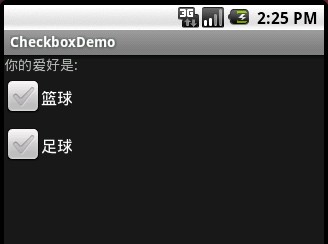
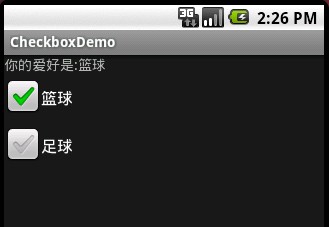
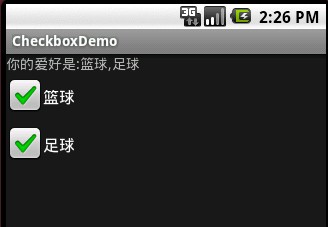
string.xml:<?xml version="1.0" encoding="utf-8"?><resources> <string name="hello">Hello World, CheckboxDemo!</string> <string name="app_name">CheckboxDemo</string> <string name="hobby">你的爱好是:</string> <string name="basketball">篮球</string> <string name="football">足球</string></resources>主程序界面代码main.xml<?xml version="1.0" encoding="utf-8"?><LinearLayout xmlns:android="http://schemas.android.com/apk/res/android" android:orientation="vertical" android:layout_width="fill_parent" android:layout_height="fill_parent" ><TextView android:id="@+id/textview1" android:layout_width="fill_parent" android:layout_height="wrap_content" android:text="@string/hobby" /><CheckBox android:id="@+id/checkbox1" android:layout_width="wrap_content" android:layout_height="wrap_content" android:text="@string/basketball"/><CheckBox android:id="@+id/checkbox2" android:layout_width="wrap_content" android:layout_height="wrap_content" android:text="@string/football"/></LinearLayout>最后是程序的核心代码CheckBoxDemo:package com.android.test;import android.app.Activity;import android.os.Bundle;import android.widget.CheckBox;import android.widget.CompoundButton;import android.widget.TextView;public class CheckboxDemo extends Activity { private TextView tv; private CheckBox cb1; private CheckBox cb2; public void onCreate(Bundle savedInstanceState) { super.onCreate(savedInstanceState); setContentView(R.layout.main); tv = (TextView)findViewById(R.id.textview1); cb1 = (CheckBox)findViewById(R.id.checkbox1); cb2 = (CheckBox)findViewById(R.id.checkbox2); cb1.setOnCheckedChangeListener(cbListener); cb2.setOnCheckedChangeListener(cbListener); } private CheckBox.OnCheckedChangeListener cbListener = new CheckBox.OnCheckedChangeListener(){ public void onCheckedChanged(CompoundButton buttonView,boolean isChecked) { String stv = getString(R.string.hobby); String scb1 = getString(R.string.basketball); String scb2 = getString(R.string.football); //判断一共有四种情况 if(cb1.isChecked()== true && cb2.isChecked()== true) { tv.setText(stv + scb1 + "," + scb2); } else if(cb1.isChecked()== true && cb2.isChecked()== false) { tv.setText(stv+scb1); } else if(cb1.isChecked() == false && cb2.isChecked() == true) { tv.setText(stv+scb2); } else{ tv.setText(stv); } } }; }? 1 楼 windloverain 2010-12-04 //判断一共有四种情况 这样判断有点复杂了,其实只要判断每个是否check就行,如果check了就追加要显示的字符串给String对象或StringBuffer对象。
最后在把String对象设置TextView的值就ok了。