
SQLite例子
一、什么是SQLite
SQLite是一款开源的、轻量级的、嵌入式的、关系型数据库。它在2000年由D. Richard Hipp发布,可以支援Java、Net、PHP、Ruby、Python、Perl、C等几乎所有的现代编程语言,支持Windows、Linux、Unix、Mac OS、Android、IOS等几乎所有的主流操作系统平台。
SQLite被广泛应用的在苹果、Adobe、Google的各项产品。如果非要举一个你身边应用SQLite的例子的话,如果你的机器中装的有迅雷,请打开迅雷安装目录,搜索一下sqlite3.dll,是不是找到了它的身影? 如果你装的有金山词霸,那么打开他的安装目录也会看到sqlite.dll的存在。是的,SQLite早就广泛的应用在我们接触的各种产品中了,当然我们今天学习它,是因为在Android开发中,Android推荐的数据库,也是内置了完整支持的数据库就是SQlite。
SQLite的特性:?
1. ACID事务?
2. 零配置 – 无需安装和管理配置?
3. 储存在单一磁盘文件中的一个完整的数据库?
4. 数据库文件可以在不同字节顺序的机器间自由的共享?
5. 支持数据库大小至2TB?
6. 足够小, 大致3万行C代码, 250K?
7. 比一些流行的数据库在大部分普通数据库操作要快?
8. 简单, 轻松的API?
9. 包含TCL绑定, 同时通过Wrapper支持其他语言的绑定?
10. 良好注释的源代码, 并且有着90%以上的测试覆盖率?
11. 独立: 没有额外依赖?
12. Source完全的Open, 你可以用于任何用途, 包括出售它?
13. 支持多种开发语言,C, PHP, Perl, Java, ASP.NET,Python
推荐的SQLite客户端管理工具,火狐插件?Sqlite Manger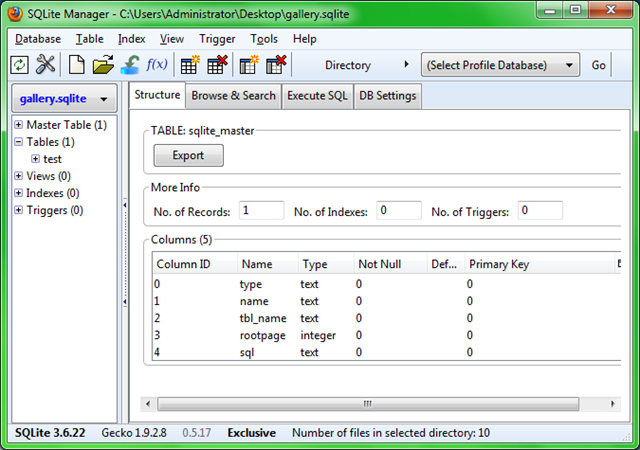
二、Android中使用SQLite
我们还是通过一个例子来学习,相关讲解都写在代码注释里。
1、新建一个项目Lesson15_HelloSqlite,Activity起名叫MainHelloSqlite.java
2、编写用户界面 res/layout/main.xml,准备增(insert)删(delete)改(update)查(select)四个按钮,准备一个下拉列表spinner,显示表中的数据。
01<?xml?version="1.0"?encoding="utf-8"?>
02<linearlayout?android:layout_height="fill_parent"?android:layout_width="fill_parent"android:orientation="vertical"xmlns:android="http://schemas.android.com/apk/res/android">
03
04????<textview?android:layout_height="wrap_content"android:layout_width="wrap_content"?android:textsize="20sp"android:layout_margintop="5dp"?android:id="@+id/TextView01"?android:text="SQLite基本操作">
05????</textview>
06
07????<button?android:layout_height="wrap_content"?android:layout_width="wrap_content"android:textsize="20sp"?android:layout_margintop="5dp"?android:id="@+id/Button01"android:text="增 | insert"?android:minwidth="200dp"></button>
08
09????<button?android:layout_height="wrap_content"?android:layout_width="wrap_content"android:textsize="20sp"?android:layout_margintop="5dp"?android:id="@+id/Button02"android:text="删 | delete"?android:minwidth="200dp"></button>
10
11????<button?android:layout_height="wrap_content"?android:layout_width="wrap_content"android:textsize="20sp"?android:layout_margintop="5dp"?android:id="@+id/Button03"android:text="改 | update"?android:minwidth="200dp"></button>
12
13????<button?android:layout_height="wrap_content"?android:layout_width="wrap_content"android:textsize="20sp"?android:layout_margintop="5dp"?android:id="@+id/Button04"android:text="查 | select"?android:minwidth="200dp"></button>
14
15????<spinner?android:layout_height="wrap_content"android:layout_width="wrap_content"?android:layout_margintop="5dp"android:id="@+id/Spinner01"?android:minwidth="200dp">
16????</spinner>
17
18????<textview?android:layout_height="wrap_content"android:layout_width="wrap_content"?android:textsize="20sp"android:layout_margintop="5dp"?android:id="@+id/TextView02"></textview>
19</linearlayout>
3、在MainHeloSqlite.java的同目录中新建一个数据库操作辅助类 DbHelper.java,内容如下:
01package?android.basic.lesson15;
02
03import?android.content.Context;
04import?android.database.sqlite.SQLiteDatabase;
05import?android.database.sqlite.SQLiteDatabase.CursorFactory;
06import?android.database.sqlite.SQLiteOpenHelper;
07
08public?class?DbHelper?extends?SQLiteOpenHelper {
09
10????public?DbHelper(Context context, String name, CursorFactory factory,
11????????????int?version) {
12????????super(context, name, factory, version);
13????}
14
15????//辅助类建立时运行该方法
16????@Override
17????public?void?onCreate(SQLiteDatabase db) {
18
19????????String sql =?"CREATE? TABLE pic (_id INTEGER PRIMARY KEY? AUTOINCREMENT? NOT NULL , fileName VARCHAR, description VARCHAR)";
20????????db.execSQL(sql);
21????}
22
23????@Override
24????public?void?onUpgrade(SQLiteDatabase db,?int?oldVersion,?int?newVersion) {
25????}
26
27}
4、MainHelloSqlite.java的内容如下:
001package?android.basic.lesson15;
002
003import?android.app.Activity;
004import?android.content.ContentValues;
005import?android.database.Cursor;
006import?android.database.sqlite.SQLiteDatabase;
007import?android.os.Bundle;
008import?android.view.View;
009import?android.view.View.OnClickListener;
010import?android.widget.AdapterView;
011import?android.widget.AdapterView.OnItemSelectedListener;
012import?android.widget.Button;
013import?android.widget.SimpleCursorAdapter;
014import?android.widget.Spinner;
015import?android.widget.TextView;
016import?android.widget.Toast;
017
018public?class?MainHelloSqlite?extends?Activity {
019
020????//SQLiteDatabase对象
021????SQLiteDatabase db;
022????//数据库名
023????public?String db_name =?"gallery.sqlite";
024????//表名
025????public?String table_name =?"pic";
026
027????//辅助类名
028????final?DbHelper helper =?new?DbHelper(this, db_name,?null,?1);
029
030????/** Called when the activity is first created. */
031????@Override
032????public?void?onCreate(Bundle savedInstanceState) {
033????????super.onCreate(savedInstanceState);
034????????setContentView(R.layout.main);
035
036????????//UI组件
037????????Button b1 = (Button) findViewById(R.id.Button01);
038????????Button b2 = (Button) findViewById(R.id.Button02);
039????????Button b3 = (Button) findViewById(R.id.Button03);
040????????Button b4 = (Button) findViewById(R.id.Button04);
041
042????????//从辅助类获得数据库对象
043????????db = helper.getWritableDatabase();
044
045????????//初始化数据
046????????initDatabase(db);
047????????//更新下拉列表中的数据
048????????updateSpinner();
049
050????????//定义按钮点击监听器
051????????OnClickListener ocl =?new?OnClickListener() {
052
053????????????@Override
054????????????public?void?onClick(View v) {
055
056????????????????//ContentValues对象
057????????????????ContentValues cv =?new?ContentValues();
058????????????????switch?(v.getId()) {
059
060????????????????//添加按钮
061????????????????case?R.id.Button01:
062
063????????????????????cv.put("fileName",?"pic5.jpg");
064????????????????????cv.put("description",?"图片5");
065????????????????????//添加方法
066????????????????????long?long1 = db.insert("pic",?"", cv);
067????????????????????//添加成功后返回行号,失败后返回-1
068????????????????????if?(long1 == -1) {
069????????????????????????Toast.makeText(MainHelloSqlite.this,
070????????????????????????????????"ID是"?+ long1 +?"的图片添加失败!", Toast.LENGTH_SHORT)
071????????????????????????????????.show();
072????????????????????}?else?{
073????????????????????????Toast.makeText(MainHelloSqlite.this,
074????????????????????????????????"ID是"?+ long1 +?"的图片添加成功!", Toast.LENGTH_SHORT)
075????????????????????????????????.show();
076????????????????????}
077????????????????????//更新下拉列表
078????????????????????updateSpinner();
079????????????????????break;
080
081????????????????//删除描述是'图片5'的数据行
082????????????????case?R.id.Button02:
083????????????????????//删除方法
084????????????????????long?long2 = db.delete("pic",?"description='图片5'",?null);
085????????????????????//删除失败返回0,成功则返回删除的条数
086????????????????????Toast.makeText(MainHelloSqlite.this,?"删除了"?+ long2 +?"条记录",
087????????????????????????????Toast.LENGTH_SHORT).show();
088????????????????????//更新下拉列表
089????????????????????updateSpinner();
090????????????????????break;
091
092????????????????//更新文件名是'pic5.jpg'的数据行
093????????????????case?R.id.Button03:
094
095????????????????????cv.put("fileName",?"pic0.jpg");
096????????????????????cv.put("description",?"图片0");
097????????????????????//更新方法
098????????????????????int?long3 = db.update("pic", cv,?"fileName='pic5.jpg'",?null);
099????????????????????//删除失败返回0,成功则返回删除的条数
100????????????????????Toast.makeText(MainHelloSqlite.this,?"更新了"?+ long3 +?"条记录",
101????????????????????????????Toast.LENGTH_SHORT).show();
102????????????????????//更新下拉列表
103????????????????????updateSpinner();
104????????????????????break;
105
106????????????????//查询当前所有数据
107????????????????case?R.id.Button04:
108????????????????????Cursor c = db.query("pic",?null,?null,?null,?null,
109????????????????????????????null,?null);
110????????????????????//cursor.getCount()是记录条数
111????????????????????Toast.makeText(MainHelloSqlite.this,
112????????????????????????????"当前共有"?+ c.getCount() +?"条记录,下面一一显示:",
113????????????????????????????Toast.LENGTH_SHORT).show();
114????????????????????//循环显示
115????????????????????for(c.moveToFirst();!c.isAfterLast();c.moveToNext()){
116????????????????????????Toast.makeText(MainHelloSqlite.this,
117????????????????????????????????"第"+ c.getInt(0)? +"条数据,文件名是"?+ c.getString(1) +?",描述是"+c.getString(2),
118????????????????????????????????Toast.LENGTH_SHORT).show();
119????????????????????}
120????????????????????//更新下拉列表
121????????????????????updateSpinner();
122????????????????????break;
123????????????????}
124????????????}
125????????};
126
127????????//给按钮绑定监听器
128????????b1.setOnClickListener(ocl);
129????????b2.setOnClickListener(ocl);
130????????b3.setOnClickListener(ocl);
131????????b4.setOnClickListener(ocl);
132
133????}
134
135????//初始化表
136????public?void?initDatabase(SQLiteDatabase db) {
137????????ContentValues cv =?new?ContentValues();
138
139????????cv.put("fileName",?"pic1.jpg");
140????????cv.put("description",?"图片1");
141????????db.insert(table_name,?"", cv);
142
143????????cv.put("fileName",?"pic2.jpg");
144????????cv.put("description",?"图片2");
145????????db.insert(table_name,?"", cv);
146
147????????cv.put("fileName",?"pic3.jpg");
148????????cv.put("description",?"图片3");
149????????db.insert(table_name,?"", cv);
150
151????????cv.put("fileName",?"pic4.jpg");
152????????cv.put("description",?"图片4");
153????????db.insert(table_name,?"", cv);
154
155????}
156
157????//更新下拉列表
158????public?void?updateSpinner() {
159
160????????//定义UI组件
161????????final?TextView tv = (TextView) findViewById(R.id.TextView02);
162????????Spinner s = (Spinner) findViewById(R.id.Spinner01);
163
164????????//从数据库中获取数据放入游标Cursor对象
165????????final?Cursor cursor = db.query("pic",?null,?null,?null,?null,?null,
166????????????????null);
167
168????????//创建简单游标匹配器
169????????SimpleCursorAdapter adapter =?new?SimpleCursorAdapter(this,
170????????????????android.R.layout.simple_spinner_item, cursor,?new?String[] {
171????????????????????????"fileName",?"description"?},?new?int[] {
172????????????????????????android.R.id.text1, android.R.id.text2 });
173????????adapter.setDropDownViewResource(android.R.layout.simple_spinner_dropdown_item);
174
175????????//给下拉列表设置匹配器
176????????s.setAdapter(adapter);
177
178????????//定义子元素选择监听器
179????????OnItemSelectedListener oisl =?new?OnItemSelectedListener() {
180
181????????????@Override
182????????????public?void?onItemSelected(AdapterView<?> parent, View view,
183????????????????????int?position,?long?id) {
184????????????????cursor.moveToPosition(position);
185????????????????tv.setText("当前pic的描述为:"?+ cursor.getString(2));
186????????????}
187
188????????????@Override
189????????????public?void?onNothingSelected(AdapterView<?> parent) {
190????????????}
191????????};
192
193????????//给下拉列表绑定子元素选择监听器
194????????s.setOnItemSelectedListener(oisl);
195????}
196
197????//窗口销毁时删除表中数据
198????@Override
199????public?void?onDestroy() {
200????????super.onDestroy();
201????????db.delete(table_name,?null,?null);
202????????updateSpinner();
203????}
204}
5、运行程序,查看结果: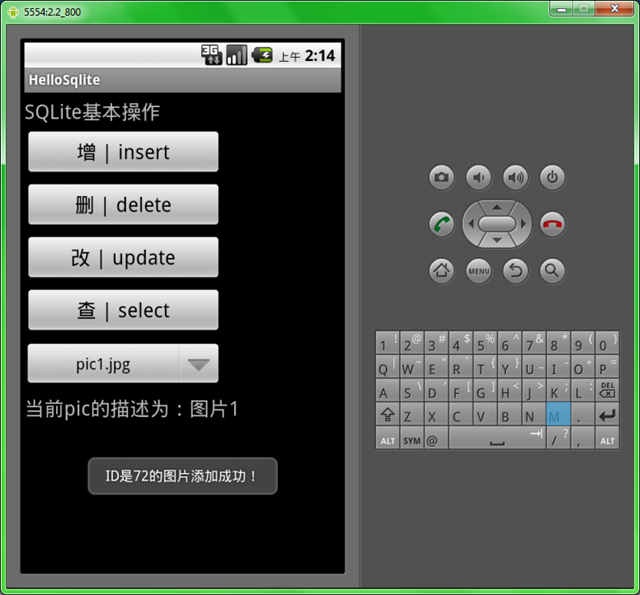
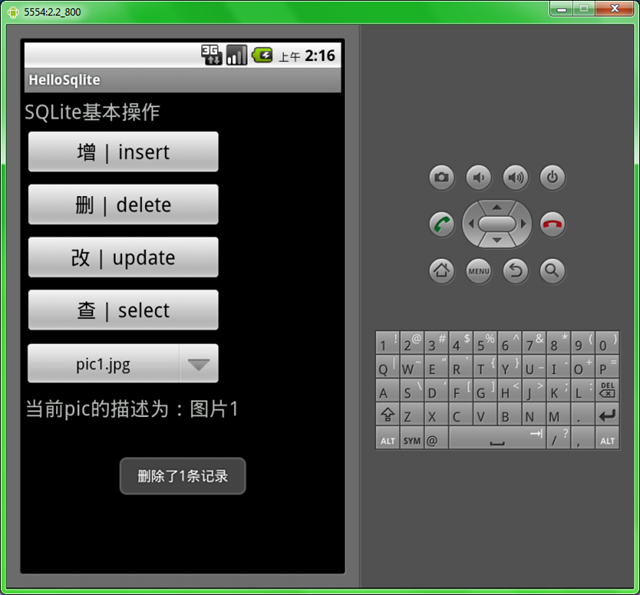
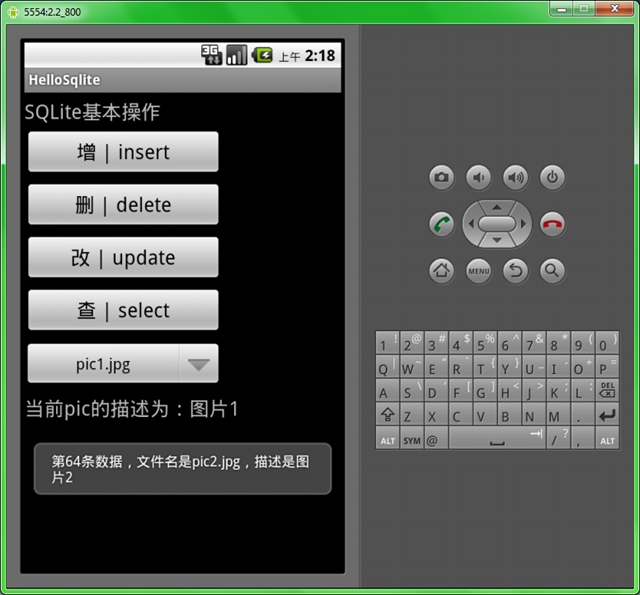
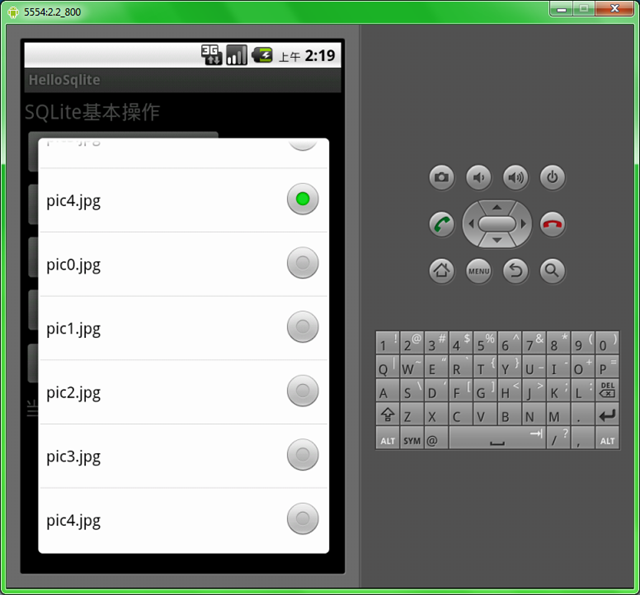
本例使用的是SQLiteDatabase已经封装好的insert,delete,update,query方法,感兴趣的同学可以用SQLiteDatabase的execSQL()方法和rawQuery()方法来实现。
SQLite事例
SQLite例子一、什么是SQLiteSQLite是一款开源的、轻量级的、嵌入式的、关系型数据库。它在2000年由D. Richard H