
Android:将View的内容映射成Bitmap
?
??? ?最近在做一个类似于游标的东西,由一个类似于seekbar的view来控制下端view内容的显示位置。所以需要将view中的内容映射成一张图片,设为seekbar的背景。所以就做了一些尝试,不过还有一些遗漏的小问题。
?? ? ?在Android中自有获取view中的cache内容,然后将内容转换成bitmap,方法名是:getDrawingCache(),返回结果为Bitmap,但是刚开始使用的时候,得到的结果都是null,所以在一个论坛里查到了正确的使用方法.代码如下:
?
contentLayout.setDrawingCacheEnabled(true);contentLayout.measure(MeasureSpec.makeMeasureSpec(0, MeasureSpec.UNSPECIFIED),MeasureSpec.makeMeasureSpec(0, MeasureSpec.UNSPECIFIED));contentLayout.layout(0, 0, contentLayout.getMeasuredWidth(),contentLayout.getMeasuredHeight());contentLayout.buildDrawingCache();Bitmap bitmap= contentLayout.getDrawingCache();?
?? ? ?最后就可以调用:Bitmap bitmap = view.getDrawingCache();就可以得到图片了。
?
?? ? ?为了测试这个功能,我使用了两种方式来创建LinerLayout中的内容,一种是在xml文件中就将view的内容添加了,只需在代码中添加对应ImageView中的图片就行了;另一种是动态添加LinerLayout中的View。
?? ? ?项目的主界面为:
?
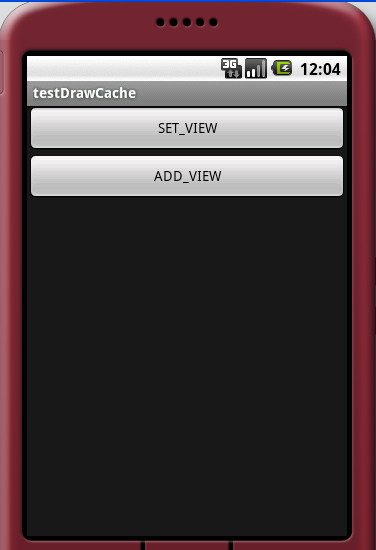
接下来是SET_VIEW的代码:
?
public void onCreate(Bundle savedInstanceState) {super.onCreate(savedInstanceState);setContentView(R.layout.set_view);contentLayout = (LinearLayout) findViewById(R.id.content);imgSource1 = (ImageView) findViewById(R.id.imgSource1);imgSource2 = (ImageView) findViewById(R.id.imgSource2);imgCache = (ImageView) findViewById(R.id.imgCache);imgSource1.setImageResource(R.drawable.source1);imgSource2.setImageResource(R.drawable.source2);contentLayout.setDrawingCacheEnabled(true);contentLayout.measure(MeasureSpec.makeMeasureSpec(0, MeasureSpec.UNSPECIFIED),MeasureSpec.makeMeasureSpec(0, MeasureSpec.UNSPECIFIED));contentLayout.layout(0, 0, contentLayout.getMeasuredWidth(),contentLayout.getMeasuredHeight());contentLayout.buildDrawingCache();Bitmap bitmap= contentLayout.getDrawingCache();if(bitmap!=null){imgCache.setImageBitmap(bitmap);}else{Log.i("CACHE_BITMAP", "DrawingCache=null");}}?
?set_view.xml布局文件为:
?
<?xml version="1.0" encoding="utf-8"?><LinearLayout xmlns:android="http://schemas.android.com/apk/res/android"android:orientation="vertical" android:layout_width="fill_parent"android:layout_height="fill_parent"><TextView android:text="set_view" android:layout_width="fill_parent"android:layout_height="wrap_content"></TextView><LinearLayout android:id="@+id/content"android:orientation="vertical" android:layout_width="wrap_content"android:layout_height="wrap_content"><ImageView android:id="@+id/imgSource1"android:layout_width="wrap_content" android:layout_height="wrap_content"></ImageView><ImageView android:id="@+id/imgSource2"android:layout_width="wrap_content" android:layout_height="wrap_content"></ImageView></LinearLayout><LinearLayout android:id="@+id/cache"android:layout_width="wrap_content" android:layout_height="wrap_content"><ImageView android:id="@+id/imgCache" android:layout_width="wrap_content"android:layout_height="wrap_content"></ImageView></LinearLayout></LinearLayout>
?
?运行效果为:
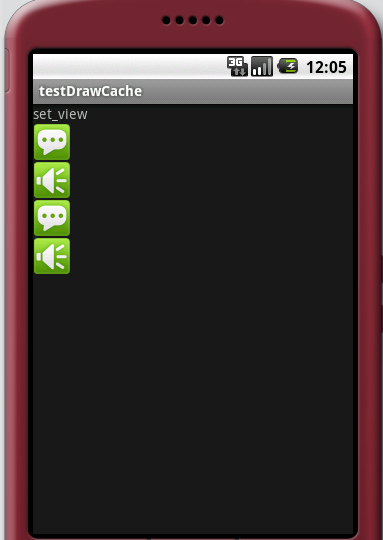
第一种情况比较简单,不会出现问题,接下来是第二种情况,这种情况有个需要注意的地方:
?
protected void onCreate(Bundle savedInstanceState) {// TODO Auto-generated method stubsuper.onCreate(savedInstanceState);setContentView(R.layout.add_view);addViewContent = (LinearLayout) findViewById(R.id.addViewContent);imgAddViewCache = (ImageView) findViewById(R.id.imgAddViewCache);// addImgSource();addRelativeLayout();addViewContent.setDrawingCacheEnabled(true);addViewContent.measure(MeasureSpec.makeMeasureSpec(0, MeasureSpec.UNSPECIFIED),MeasureSpec.makeMeasureSpec(0, MeasureSpec.UNSPECIFIED));addViewContent.layout(0, 0, addViewContent.getMeasuredWidth(),addViewContent.getMeasuredHeight());addViewContent.buildDrawingCache();int color = addViewContent.getDrawingCacheBackgroundColor();Bitmap cacheBitmap = addViewContent.getDrawingCache();Bitmap bitmap = Bitmap.createBitmap(cacheBitmap);//注意:这地方必须特别注意if (bitmap != null) {imgAddViewCache.setImageBitmap(bitmap);imgAddViewCache.setDrawingCacheBackgroundColor(color);} else {Log.i("CACHE_BITMAP", "DrawingCache=null");}}private void addRelativeLayout() {// TODO Auto-generated method stubRelativeLayout.LayoutParams layoutpare = new RelativeLayout.LayoutParams(LayoutParams.FILL_PARENT, LayoutParams.WRAP_CONTENT);RelativeLayout relativeLayout = new RelativeLayout(this);relativeLayout.setLayoutParams(layoutpare);ImageView imgView1 = new ImageView(this);ImageView imgView2 = new ImageView(this);imgView1.setImageResource(R.drawable.source1);imgView2.setImageResource(R.drawable.source2);RelativeLayout.LayoutParams img1 = new RelativeLayout.LayoutParams(38,38);img1.addRule(RelativeLayout.ALIGN_PARENT_LEFT, RelativeLayout.TRUE);RelativeLayout.LayoutParams img2 = new RelativeLayout.LayoutParams(38,38);img2.addRule(RelativeLayout.ALIGN_PARENT_RIGHT, RelativeLayout.TRUE);relativeLayout.addView(imgView1, img1);relativeLayout.addView(imgView2, img2);addViewContent.addView(relativeLayout);}/** * 添加图片源 */private void addImgSource() {ImageView imgView1 = new ImageView(this);ImageView imgView2 = new ImageView(this);imgView1.setImageResource(R.drawable.source1);imgView2.setImageResource(R.drawable.source2);addViewContent.addView(imgView1, new LayoutParams(LinearLayout.LayoutParams.WRAP_CONTENT,LinearLayout.LayoutParams.WRAP_CONTENT));addViewContent.addView(imgView2, new LayoutParams(LinearLayout.LayoutParams.WRAP_CONTENT,LinearLayout.LayoutParams.WRAP_CONTENT));}?
?对于上面的代码,需要说明一下:一种我是直接添加ImageView到页面中,这种情况没有问题,后来我又尝试了新建一个RelativeLayout中添加布局文件,
发现如果没有“代码中注释:注意”的一行时,混出现运行时的异常:trying to use a recycled bitmap android.graphics.Bitmap.这个问题我debug了很久,
也没有找到很彻底的方法来解决,不过用“注意”的一行代码就能够实现。但是显示的时候会出现意想不到的结果,关于出现的问题可以看下面的图:
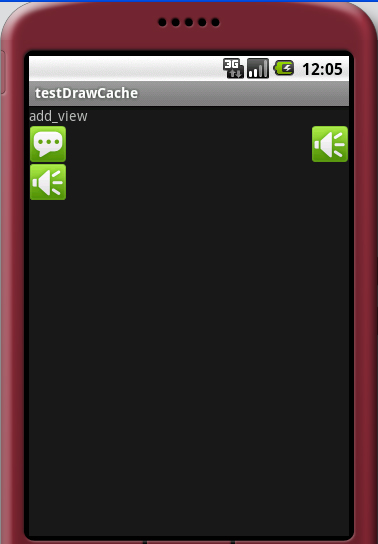
布局添加的图片没有全部显示出来,只显示了一个,这个原因我还没有解决,最近几天我会试着解决。
add_view.xml:
?
<?xml version="1.0" encoding="utf-8"?><LinearLayout xmlns:android="http://schemas.android.com/apk/res/android"android:orientation="vertical" android:layout_width="fill_parent"android:layout_height="fill_parent"><TextView android:text="add_view" android:layout_width="fill_parent"android:layout_height="wrap_content"></TextView><LinearLayout android:id="@+id/addViewContent"android:orientation="vertical" android:layout_width="fill_parent"android:layout_height="wrap_content"></LinearLayout><LinearLayout android:id="@+id/addViewCache"android:layout_width="wrap_content" android:layout_height="wrap_content"><ImageView android:id="@+id/imgAddViewCache"android:layout_width="fill_parent" android:layout_height="wrap_content"></ImageView></LinearLayout></LinearLayout>?
?
private Bitmap bmp;public void takeScreenShot(View view){if (!isStorageAvailable()) {return;}// this is the important code :) // Without it the view will have a dimension of 0,0 and the bitmap will be null //view.measure(MeasureSpec.makeMeasureSpec(0, MeasureSpec.UNSPECIFIED), // MeasureSpec.makeMeasureSpec(0, MeasureSpec.UNSPECIFIED));//为什么这样写得到的view.getDrawingCache()是null?//int w=view.getMeasuredWidth();//int h=view.getMeasuredHeight();//Log.i(tag,"Width=" +w);//480,有值的啊。//Log.i(tag,"Height=" +h);//893//view.layout(0, 0, w, h); //没办法,只好全屏截图了Display display = this.getWindowManager().getDefaultDisplay(); view.layout(0, 0, display.getWidth(), display.getHeight());view.setDrawingCacheEnabled(true);view.setFocusable(true);view.buildDrawingCache(true);Bitmap cacheBitmap = view.getDrawingCache();if(cacheBitmap==null){sendMessage(R.string.take_pictrue_failure);return;}bmp = Bitmap.createBitmap(cacheBitmap);view.setDrawingCacheEnabled(false); // clear drawing cacheview.destroyDrawingCache();//讲bmp保存入文件FileOutputStream fos = null;try {String filePath=getUniquePictureName(getSaveDir());fos = new FileOutputStream(filePath);if (fos != null) {bmp.compress(Bitmap.CompressFormat.PNG, 100, fos);fos.close();hasSomethingWrong=false;}} catch (Exception e) {sendMessage(R.string.bug);e.printStackTrace();}} 4 楼 gundumw100 2011-06-23 有可能是我的背景图片太大引起的,我图片的宽400*600 5 楼 gundumw100 2011-06-23 搞定,320×480就可以