
使用WebView实现新浪微博OAuth登录?#新浪官方下载SDK(weibo4android)http://open.weibo.com/wiki/index.ph
使用WebView实现新浪微博OAuth登录
?
#新浪官方下载SDK(weibo4android)
http://open.weibo.com/wiki/index.php/SDK
?
#申请应用KEY
登录新浪微博,进入http://open.weibo.com/申请应用,获取KEY和SECRET。
?
#准备
在项目中导入commons-httpclient-3.x.jar并加入weibo4android、weibo4android.http、weibo4android.org.json、weibo4android.util包文件(这些都是官方下载的SDK提供的文件)
?
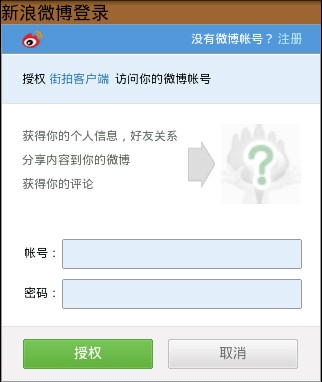
在跳转到新浪微博授权页面时会使用默认浏览器,这个不太好看,也有些用户手机用其他如UC等浏览器。因此,我决定用WebView代换默认浏览器。
默认浏览器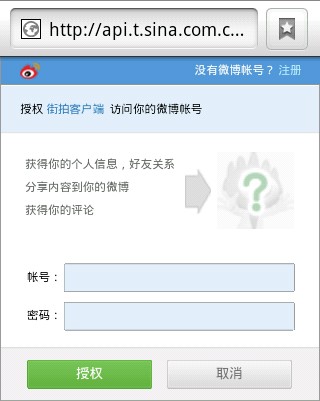
?
WebView代换
?
在我的项目中,有多个应用项目需要OAuth登录,因此需要做成共通,也考虑到应用今后可能会支持如腾讯微博、人人网、支付宝等多种方式登录,所以我的代码考虑了“开-闭原则”。
?
?
package com.oauth;import android.app.Activity;import android.os.Bundle;import android.view.View;import android.view.View.OnClickListener;public class ShareWithOAuthActivity extends Activity { @Override public void onCreate(Bundle savedInstanceState) { super.onCreate(savedInstanceState); setContentView(R.layout.main); findViewById(R.id.share_button).setOnClickListener(new OnClickListener() { @Override public void onClick(View button) { OAuth.share(ShareWithOAuthActivity.this); } }); }}?
?
package com.oauth;import com.db.DbHelper;import android.app.AlertDialog;import android.content.Context;import android.content.DialogInterface;import android.content.Intent;import android.database.Cursor;import android.widget.Toast;public class Share { public static final String SINA = "sina"; public static final String TENCENT = "tencent"; private static AlertDialog alertDialog = null; private static String[] shareList = null; private static String[] fullShareList = null; public static void share(final Context context, final String content) { if (shareList == null) { shareList = context.getResources().getStringArray(R.array.share_list); fullShareList = new String[shareList.length]; for (int i=0; i<shareList.length; i++) { fullShareList[i] = "分享到" + shareList[i]; } } if (alertDialog == null) { AlertDialog.Builder dialogBuilder = new AlertDialog.Builder(context); dialogBuilder.setTitle("分享"); dialogBuilder.setItems(fullShareList, new DialogInterface.OnClickListener() { @Override public void onClick(DialogInterface dialog, int position) { String flag = text2Flag(context, shareList[position]); if (flag != null) { oauthLogin(context, flag, content); } } }); alertDialog = dialogBuilder.create(); } alertDialog.show(); } public static String text2Flag(Context context, String text) { String result = null; if ("新浪微博".equals(text)) { result = SINA; } else if ("腾讯微博".equals(text)) { result = TENCENT; } else { Toast.makeText(context, "没有匹配的类型", Toast.LENGTH_SHORT).show(); } return result; } public static void oauthLogin(Context context, String flag, String content) { Intent intent = new Intent(); intent.putExtra("oauth_type", flag); intent.putExtra("share_content", content); Cursor cursor = DbHelper.getUserByFlag(flag); if (cursor != null && cursor.moveToFirst()) { intent.putExtra("token", cursor.getString(cursor.getColumnIndex("token"))); intent.putExtra("secret", cursor.getString(cursor.getColumnIndex("secret"))); intent.setClass(context, ShareActivity.class); } else { if (SINA.equals(flag)) { intent.setClass(context, SinaOAuth.class); } else if (TENCENT.equals(flag)) { intent.setClass(context, TencentOAuth.class); } } if(cursor != null) cursor.close(); context.startActivity(intent); }}?
res/layout/oauth_webview_layout.xml
<?xml version="1.0" encoding="utf-8"?><LinearLayout xmlns:android="http://schemas.android.com/apk/res/android" android:orientation="vertical" android:layout_width="fill_parent" android:layout_height="fill_parent"> <TextView android:id="@+id/oauth_webview_title" android:layout_width="fill_parent" android:layout_height="wrap_content" android:background="#996633" android:textColor="#000" android:textSize="18dp" /> <WebView android:id="@+id/oauth_webview" android:layout_width="fill_parent" android:layout_height="fill_parent" /></LinearLayout>?
?
?
package com.oauth;import android.app.Activity;import android.content.Intent;import android.net.Uri;import android.os.Bundle;import android.webkit.WebView;import android.widget.TextView;import android.webkit.WebViewClient;public abstract class OAuthActivity extends Activity { protected static OAuthActivity oauthActivity; protected TextView titleView; protected WebView oauthWebView; @Override public void onCreate(Bundle savedInstanceState) { super.onCreate(savedInstanceState); setContentView(R.layout.oauth_webview_layout); initViews(); oauthLogin(); } private void initViews() { titleView = (TextView)findViewById(R.id.oauth_webview_title); oauthWebView = (WebView)findViewById(R.id.oauth_webview); oauthWebView.getSettings().setJavaScriptEnabled(true); oauthWebView.setWebViewClient(new WebViewClient() { @Override public boolean shouldOverrideUrlLoading(WebView view, String url) { if (url == null) return false; if (url.startsWith("weibo4android")) { Intent intent = new Intent(OAuthActivity.this, CallbackActivity.class); intent.setData(Uri.parse(url)); OAuthActivity.this.startActivity(intent); } else { view.loadUrl(url);//腾讯微博在载入授权页面时会跳转,这里不写会用默认浏览器加载页面 } return true; } }); } protected abstract void oauthLogin(); protected abstract void callback(Intent callbackIntent); public static void postLogin(Intent callbackIntent) { if (oauthActivity != null) { oauthActivity.callback(callbackIntent); } oauthActivity = null; }}?
?
package com.oauth;import com.db.DbHelper;import weibo4android.Weibo;import weibo4android.WeiboException;import weibo4android.http.AccessToken;import weibo4android.http.RequestToken;import android.content.Intent;import android.net.Uri;import android.os.Bundle;public class SinaOAuth extends OAuthActivity {private RequestToken requestToken; @Override public void onCreate(Bundle savedInstanceState) { super.onCreate(savedInstanceState); titleView.setText("新浪微博登录"); } @Override protected void oauthLogin() { System.setProperty("weibo4j.oauth.consumerKey", Weibo.CONSUMER_KEY); System.setProperty("weibo4j.oauth.consumerSecret", Weibo.CONSUMER_SECRET); Weibo weibo = new Weibo(); try { requestToken = weibo.getOAuthRequestToken("weibo4android://CallbackActivity"); Uri uri = Uri.parse(requestToken.getAuthenticationURL()+ "&display=mobile"); oauthWebView.loadUrl(uri.toString());//自定义WebView } catch (WeiboException e) { e.printStackTrace(); } oauthActivity = this;//此处很关键 } @Override public void callback(Intent callbackIntent) { Uri uri = callbackIntent.getData(); AccessToken accessToken = null; try { accessToken = requestToken.getAccessToken(uri.getQueryParameter("oauth_verifier")); } catch (WeiboException e) { e.printStackTrace(); return; } DbHelper.persistUser(Share.SINA, accessToken.getUserId(), accessToken.getToken(), accessToken.getTokenSecret()); Intent intent = this.getIntent(); intent.putExtra("oauth_type", Share.SINA); intent.putExtra("token", accessToken.getToken()); intent.putExtra("secret", accessToken.getTokenSecret()); intent.setClass(this, ShareActivity.class); this.startActivity(intent); this.finish(); }}?
?
package com.oauth;import android.app.Activity;import android.os.Bundle;public class CallbackActivity extends Activity {public void onCreate(Bundle savedInstanceState) {super.onCreate(savedInstanceState);OAuthActivity.postLogin(this.getIntent());}}<?xml version="1.0" encoding="utf-8"?><manifest xmlns:android="http://schemas.android.com/apk/res/android" package="com.oauth" android:versionCode="1" android:versionName="1.0"> <uses-sdk android:minSdkVersion="7" /> <uses-permission android:name="android.permission.INTERNET" /> <application android:name="com.application.CommonApplication" android:icon="@drawable/icon" android:theme="@style/theme" android:label="@string/app_name"> <activity android:name=".ShareWithOAuthActivity" android:label="@string/app_name"> <intent-filter> <action android:name="android.intent.action.MAIN" /> <category android:name="android.intent.category.LAUNCHER" /> </intent-filter> </activity> <activity android:name=".CallbackActivity"> <intent-filter> <action android:name="android.intent.action.VIEW" /> <category android:name="android.intent.category.DEFAULT" /> <category android:name="android.intent.category.BROWSABLE" /> <data android:scheme="weibo4android" android:host="CallbackActivity" /> </intent-filter> </activity> <activity android:name=".SinaOAuth" android:theme="@android:style/Theme.NoTitleBar" /> <activity android:name=".TencentOAuth" android:theme="@android:style/Theme.NoTitleBar" /> <activity android:name=".ShareActivity" android:launchMode="singleTask"/> <activity android:name=".ChangeAccountActivity" /> </application></manifest>1 楼 yautah 2011-12-09 这种做法,网速稍微慢一点,应该很容易出anr的情况 2 楼 chenfeng0104 2012-02-28 yautah 写道这种做法,网速稍微慢一点,应该很容易出anr的情况
url请求可以在异步线程中执行 3 楼 浪迹随风 2012-05-28 可以不使用webVIEW方式达到授权认证的效果吗?有什么好的办法解决?请教下