
android中模拟http协议表单上传利用ie浏览器插件httpwatch查看form表单上传时的数据封装格式,然后照着这数
android中模拟http协议表单上传
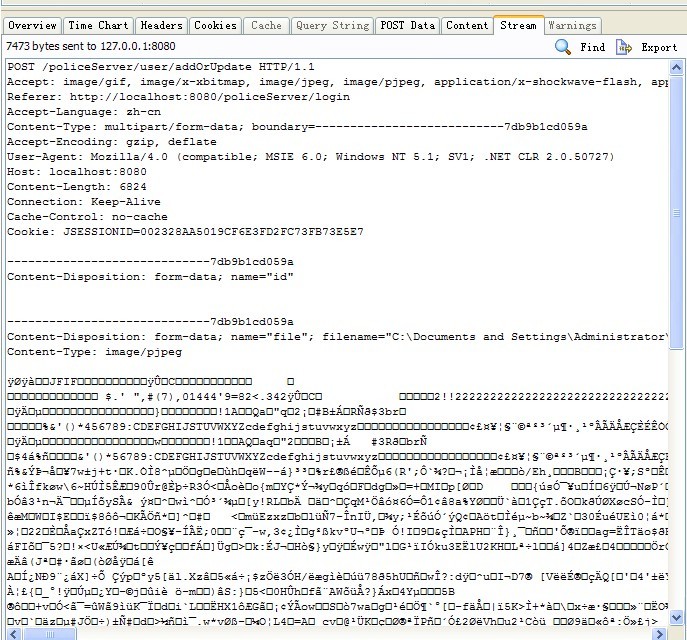
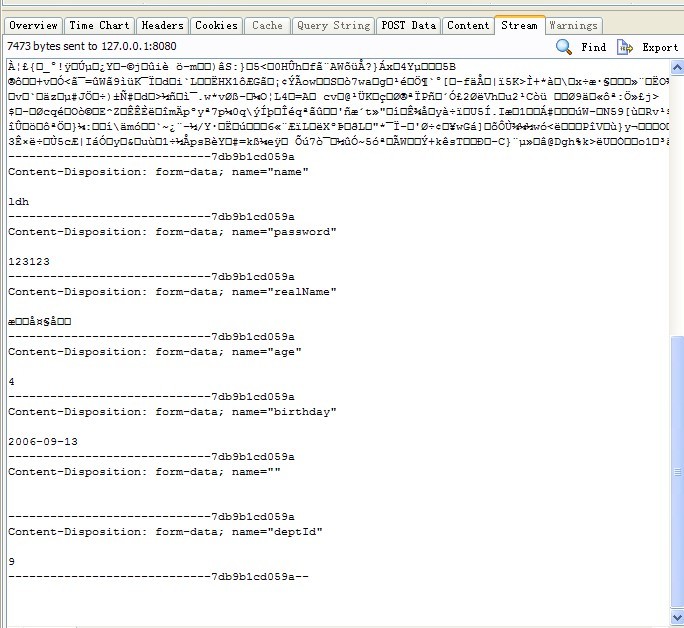
利用ie浏览器插件httpwatch查看form表单上传时的数据封装格式,然后照着这数据格式自己一步一步封装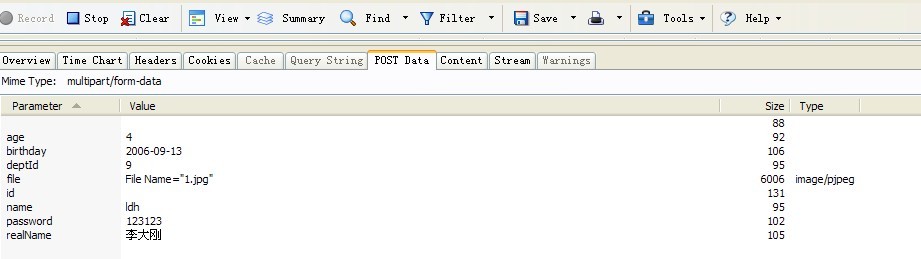
package com.android.cist.network.form;import java.io.DataOutputStream;import java.io.InputStream;import java.io.UnsupportedEncodingException;import java.net.HttpURLConnection;import java.net.URL;import java.net.URLEncoder;import java.util.Iterator;import java.util.Map;import java.util.Set;public class HttpFormUtil {public static String post(String actionUrl, Map<String, String> params,FormFile[] files) {try {String enterNewline = "\r\n";String fix="--";String boundary="######";String MULTIPART_FORM_DATA = "multipart/form-data";URL url = new URL(actionUrl);HttpURLConnection con = (HttpURLConnection)url.openConnection();con.setDoInput(true);con.setDoOutput(true);con.setUseCaches(false);con.setRequestMethod("POST");con.setRequestProperty("Connection", "Keep-Alive");con.setRequestProperty("Accept", "image/gif, image/x-xbitmap, image/jpeg, image/pjpeg, application/x-shockwave-flash, application/msword, application/vnd.ms-excel, application/vnd.ms-powerpoint, */*");con.setRequestProperty("Accept-Encoding", "gzip, deflate");con.setRequestProperty("Charset", "UTF-8");con.setRequestProperty("Content-Type", MULTIPART_FORM_DATA+ ";boundary=" + boundary);DataOutputStream ds = new DataOutputStream(con.getOutputStream());Set<String> keySet = params.keySet();Iterator<String> it = keySet.iterator();while(it.hasNext()){String key = it.next();String value = params.get(key);ds.writeBytes(fix+boundary+enterNewline);ds.writeBytes("Content-Disposition: form-data; "+"name="" + key + """ + enterNewline);ds.writeBytes(enterNewline);//ds.write(value.getBytes("UTF-8"));ds.writeBytes(value);//如果有中文乱码,保存改用上面的ds.writeBytes(enterNewline);那句代码ds.writeBytes(enterNewline);}if(files!=null&&files.length>0){ds.writeBytes(fix+boundary+enterNewline);ds.writeBytes("Content-Disposition: form-data; "+"name="" + files[0].getFormname() + """ +"; filename=""+files[0].getFilname()+"""+enterNewline);ds.writeBytes(enterNewline);ds.write(files[0].getData());ds.writeBytes(enterNewline);}ds.writeBytes(fix+boundary+fix+enterNewline);ds.flush();InputStream is = con.getInputStream();int ch;StringBuffer b = new StringBuffer();while((ch = is.read()) != -1){b.append((char)ch);}ds.close();return b.toString().trim();} catch (Exception e) {throw new RuntimeException(e);}}public static String encode(String url) { try { return URLEncoder.encode(url, "UTF-8"); } catch (UnsupportedEncodingException ex) { return url; } } }