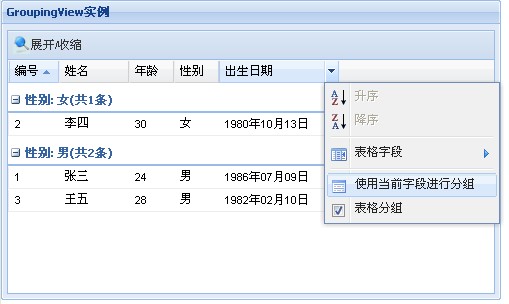
表格数据分组:Ext.grid.GroupingView
1、Ext.grid.GroupingView
主要配置项:
enableGroupingMenu:是否在表头菜单中进行分组控制,默认为true
groupByText:表头菜单中分组控制的菜单文字,默认为'Group By This Field'
enableNoGroups:是否允许用户关闭分组功能,默认为true
showGroupsText:在表头菜单中启用分组和禁用分组的菜单文字,默认为'Show in Groups'
groupTextTpl:用于渲染分组信息的模板,默认为'{text}',常用的可选值有:
text:列标题:组字段值
gvalue:组字段的值
startRow:组行索引
enableGrouping:是否对数据分组,默认为true
hideGroupedColumn:是否隐藏分组列,默认为false
ignoreAdd:在向表格中添加数据时是否刷新表格,默认为false
showGroupName:是否在分组行上显示分组字段的名字,默认为true
startCollapsed:初次显示时分组是否处于收缩状态,默认为false
主要方法:
collapseAllGroups():收缩所有分组行
expandAllGroups():展开所有分组行
getGroupId( String value ):根据分组字段值取得组id
toggleAllGroups( [Boolean expanded] ):切换所有分组行的展开或收缩状态
toggleGroup( String groupId, [Boolean expanded] ):切换指定分组行的展开或收缩状态
2、Ext.data.GroupingStore
groupField:分组字段
groupOnSort:是否在分组字段上排序,默认为false
remoteGroup:是否远程分组数据,默认为false。如果是远程分组数据,则通过groupBy参数发送分组字段名
3、范例源码
datas = [[1,,24,, Date(1986,06,09)], [2,,30,, Date(1980,09,13)], [3,,28,, Date(1982,01,10)]]; person = Ext.data.Record.create([ {name: , mapping: 0}, {name: , mapping: 1}, {name: , mapping: 2}, {name: , mapping: 3}, {name: , mapping: 4} ]); grid = Ext.grid.GridPanel({ title: , renderTo: , width: 500, height: 300, frame: , tbar: [ { text: , iconCls: , handler: (){ view = grid.getView(); view.toggleAllGroups(); } } ], store: Ext.data.GroupingStore({ reader: Ext.data.ArrayReader({id:0}, person), data: datas, sortInfo: {field:, direction:}, groupField: }), view: Ext.grid.GroupingView({ sortAscText: , sortDescText: , columnsText: , groupByText: , showGroupsText: , groupTextTpl: }), columns: [ {id:, header:, width:50, dataIndex:}, {id:, header:, width:70, dataIndex:}, {id:, header:, width:45, dataIndex:}, {id:, header:, width:45, dataIndex:}, {id:, header:, width:120, dataIndex:, renderer:Ext.util.Format.dateRenderer()} ] });