说说Android 两种为自定义组件添加属性的使用方法和区别(转)转自:http://www.cnblogs.com/TerryBlog/archi
说说Android 两种为自定义组件添加属性的使用方法和区别(转)
转自:http://www.cnblogs.com/TerryBlog/archive/2010/11/03/1868431.html
Android 自定义View 己经不是什么新鲜话题,Android Api提供了一大堆基础组件给我们,需要什么特定功能还需要我们继承它们然后定制更加丰富的功能。前面有篇文章也说过为自定义VIEW添加属性,但只是一笔带过,这里就拿这点来说说吧。
第一种添加属性的方法,之前我也是经常使用这种写法,代码如下:
Code highlighting produced by Actipro CodeHighlighter (freeware)http://www.CodeHighlighter.com/-->package com.terry.attrs;import android.content.Context;import android.util.AttributeSet;import android.widget.EditText;import android.widget.LinearLayout;import android.widget.TextView;public class EditTextExt1 extends LinearLayout { private String Text = ""; public EditTextExt1(Context context) { this(context, null); // TODO Auto-generated constructor stub } public EditTextExt1(Context context, AttributeSet attrs) { super(context, attrs); // TODO Auto-generated constructor stub int resouceId = -1; TextView tv = new TextView(context); EditText et = new EditText(context); resouceId = attrs.getAttributeResourceValue(null, "Text", 0); if (resouceId > 0) { Text = context.getResources().getText(resouceId).toString(); } else { Text = ""; } tv.setText(Text); addView(tv); addView(et, new LinearLayout.LayoutParams(LayoutParams.FILL_PARENT, LayoutParams.WRAP_CONTENT)); this.setGravity(LinearLayout.VERTICAL); }}这种写法,简单明了,不需要额外XML的配置,就可以在我们的VIEW文件下使用。
以上代码通过构造函数中引入的AttributeSet 去查找XML布局的属性名称,然后找到它对应引用的资源ID去找值。使用也时分方便。所以一直以来我也是很喜欢这种写法。
如上,自定好VIEW文件就可以在XML布局下如此使用:
<com.terry.attrs.EditTextExt1 android:id="@+id/ss3" android:layout_width="wrap_content" android:layout_height="wrap_content" Text="@string/app_name" ></com.terry.attrs.EditTextExt1>
好了,这是第一种为VIEW注册属性的写法,比较简单就不多介绍。
下面是第二为VIEW注册属性的写法,这里也要重点说说第二种注册 属性的写法和使用要点,先看一下JAVA代码要如何编写:
Code highlighting produced by Actipro CodeHighlighter (freeware)http://www.CodeHighlighter.com/-->package com.terry.attrs;import android.content.Context;import android.content.res.TypedArray;import android.util.AttributeSet;import android.widget.EditText;import android.widget.LinearLayout;import android.widget.TextView;public class EditTextExt extends LinearLayout { public EditTextExt(Context context) { this(context, null); // TODO Auto-generated constructor stub } public EditTextExt(Context context, AttributeSet attrs) { super(context, attrs); // TODO Auto-generated constructor stub int resouceId = -1; TypedArray typeArray = context.obtainStyledAttributes(attrs, R.styleable.EditTextExt); TextView tv = new TextView(context); EditText et = new EditText(context); int N = typeArray.getIndexCount(); for (int i = 0; i < N; i++) { int attr = typeArray.getIndex(i); switch (attr) { case R.styleable.EditTextExt_Oriental: resouceId = typeArray.getInt(R.styleable.EditTextExt_Oriental,); this.setOrientation(resouceId == 1 ? LinearLayout.HORIZONTAL : LinearLayout.VERTICAL); break; case R.styleable.EditTextExt_Text: resouceId = typeArray.getResourceId( R.styleable.EditTextExt_Text, 0); tv.setText(resouceId > 0 ? typeArray.getResources().getText( resouceId) : typeArray .getString(R.styleable.EditTextExt_Text)); break; } } addView(tv); addView(et); typeArray.recycle(); }}如上代码,跟前面代码一样。还是用的一个EDITTEXT和TEXTVIEW做基础组件。下面我们一步步分析上面的代码:
R.styleable.EditTextExt 代码的是一个attrs指向的一个declare-styleable 的标签,如下代码:
Code highlighting produced by Actipro CodeHighlighter (freeware)http://www.CodeHighlighter.com/--><?xml version="1.0" encoding="UTF-8"?><resources> <declare-styleable name="EditTextExt"> <attr name="Text" format="reference|string"></attr> <attr name="Oriental"> <enum name="Horizontal" value="1"></enum> <enum name="Vertical" value="0"></enum> </attr> </declare-styleable></resources>
这个文件位于,values下的attrs.xml目录下面,我比较喜欢一个自定义View 对应一个declare-styleable标签。
Tip:一个自定义View 第一部分的代码,
TypedArray typeArray = context.obtainStyledAttributes(attrs, R.styleable.EditTextExt);
指定为一个declare-styleable,而在declare-styleable 下的attr (即各属性)Android 的ADT 将会自动生成为declare-styleable的name 名字加上“_”加上对应attr(即属性名称)的名称,如上(EditTextExt_Text)我们要得到Text 就需要R.styleable.EditTextExt_Text,这一点的话可以看看R.java生成文件:
Code highlighting produced by Actipro CodeHighlighter (freeware)http://www.CodeHighlighter.com/-->public static final class styleable { /** Attributes that can be used with a EditTextExt. <p>Includes the following attributes:</p> <table> <colgroup align="left" /> <colgroup align="left" /> <tr><th>Attribute</th><th>Description</th></tr> <tr><td><code>{@link #EditTextExt_Oriental com.terry.attrs:Oriental}</code></td><td></td></tr> <tr><td><code>{@link #EditTextExt_Text com.terry.attrs:Text}</code></td><td></td></tr> </table> @see #EditTextExt_Oriental @see #EditTextExt_Text */ public static final int[] EditTextExt = {x7f010000, 0x7f010001 }; /** <p>This symbol is the offset where the {@link com.terry.attrs.R.attr#Oriental} attribute's value can be found in the {@link #EditTextExt} array. <p>Must be one of the following constant values.</p><table><colgroup align="left" /><colgroup align="left" /><colgroup align="left" /><tr><th>Constant</th><th>Value</th><th>Description</th></tr><tr><td><code>Horizontal</code></td><td>1</td><td></td></tr><tr><td><code>Vertical</code></td><td>0</td><td></td></tr></table> @attr name android:Oriental */ public static final int EditTextExt_Oriental = 1; /** <p>This symbol is the offset where the {@link com.terry.attrs.R.attr#Text} attribute's value can be found in the {@link #EditTextExt} array. <p>May be a reference to another resource, in the form "<code>@[+][<i>package</i>:]<i>type</i>:<i>name</i></code>"or to a theme attribute in the form "<code>?[<i>package</i>:][<i>type</i>:]<i>name</i></code>".<p>May be a string value, using '\\;' to escape characters such as '\\n' or '\\uxxxx' for a unicode character. @attr name android:Text */ public static final int EditTextExt_Text = 0; };好了,上述的代码写完,我们要在XML布局如何使用呢?这个会跟Android 提供的基础组件的使用方法是一致的。首先,我们要为其提供一个引用包名如下:
xmlns:android="http://schemas.android.com/apk/res/android" xmlns:terry="http://schemas.android.com/apk/res/com.terry.attrs"
上面提供的是android 基础组件的包名,和我们自己组件的包名。
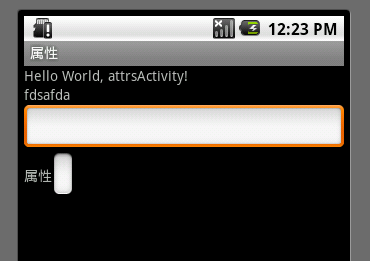
写好了包名。就可以像使用andriod 基础组件一样使用了,如下全部XML布局源码:
Code highlighting produced by Actipro CodeHighlighter (freeware)http://www.CodeHighlighter.com/--><?xml version="1.0" encoding="utf-8"?><LinearLayout xmlns:android="http://schemas.android.com/apk/res/android" xmlns:terry="http://schemas.android.com/apk/res/com.terry.attrs" android:orientation="vertical" android:layout_width="fill_parent" android:layout_height="fill_parent"> <TextView android:layout_width="fill_parent" android:layout_height="wrap_content" android:text="@string/hello" /> <com.terry.attrs.EditTextExt android:id="@+id/ss" android:layout_width="fill_parent" android:layout_height="wrap_content" terry:Text="fdsafda" terry:Oriental="Vertical"></com.terry.attrs.EditTextExt> <com.terry.attrs.EditTextExt1 android:id="@+id/ss3" android:layout_width="wrap_content" android:layout_height="wrap_content" Text="@string/app_name" ></com.terry.attrs.EditTextExt1></LinearLayout>