
【转】android使用分页标签转自:http://marshal.easymorse.com/archives/1739?在android中,也有类似分页标签
【转】android使用分页标签
转自:http://marshal.easymorse.com/archives/1739
?
在android中,也有类似分页标签(tab)的布局和组件。可以实现类似的功能。
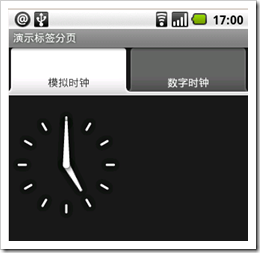
看另外一个分页标签内容:
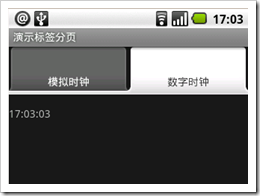
实现功能,继承TabActivity不是必须的,可以直接继承Activity编写Activity即可,见:
package com.easymorse; import android.app.Activity;import android.os.Bundle;import android.widget.TabHost; public class TabDemoActivity extends Activity { /** Called when the activity is first created. */ @Override public void onCreate(Bundle savedInstanceState) { super.onCreate(savedInstanceState); setContentView(R.layout.main); this.setTitle(“演示标签分页”); TabHost tabHost=(TabHost) this.findViewById(R.id.tabhost); tabHost.setup(); //添加第一个tab页面 TabHost.TabSpec spec=tabHost.newTabSpec(“clockTab”); spec.setContent(R.id.AnalogClock01); spec.setIndicator(“模拟时钟”); tabHost.addTab(spec); //添加第二个tab页面 spec=tabHost.newTabSpec(“buttonTab”); spec.setContent(R.id.DigitalClock01); spec.setIndicator(“数字时钟”); tabHost.addTab(spec); //设置默认页面 tabHost.setCurrentTab(0); }}?
?
对应的布局文件layout/main.xml:
<?xml version=”1.0″ encoding=”utf-8″?><LinearLayout xmlns:android=”http://schemas.android.com/apk/res/android” android:orientation=”vertical” android:layout_width=”fill_parent” android:layout_height=”fill_parent”> <TabHost android:id=”@+id/tabhost” android:layout_width=”wrap_content” android:layout_height=”wrap_content”> <TabWidget android:id=”@android:id/tabs” android:layout_width=”fill_parent” android:layout_height=”wrap_content” /> <FrameLayout android:id=”@android:id/tabcontent” android:paddingTop=”80px” android:layout_width=”fill_parent” android:layout_height=”fill_parent”> <AnalogClock android:id=”@+id/AnalogClock01″ android:layout_width=”wrap_content” android:layout_height=”wrap_content”></AnalogClock> <DigitalClock android:id=”@+id/DigitalClock01″ android:layout_width=”fill_parent” android:layout_height=”fill_parent” android:layout_centerHorizontal=”true”></DigitalClock> </FrameLayout> </TabHost></LinearLayout>
?
?
?
这里需要注意以下几点:
TabHost是分页标签的总的容器,必须指定android:id为@android:id/tabhost TabWidget放在TabHost容器中,必须指定android:id属性为@android:id/tabs FrameLayout是Tab内容的容器,其中的每个内容都会被实现为一个分页标签,布局上要做处理,比如paddingTop,定位标签内容