
SpringMVC简单实例我这里用的是spring 3.0.5 版本,这个版本是比较稳定的版本ps:我这里的项目取名为springM
SpringMVC 简单实例
我这里用的是spring 3.0.5 版本,这个版本是比较稳定的版本
ps:我这里的项目取名为springMVC
在web. xml中添加:
?
<?xml version="1.0" encoding="UTF-8"?><web-app version="2.5" xmlns="http://java.sun.com/xml/ns/javaee" xmlns:xsi="http://www.w3.org/2001/XMLSchema-instance" xsi:schemaLocation="http://java.sun.com/xml/ns/javaee http://java.sun.com/xml/ns/javaee/web-app_2_5.xsd"> <display-name>springMVC</display-name> <context-param><param-name>contextConfigLocation</param-name><param-value>classpath:spring/applicationContext.xml</param-value></context-param><listener><listener-class>org.springframework.web.context.ContextLoaderListener</listener-class></listener><servlet><!-- [servlet-name]-servlet.xml,比如如下的spring-servlet.xml--><servlet-name>spring</servlet-name><servlet-class>org.springframework.web.servlet.DispatcherServlet</servlet-class> <init-param> <param-name>contextConfigLocation</param-name> <param-value>classpath:spring/spring-servlet.xml</param-value> </init-param><load-on-startup>1</load-on-startup></servlet><servlet-mapping><servlet-name>spring</servlet-name><url-pattern>*.action</url-pattern></servlet-mapping><filter><filter-name>Encoding</filter-name><filter-class>org.springframework.web.filter.CharacterEncodingFilter</filter-class><init-param><param-name>encoding</param-name><param-value>utf8</param-value></init-param></filter><filter-mapping><filter-name>Encoding</filter-name><url-pattern>/*</url-pattern></filter-mapping> <welcome-file-list> <welcome-file>index.jsp</welcome-file> </welcome-file-list></web-app>?
?
ps:上面的classpath:spring/spring-servlet.xml,你需要配置classpath中spring-servlet.xml所在目录的位置,我这里是把
spring-servlet.xml,applicationContext.xml放在了src同级目录src-resource下
?
在src的同级目录下,如下所示:
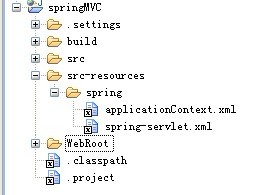
?在.classpath中配置如下:
<classpathentry kind="src" path="src-resources"/>
?
spring-servlet.xml
?
<?xml version="1.0" encoding="UTF-8"?> <!--[servlet-name]-servlet.xml,它被用于配置Web层、视图解析器、控制器、校验器以及其他所有MVC框架中必需的Bean。[servlet-name]指的是在web.xml部署描述符中定义的Spring dispatcher servlet的名称。 --> <beans xmlns="http://www.springframework.org/schema/beans" xmlns:xsi="http://www.w3.org/2001/XMLSchema-instance" xmlns:p="http://www.springframework.org/schema/p" xmlns:context="http://www.springframework.org/schema/context" xsi:schemaLocation="http://www.springframework.org/schema/beans http://www.springframework.org/schema/beans/spring-beans-3.0.xsd http://www.springframework.org/schema/aop http://www.springframework.org/schema/aop/spring-aop-3.0.xsd http://www.springframework.org/schema/tx http://www.springframework.org/schema/tx/spring-tx-3.0.xsd http://www.springframework.org/schema/context http://www.springframework.org/schema/context/spring-context-3.0.xsd"> <!-- 自定义拦截器 --><bean > <list> <bean /> </list > </property></bean> <context:annotation-config /> <!-- 把标记了@Controller注解的类转换为bean --> <context:component-scan base-package="org.app.demo.spring.controller" /> <!-- 启动Spring MVC的注解功能,完成请求和注解POJO的映射 --> <bean /> <!-- 对模型视图名称的解析,即在模型视图名称添加前后缀 --> <bean p:prefix="/WEB-INF/views/" p:suffix=".jsp" /> <!-- 上传文件的配置属性--> <bean id="multipartResolver" p:defaultEncoding="utf-8" /> </beans>?
?
applicationContext.xml
?
<?xml version="1.0" encoding="UTF-8"?> <!--applicationContext.xml,它让您可以配置Bean,或者显示应用程序上下文。通过这个文件,您可以定义自己的业务逻辑Bean、资源以及其他可以与Web端口相关联的所有Bean。 --><beans xmlns="http://www.springframework.org/schema/beans" xmlns:aop="http://www.springframework.org/schema/aop" xmlns:context="http://www.springframework.org/schema/context" xmlns:p="http://www.springframework.org/schema/p" xmlns:tx="http://www.springframework.org/schema/tx" xmlns:xsi="http://www.w3.org/2001/XMLSchema-instance" xsi:schemaLocation=" http://www.springframework.org/schema/beans http://www.springframework.org/schema/beans/spring-beans-3.0.xsd http://www.springframework.org/schema/context http://www.springframework.org/schema/context/spring-context-3.0.xsd http://www.springframework.org/schema/aop http://www.springframework.org/schema/aop/spring-aop-3.0.xsd http://www.springframework.org/schema/tx http://www.springframework.org/schema/tx/spring-tx-3.0.xsd"> <!-- 该配置隐式注册了多个对注解进行解析的处理器,如下列举AutowiredAnnotationBeanPostProcessor CommonAnnotationBeanPostProcessorPersistenceAnnotationBeanPostProcessor RequiredAnnotationBeanPostProcessor其实,注解本身做不了任何事情,和XML一样,只起到配置的作用,主要在于背后强大的处理器--> <context:annotation-config /> <context:component-scan base-package="org.app.demo.spring" /> <!-- 自动扫描所有注解该路径 --> </beans>
?
?
?
其他的代码见附件,相关的lib下的jar包也上传了
?
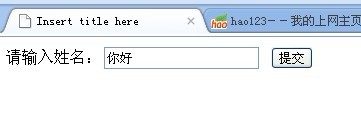
通过http://localhost:8080/springMVC?进行访问,页面效果如下:
?
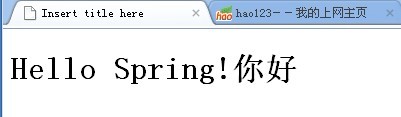
?提交之后
?