
J2ME游戏只移植到Android平台(一)为了让J2ME游戏无需大的改动就可以在Android的平台下,我是在利用Android
J2ME游戏只移植到Android平台(一)
为了让J2ME游戏无需大的改动就可以在Android的平台下,我是在利用Android平台的类库拼接成J2ME类,如用Android的canvas类和paint类拼接成J2me的Graphics类,用Bitmap重写J2ME的Image类。最终得到一个中间件包!
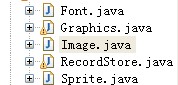
?
Font类的代码:
import java.io.IOException;import java.io.InputStream;import lxs.slg.Game;import android.content.res.AssetManager;import android.content.res.Resources;import android.graphics.Bitmap;import android.graphics.BitmapFactory;import android.graphics.Canvas;import android.graphics.Matrix;import android.graphics.Paint;public class Image {//在android 中 图片对象是Bitmapprivate Bitmap img;private int alpha;private Image() {img = null;alpha = 0xff;}private Image(Bitmap img, int alpha) {this.img = img;this.alpha = alpha;}private Image(Image source) {this.img = source.img;this.alpha = source.alpha;}public static Image createImage(String src) {if (src.startsWith("/")) {src = src.substring(1);}//当前的activity对象//如下是标准的读取Bitmap方法Resources resources = Game.father.getResources();AssetManager assetManager = resources.getAssets();InputStream in = null;Bitmap img = null;try {in = assetManager.open(src);img = BitmapFactory.decodeStream(in);in.close();} catch (IOException e) {e.printStackTrace();}return new Image(img, 0xff);}public static Image createImage(byte[] imageData, int imageOffset,int imageLength) {//从byte对象创建一个Bitmap 是由BitmapFactory函数负责的Bitmap img = BitmapFactory.decodeByteArray(imageData, imageOffset,imageLength);return new Image(img, 0xff);}public static Image createImage(Image source) {return new Image(source);}public static Image createImage(Image image, int x, int y, int width,int height, int transform) {Bitmap bmp = Bitmap.createBitmap(image.img, x, y, width, height);Paint paint = new Paint();paint.setAlpha(image.alpha);Image tImage = createImage(width, height);Canvas canvas = new Canvas(tImage.img);//调用Graphics函数 获取旋转矩阵Matrix mMatrix = Graphics.getTransformMetrix(transform, width, height);//调用如下的函数将其绘制在兴建的Bitmap对象上canvas.drawBitmap(bmp, mMatrix, paint);return tImage;}public static Image createImage(InputStream stream) {Bitmap img = BitmapFactory.decodeStream(stream);return new Image(img, 0xff);}public static Image createImage(int width, int height) {//android 中创建Image 对象的函数Bitmap img = Bitmap.createBitmap(width, height, Bitmap.Config.ARGB_8888);return new Image(img, 0xff);}public static Image createRGBImage(int[] rgb, int width, int height,boolean processAlpha) {Bitmap img;if (processAlpha) {img = Bitmap.createBitmap(rgb, width, height,Bitmap.Config.ARGB_8888);} else {//不需要支持透明的图片,我们采用差分颜色图片点阵标识img = Bitmap.createBitmap(rgb, width, height, Bitmap.Config.RGB_565);}return new Image(img, 0xff);}//获取图片的绘制对象public Graphics getGraphics() {Canvas canvas = new Canvas(img);Paint paint = new Paint();paint.setAlpha(alpha);return new Graphics(canvas, paint);}public void setAlpha(int alpha) {this.alpha = alpha;}public int getAlpha() {return alpha;}public Bitmap getImg() {return img;}public int getHeight() {return img.getHeight();}public void getRGB(int[] rgbData, int offset, int scanlength, int x, int y,int width, int height) {img.getPixels(rgbData, offset, scanlength, x, y, width, height);}public int getWidth() {return img.getWidth();}boolean isMutable() {return img.isMutable();}public void replaceColor(int newColor, int oldColor) {int width = img.getWidth();int height = img.getHeight();int[] pixels = new int[width * height];img.getPixels(pixels, 0, width, 0, 0, width, height);for (int i = 0; i < pixels.length; i++) {if ((pixels[i] | 0x00ffffff) == (oldColor | 0x00ffffff)) {pixels[i] = oldColor;}}img = Bitmap.createBitmap(pixels, 0, 0, height, height,Bitmap.Config.ARGB_8888);}}???