Android 使用shape刚刚翻论坛的时候看到的,总觉得以后会用的上这些零零碎碎的东西,所以转载流存啦~~~~原文
Android 使用shape
刚刚翻论坛的时候看到的,总觉得以后会用的上这些零零碎碎的东西,所以转载流存啦~~~~
原文http://www.eoeandroid.com/thread-71143-1-1.html
大家都应该明白的,在Android中常常会使用shape来定义控件的一些显示属性,那么怎么来用那,今天我们就来看一些shape的使用,大家看完这 篇以后就会对shape有了大体的了解,下面的是稍作总结请大家仔细的观看:
Java代码:
<!-- 描边 --><strokeandroid:width="2dp"android:color="#dcdcdc" /><!-- 圆角 --><cornersandroid:radius="2dp" /><paddingandroid:left="10dp"android:top="10dp"android:right="10dp"android:bottom="10dp" /></shape>复制代码
? ?? ??solid:实心,就是填充的意思
? ?? ? android:color指定填充的颜色
? ?? ??gradient:渐变
? ?? ? android:startColor和android:endColor分别为起始和结束颜色,ndroid:angle是渐变角度,必须为45的整数 倍。
? ?? ? 另外渐变默认的模式为android:type="linear",即线性渐变,可以指定渐变为径向渐变,android:type="radial", 径向渐变需要指定半径android:gradientRadius="50"。
? ?? ??stroke:描边
? ?? ? android:width="2dp" 描边的宽度,android:color 描边的颜色。
? ?? ??我们还可以把描边弄成虚线的形式,设置方式为:
? ?? ? android:dashWidth="5dp"
? ?? ? android:dashGap="3dp"
? ?? ? 其中android:dashWidth表示'-'这样一个横线的宽度,android:dashGap表示之间隔开的距离。
? ?? ??corners:圆角
? ?? ? android:radius为角的弧度,值越大角越圆。
? ?? ? 我们还可以把四个角设定成不同的角度,方法为:
Java代码:android:bottomLeftRadius="20dp" 右下角android:topLeftRadius="1dp" 左上角android:bottomRightRadius="0dp" 左下角/>复制代码
? ?? ? 这里有个地方需要注意,bottomLeftRadius是右下角,而不是左下角,这个有点郁闷,不过不影响使用,记得别搞错了就行。
? ?? ? 还有网上看到有人说设置成0dp无效,不过我在测试中发现是可以的,我用的是2.2,可能修复了这个问题吧,如果无效的话那就只能设成1dp了。
? ?? ??padding:间隔
? ?? ? 这个就不用多说了,XML布局文件中经常用到。
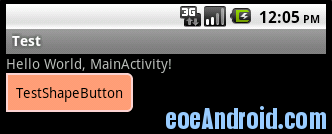
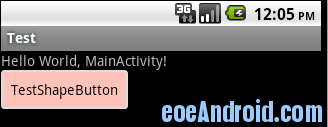
? ?? ? 大体的就是这样,以下是一个使用的具体示例:用在Selector中作为Button的背景,分别定义了按钮的一般状态、获得焦点状态和按下时的状态,具 体代码如下:
Java代码:<selectorxmlns:android="http://schemas.android.com/apk/res/android"><item android:state_pressed="true" ><shape><!-- 渐变 --><gradientandroid:startColor="#ff8c00"android:endColor="#FFFFFF"android:type="radial"android:gradientRadius="50" /><!-- 描边 --><strokeandroid:width="2dp"android:color="#dcdcdc"android:dashWidth="5dp"android:dashGap="3dp" /><!-- 圆角 --><cornersandroid:radius="2dp" /><paddingandroid:left="10dp"android:top="10dp"android:right="10dp"android:bottom="10dp" /></shape></item><item android:state_focused="true" ><shape><gradientandroid:startColor="#ffc2b7"android:endColor="#ffc2b7"android:angle="270" /><strokeandroid:width="2dp"android:color="#dcdcdc" /><cornersandroid:radius="2dp" /><paddingandroid:left="10dp"android:top="10dp"android:right="10dp"android:bottom="10dp" /></shape></item><item><shape><solid android:color="#ff9d77"/><strokeandroid:width="2dp"android:color="#fad3cf" /><cornersandroid:topRightRadius="5dp"android:bottomLeftRadius="5dp"android:topLeftRadius="0dp"android:bottomRightRadius="0dp"/><paddingandroid:left="10dp"android:top="10dp"android:right="10dp"android:bottom="10dp" /></shape></item></selector>复制代码
运行效果:

感谢http://www.cnblogs.com/mmll/archive/2011/04/27/2030486.html



