
四,android四大组件基础介绍及打电话,发短信简单应用 &单元测试
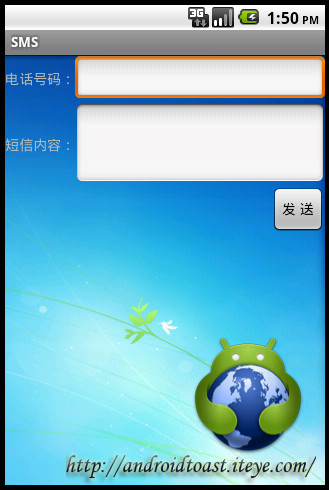
?
?
<!--EndFragment-->
打电话的主要代码:
mCall.setOnClickListener(new Button.OnClickListener(){ @Override public void onClick(View v) {String phoneNumber=mPhoneNumber.getText().toString();//意图 用于激活组件,绑定数据。充 当信使的作用Intent intent=new Intent();/*要执行的动作。执行不同的动作的Action去这找 http://developer.android.com/reference/android/content/Intent.html */ intent.setAction("android.intent.action.CALL"); //绑定数据 intent.setData(Uri.parse("tel:"+phoneNumber)); //激活打电话组件 通过隐式意图 另外不要忘记在清单文件中注册一下打电话的权限 startActivity(intent);} });?发送短信的主要代码:
mSendButton.setOnClickListener(new Button.OnClickListener(){@Overridepublic void onClick(View v) { String phoneNumber=mPhoneNumber.getText().toString(); String content=mMessage.getText().toString();//得到短信管理器SmsManager manager=SmsManager.getDefault();//如果短信内容超过70个字将被分割成多条ArrayList<String> messages=manager.divideMessage(content);//循环发送for(String ms:messages){ //注:在模拟器中发送中文短信会乱码 这跟底层的网络有关。不过到真机上就没事了。 manager.sendTextMessage(phoneNumber, null, ms, null, null);Toast.makeText(getApplicationContext(), "发送成功!", 0).show();}} });?之所以还会在讲这一点主要是 这是电话的最基本的两个功能,还有一点在很多应用中还是会用到这些的,比如在CRM,OA,SNS应用上都有可能用上这个功能。最典型的在CRM上,在客户资料上有电话号码这一项,你可以直接加一按钮就能拨打,总比再把号码记下来用内置的拨打吧。
?
<application android:icon="@drawable/icon" android:label="@string/app_name"> <!-- 使用的类库 --> <uses-library android:name="android.test.runner"/> <activity android:name="com.iteye.androidtoast.JUnitActivity" android:label="@string/app_name"> <intent-filter> <action android:name="android.intent.action.MAIN" /> <category android:name="android.intent.category.LAUNCHER" /> </intent-filter> </activity> </application> <!-- 这里的 targetPackage的内容与上面package内容需相同。表示该测试运行在此包下,说白了就是在同一个进程 --> <instrumentation android:name="android.test.InstrumentationTestRunner" android:targetPackage="com.iteye.androidtoast" android:label="Tests for My App" />
?第二步,看代码
? 首先是AndroidTestCase的简单应用
??
package com.iteye.service.tests;import junit.framework.Assert;import android.test.AndroidTestCase;import android.util.Log;import com.iteye.service.SomeService;/** * 需要测试类要继承AndroidTestCase * AndroidTestCase 多用于对系统中业务逻辑的测试 * 需要与界面交互的测试一般采用InstrumentationTestCase * @author androidtoast * */public class SomeServiceTest extends AndroidTestCase {private static final String TAG="SomeServiceTest";SomeService some;protected int a;protected int b;//初始化测试环境 在实例化当前类的时候自动调用此方法@Overrideprotected void setUp() throws Exception {super.setUp();some=new SomeService();a=3;b=8;}//测试结束后调用此方法,用于清理测试环境中得变量@Overrideprotected void tearDown() throws Exception {super.tearDown();Log.i(TAG, "Test Over!");}//测试getAdd方法public void testAdd()throws Exception{Log.d(TAG, "testAdd");int result=some.getAdd(a, b);Assert.assertEquals(11, result);}}?
? InstrumentationTestCase应用代码:
????
package com.iteye.androidtoast.tests;import com.iteye.androidtoast.JUnitActivity;import com.iteye.androidtoast.R;import android.content.Intent;import android.os.SystemClock;import android.test.InstrumentationTestCase;import android.view.View;import android.widget.Button;import android.widget.TextView; /** * InstrumentationTestCase多用于测试与组件相关的操作 * @author androidtoast * */public class JUnitActivityTest extends InstrumentationTestCase { JUnitActivity mActivityTested;public JUnitActivityTest() {}/** * 初始化测试环境 */@Overrideprotected void setUp() throws Exception {super.setUp();//意图用于激活ActivityIntent intent = new Intent();//设置用于激活哪个Activityintent.setClassName("com.iteye.androidtoast", JUnitActivity.class.getName());//启动一个新的任务 并在后台运行intent.setFlags(Intent.FLAG_ACTIVITY_NEW_TASK);//获得Instrumentation 启动一个活动mActivityTested = (JUnitActivity) getInstrumentation().startActivitySync(intent);}//清理资源 @Overrideprotected void tearDown() throws Exception {mActivityTested.finish();//测试完成后关闭Activitysuper.tearDown();}//测试方法 (其实就是一个点击按钮 然后隐藏自身显示文本这么一简单功能)public void testClickButtonToShowText() throws Exception {TextView tv = (TextView) mActivityTested.findViewById(R.id.text);SystemClock.sleep(2000);//等待两秒//如果当前的TextView的状态是隐藏的则正确通过assertEquals("TextView should be Gone before Button Clicking",View.GONE, tv.getVisibility());Button btn = (Button) mActivityTested.findViewById(R.id.button);//在主线程里执行点击按钮这一动作getInstrumentation().runOnMainSync(new PerformClick(btn));SystemClock.sleep(2000);assertEquals("TextView should be Visible after Button Clicking",View.VISIBLE, tv.getVisibility());}private class PerformClick implements Runnable {Button mBtnClicked;public PerformClick(Button button) {mBtnClicked = button;}public void run() {mBtnClicked.performClick();}}}?