
Android开发笔记
1:Android Permission denied(不允许连接Socket) 错误
原因是: 需要访问到网络,所以,在AndroidManifest.xml中,需要进行如下配置:
<uses-permission android:name="android.permission.INTERNET" />
?
?
2:ListView滚动变黑解决方法
ListView增加一个属性android:cacheColorHint="#00000000"
?
3:Item用自己的背景盖住了Selector光标
ListView增加一个属性:android:drawSelectorOnTop="true"这样光标就会跑到Item上面的图层
?
4:在利用Tab标签(自定义按钮)实现不同Activity切换,不同Activity均已经设置了模式为singleTask或singleInstance时,但是每次点击Tab标签中的特定Activity时,每次都还是会执行
onCreate方法,原因如下:
1:管理Tab标签(实现Activity切换的Tab标签)的容器(Activity)必须继承ActivityGroup
2:Activity设置的启动模式必须为singleTask或singleInstance
3:LocalActivityManager中的startActivity方法对于的Activity对应的ID,必须为需要跳转过去的Activity名称,否则失效。
4:存放tab标签(自定义按钮)对应的layout中必须有一个FrameLayout放置子activity。
?
5:模拟器提示访问网络出现如下异常:
java.net.UnknownHostException: Host is unresolved
原因是模拟器没有开通代理访问网络。
?
6:开发过程中,当listview控件中有button、checkbox等控件时,可能是由于这些子控件中获取到了focus事件,导致listview中onItemClick事件失效,只需要按如下方式处理即可:
1)每一个控件重新设置focusable属性
2)Item Layout的根控件设置其android:descendantFocusability=”blocksDescendant”即可
?
?7:开发自定义控件步骤
1)创建res/values/***.xml资源文件(里面的内容节点declare-styleable,子节点中的内容为该自定义控件的属性字段)
2)创建res/layout/***.xml布局文件(对应主的布局中定义声明自定义控件xmlns:custom ="http://schemas.android.com/apk/res/com.test.jzh ")
???? custom可以随意编写;com.test.jzh则需要依据自定义控件所在package路径而定,一定为该工程的包名。
3)编写自定义控件的实体操作类,完成控件所展示的界面、功能操作等。
?
8:Listview中性能优化方案(需要加载图片)
???? 1)将图片以文件(文件名称编号唯一)的形式缓存到手机中、后面每次列表加载时先判断文件是否存在,存在则直接读取出来显示;否则直接网络请求,再写入缓存中。
???? 2)Adapte设置getview可以用---convertView = LayoutInflater.from(context).inflate(R.layout.main, null, false);也可以用自定义了继承自LinearLayout的MBlogListItemView,如:
public?class?TestItemLayout?extends?LinearLayout?{????public?TextView?text1;
????public?ImageView?icon1;
????public?TextView?text2;
????public?ImageView?icon2;
????public?TestItemLayout(Context?context)?{
????????super(context);
????????((LayoutInflater)?context
????????????????.getSystemService(Context.LAYOUT_INFLATER_SERVICE)).inflate(
????????????????R.layout.list_item_icon_text,?this);
????????icon1?=?(ImageView)?findViewById(R.id.icon1);
????????text1?=?(TextView)?findViewById(R.id.text1);
????????icon2?=?(ImageView)?findViewById(R.id.icon2);
????????text2?=?(TextView)?findViewById(R.id.text2);
????}
}
?
9:中文API
http://www.cnblogs.com/over140/
?
10:输入框中如何出现下一页。
在edittext控件中增加android:singleLine="true"即可。
?
11:将listview默认选中的背景色去除。
android:cacheColorHint="@null"
android:listSelector="#00000000"
?
12:listview中包含图片等外部数据时,如果现实内容滚动比较卡,原因可能是加载listview是主UI和Listview中的图片等加载界面混淆在一起。
解决方法:设置是否滚动标志,加载getView时以此作为依据,判断是否加载图片。
?
13:如果给android程序做压力测试,答案是monkey。
adb shell monkey -p com.huawei.basic.android -v 1000
?
14:工程如果不会自动生成gen文件夹或者报“Unable to resolve target android-9”,解决方法如下
工程-属性-android-选择合适的Project Build Target.
?
15:"Cannot reduce the visibility of the inherited method from",解决方法如下:
1)选择合适的android platform版本。
2)选择system lib中的layoutlib和android。
?
16:各个Activity通过Intent传递数据,是通过Bundle携带的,需要判断好Bundle。
?
17:android开发过程中如果遇见java是提供该类或者其他的,但是就是报(**** is not visible),原因就是sun的jar包和android冲突所致
?
18:android在实现listview中图片统一风格的方案有两种。1:通过程序做统一处理,但是消耗性能;2:通过在image底部或者上面再罩一个透明的图片,效果非常好。
?
19:ERROR: Application requires API version 10. Device API version is 8
解决方法:
1:在AndroidManifest.xml 里,? <uses-sdk android:minSdkVersion="8" /> 找到這一行,這行是表示要執行這個應用程式所需要的最低版本,把數字改成模擬器上面的版本。
2:在default.properties 里
target=android-8
把target改为要运行模拟器的版本就OK了。
?
20:如果工程出现gen文件夹不自动生成、case expressions must be constant expressions、Cannot reduce the visibility of the inherited method from Activity等问题,原因可能是eclipse默认的workspace有问题,可以考虑重新建立一个。
?
21:Canvas、Paint、SurfaceView这三者之间的关系,Canvas是一个画布,而Paint是一个工具,画布中需要画东西必须通过Paint去画,而SurfaceView是一个显示画布的控件,即最后Canvas画布中的内容都是需要通过SurfaceView去呈现在Android界面中,样例:
GameView gv= new GameView(this);=====surfaceView
LinearLayout? hotWordsContainer = (LinearLayout) findViewById(R.id.linearLayout1);
hotWordsContainer.addView(gv);
?
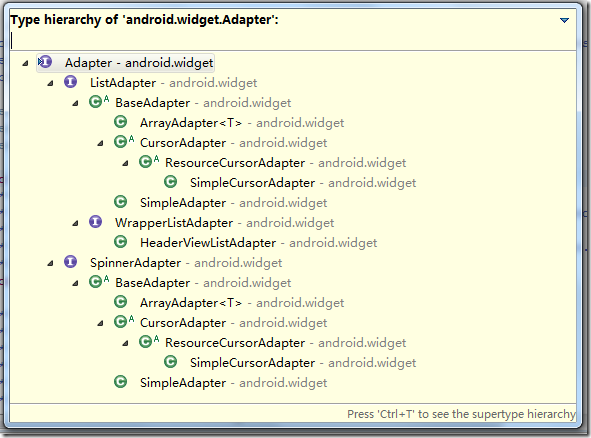
22:Adapter\LayoutInflater
1)Adapter具体见下图
?
2)LayoutInflater
Inflater英文意思是膨胀,在Android中应该是扩展的意思吧。?
LayoutInflater的作用类似于 findViewById(),不同点是LayoutInflater是用来找layout文件夹下的xml布局文件,并且实例化!而 findViewById()是找具体某一个xml下的具体 widget控件(如:Button,TextView等)。
?
如:
- LayoutInflater?inflater?=?LayoutInflater.from(??????????? cursor = this.mContext.getContentResolver().query(
??????????????????? Uri.parse(FusionField.SMS_PHONE_URI), new String[]{sql}, null, null,null);
??// }
??int nums = mList.getChildCount();
??int height = 0;
??for (int i = 0; i < nums; i++) {
???View view = mList.getChildAt(i);
???// mList.onKeyDown(KeyEvent.KEYCODE_DPAD_UP, null);
???AppManageMent app = (AppManageMent) view.getTag();
???if (app.getChildIndex() == selectedPosition) {
????int Pos[] = { -1, -1 }; // 保存当前坐标的数组
????view.getLocationOnScreen(Pos); // 获取选中的 Item
????????????// 在屏幕中的位置,以左上角为原点 (0,
????????????// 0)
????LogX.e(TAG, "selected appInfo x = " + Pos[0] + "y = " + Pos[1]);
????break;
???} else {
????int Pos[] = { -1, -1 }; // 保存当前坐标的数组
????view.getLocationOnScreen(Pos); // 获取选中的 Item
????????????// 在屏幕中的位置,以左上角为原点 (0,
????????????// 0)
????LogX.e(TAG, "appInfo" + i + " x = " + Pos[0] + "y = " + Pos[1]);
????if (Pos[1] >= 169) {//169是顶部菜单栏高度
?????height = height + itmeHeight;// itemHeight是listview每一项高度
????} else {
?????height = height + (itmeHeight - (169 - Pos[1]));
????}
???}
??}
??// if(height > 0){
??final int moveHeight = height;
??Animation upAnimation = new TranslateAnimation(0, 0, 0, -height);
??if (moveHeight > 0) {
???upAnimation.setDuration(1000);
??} else {
???upAnimation.setDuration(0);
??}
??// upAnimation.setFillBefore(true);
??upAnimation.setAnimationListener(new AnimationListener() {
72:Application?'com.hotalk'?has?its?'debuggable'?attribute?set?to?FALSE?and?cannot?be?debugged.
?是由于AndroidManifest.xml文件中的Application中设置了debug模式.73:如果运行eclipse时,出现ADB server didn't ACK * failed to start daemon * ?error: unknown host service问题,且通过重启adb、eclipse、升级adt,都无效时,可以考虑如下:1)到任务栏清除ADB.exe2)关闭PC上面的手机连接助手工具进程。3)重启adb
74:Android 实现Activity后台运行第一种方法Intent intent = new Intent(Intent.ACTION_MAIN); ?intent.addCategory(Intent.CATEGORY_HOME); ?intent.setFlags(Intent.FLAG_ACTIVITY_NEW_TASK); ?startActivity(intent);?
第二种方法:此方法其实不是主要是屏蔽Keycode_Back,让它不结束(finish())Activity,直接显示HOME界面。PackageManager pm = getPackageManager(); ?ResolveInfo homeInfo = pm.resolveActivity(new Intent(Intent.ACTION_MAIN).addCategory(Intent.CATEGORY_HOME), 0); ?
if (keyCode == KeyEvent.KEYCODE_BACK)?{ ?? ? ? ? ActivityInfo ai = homeInfo.activityInfo; ?? ? ? ? Intent startIntent = new Intent(Intent.ACTION_MAIN); ?? ? ? ? startIntent.addCategory(Intent.CATEGORY_LAUNCHER); ?? ? ? ? startIntent.setComponent(new ComponentName(ai.packageName, ?? ? ? ? ? ? ? ? ai.name)); ?? ? ? ? startActivitySafely(startIntent); ?? ? ? ? return true; ?}?else{ ?? ? ? return super.onKeyDown(keyCode, event);?}