
Android开发笔记-EditText自动补全功能项目开发之需要, 根据用户拼音或代码检索出用户信息. 现在有两种方
Android开发笔记-EditText自动补全功能
项目开发之需要, 根据用户拼音或代码检索出用户信息. 现在有两种方法可以实现.
1. 使用android系统自带组件:?AutoCompleteTextView .
效果图如下:
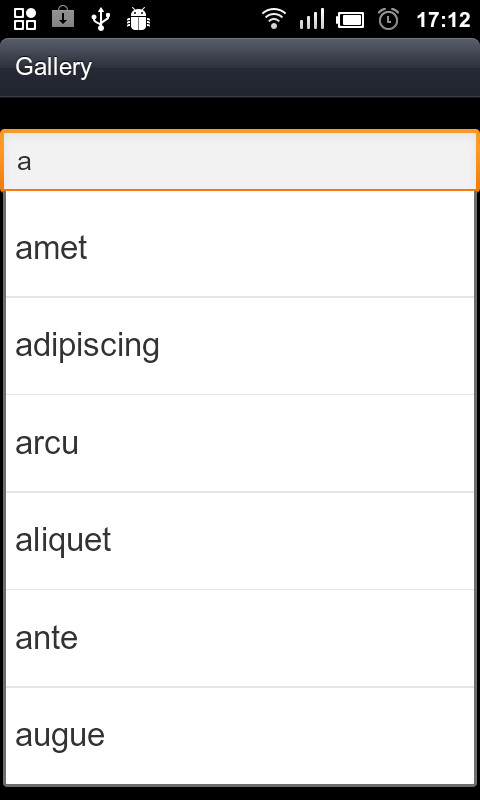
布局文件:
auto_textview.xml
?
<?xml version="1.0" encoding="utf-8"?><LinearLayout xmlns:android="http://schemas.android.com/apk/res/android" android:orientation="vertical" android:layout_width="fill_parent" android:layout_height="fill_parent" > <TextView android:id="@+id/selection6" android:layout_width="fill_parent" android:layout_height="wrap_content" /> <AutoCompleteTextView android:id="@+id/editAuto" android:layout_width="fill_parent" android:layout_height="wrap_content" android:completionThreshold ="1" /></LinearLayout>?
?
?2. java代码:
public class AutoComplementTest extends Activity {
private AutoCompleteTextView edit; private String[] items={"lorem", "ipsum", "dolor", "sit", "amet", "consectetuer", "adipiscing", "elit", "morbi", "vel", "ligula", "vitae", "arcu", "aliquet", "mollis", "etiam", "vel", "erat", "placerat", "ante", "porttitor", "sodales", "pellentesque", "augue", "purus"}; @Overrideprotected void onCreate(Bundle savedInstanceState) {super.onCreate(savedInstanceState);setContentView(R.layout.auto_textview); edit = (AutoCompleteTextView)findViewById(R.id .editAuto); //步骤1:设置适配器 edit.setAdapter (new ArrayAdapter<String>(this ,android.R.layout.simple_dropdown_item_1line ,items )); } }?
此法的弊端: 不能根据字母拼音或代码检索, 只能根据返回的值自动补全, 拓展性不全.
?
?
方法二:
EditText和ListView组合成类似自动补全功能.
?
效果图如下:
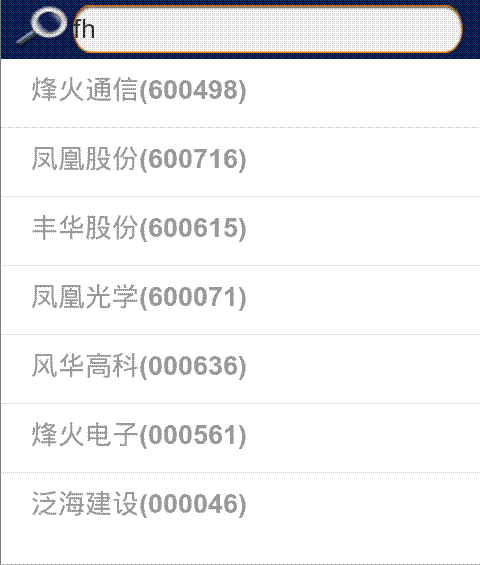
?
?
布局文件代码:
<EditText android:id="@+id/edit_key" android:layout_width="fill_parent" android:layout_height="32dip" android:layout_marginLeft="2dip" android:layout_marginTop="4dip" android:layout_marginBottom="4dip" android:paddingTop="8dip" android:paddingBottom="4dip" android:focusable="false" android:layout_marginRight="12dip" android:background="@drawable/qt_search_txt" /> <ListView android:id="@+id/lstv_all" android:layout_width="fill_parent" android:layout_height="wrap_content" />
?
java代码:
public class LoadableStockListActivity extends ListActivity{ private StringBuffer sb = new StringBuffer(); private EditText txtKey;private ListView listView;@Overrideprotected void onCreate(Bundle savedInstanceState) {super.onCreate(savedInstanceState);requestWindowFeature(Window.FEATURE_INDETERMINATE_PROGRESS);setContentView(R.layout.loadable_stock_list_activity); foursquared = ((Foursquared)this.getApplication()); mEmptyProgress = (ProgressBar) findViewById(R.id.emptyProgress);mEmptyText = (TextView) findViewById(R.id.emptyText);setLoadingView(); txtKey = (EditText)findViewById(R.id.edit_key); listView = (ListView)findViewById(R.id.lstv_all);//添加文本改变事件txtKey.addTextChangedListener(new TextWatcher() {@Overridepublic void onTextChanged(CharSequence s, int start, int before, int count) {key = txtKey.getText().toString();if(key!=null && !"".equals(key.trim())){Log.i(TAG , " key:"+key);List<Map<String , String>> lst = foursquared.getSelectStock(key);//根据关键字查询股票代码StockListAdapter stockAdapter = new StockListAdapter(LoadableStockListActivity.this , lst);listView.setAdapter(stockAdapter);}else{listView.setAdapter(null);}}@Overridepublic void beforeTextChanged(CharSequence s, int start, int count,int after) {}@Overridepublic void afterTextChanged(Editable s) {}});//查询所有股票相关数据List<Map<String , String>> lst = foursquared.getSelectStock(null);//自定义ListView适配器 StockListAdapter stockAdapter = new StockListAdapter(this , lst); //设置适配器 listView.setAdapter(stockAdapter);}?
??getSelectStock()方法详解:
/** * 获取股票代码信息列表 * @return */public List<Map<String , String>> getSelectStock(String key){stockDB.open();List<Map<String , String>> stocks = stockDB.selectStock(key);stockDB.close();return stocks;}selectStock()方法详解:(欲了解stockDB具体代码,请参考: 上篇:android开发笔记-sqllite操作)public List<Map<String , String>> selectStock(String key){if(!db.isOpen()){db = dbHelper.getReadableDatabase();}List<Map<String , String>> stockList = new ArrayList<Map<String , String>>();Cursor cur = null;if(null!=key && !"".equals(key)){//查询的列字段名String [] columns = {CODE , NAME , SIMPLE};//查询条件String where = CODE+ " like ? or "+NAME+" like ? or "+SIMPLE+" like ? ";//查询参数String [] selectArgs = {key+"%" , key+"%" , key+"%"}; //执行查询cur = db.query(DATABASE_TABLE, columns, where , selectArgs, null, null, null);cur.moveToFirst();//循环读取数据while(!cur.isAfterLast()){Map<String , String> stockMap = new HashMap<String , String>();String code = cur.getString(0);String name = cur.getString(1)+"("+code+")";stockMap.put("code" , code);stockMap.put("name" , name);stockList.add(stockMap);cur.moveToNext();}cur.close();close();return stockList;}return null;}?? 此方法能够根据股票代码, 拼音字母检索股票信息